
Disclosure: This page may contain affiliate links. Prices were checked on the date shown and may change.
An introduction to FabFilter Simplon, based on information from the maker and distributors: what it does, how to use it and who it may suit. It is not scored.
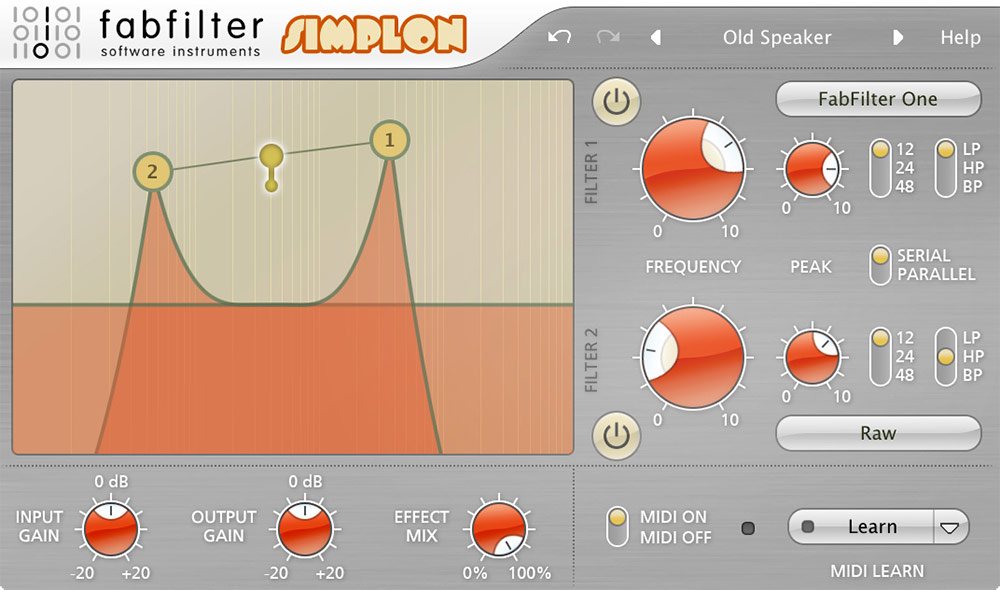
FabFilter Simplon is a simplified version of FabFilter Volcano 3 with two independent multimode filters providing low-pass, high-pass, and band-pass responses with 12/24/48 dB/octave slopes.
— FabFilter official site
What is Simplon?
FabFilter Simplon is a simple filter plugin with two independent multimode filters. The maker describes it as a simplified version of its Volcano 3.
You can choose low-pass, high-pass or band-pass responses with 12, 24 or 48 dB/octave slopes, and the two filters can run in series or in parallel.
The filters were originally developed for the FabFilter One synthesizer, and are described as designed from the ground up to be fat, smooth, self-oscillating digital filters.
Each filter offers three filter characteristics, and combined with response and slope settings this gives up to 27 filter types. A large interactive display lets you drag the filter curves directly.
Key features
Two independent multimode filters
The two filters are set up separately. Run them in series for a stronger curve, or in parallel to shape different ranges.
Low-pass, high-pass and band-pass
Three responses cover the basic moves: cutting highs, cutting lows, or passing only a band, all in one plugin.
12 / 24 / 48 dB per octave slopes
Three slope settings let you choose between a gentle roll-off and a firm cut.
Up to 27 filter types
Each filter has three characteristics which, with response and slope, give up to 27 types, from smooth with moderate overdrive to raw and self-oscillating.
Large interactive filter display
Both filter curves are shown and can be dragged. You can adjust them separately or together for quick shaping.
Familiar FabFilter handling
Knobs work with vertical or circular drag, with MIDI Learn, Smart Parameter Interpolation and sample-accurate automation.
Specifications
| Item | Details |
|---|---|
| Filters | 2 (series or parallel) |
| Responses | Low-pass / high-pass / band-pass |
| Slopes | 12 / 24 / 48 dB/oct |
| Filter types | Up to 27 |
| Formats | VST / VST3 / AU / CLAP / AAX Native / AudioSuite |
| OS (Windows) | Windows 11 / 10 / 8 / 7 / Vista (32 or 64-bit) |
| OS (Mac) | macOS 10.13 or higher (64-bit only, Apple Silicon or Intel) |
| Trial | 30 days |
What is included and system requirements
- Simplon plugin
- Formats: VST / VST3 / AU / CLAP / AAX Native / AudioSuite
- Requirements: Windows 11 down to Vista, macOS 10.13 or higher (Apple Silicon and Intel)
- 30-day trial available
- Also included in the FabFilter Total bundle
How to use it
- Download and install the 30-day trial from the FabFilter site.
- Load Simplon on an insert of the track you want to filter in your DAW.
- Choose the response (low-pass, high-pass, band-pass) and slope for filter 1.
- Drag the filter curve on the display to move the cutoff frequency.
- Raise the resonance a little and listen to how the tone changes.
- Enable the second filter if needed and choose series or parallel.
- Automate the cutoff or use MIDI Learn to add movement.
Where it may come in handy
Moving the filter through an arrangement
Automating the low-pass cutoff over an intro or breakdown may let you open the sound gradually, which could suit dance-style tracks.
Trimming unwanted ranges
A high-pass can clear excess low end from vocals or guitars, and changing the slope adjusts how firmly it cuts.
Radio and telephone effects
Narrowing the range with a band-pass may produce an old radio or phone-like tone, which could be useful for narration or stream production.
Who it may suit
- Producers who want to add movement with filtering
- Those who prefer a filter with few controls
- Those already familiar with FabFilter handling
- Those who do not need everything Volcano 3 offers
Good to know before you buy
- The LFOs and modulation matrix belong to the higher-end Volcano 3; Simplon is the simple version.
- The FabFilter shop lists 49 with a currency selector; Plugin Boutique lists $55.
How it differs from similar products
We do not pick a winner; the official figures are placed side by side.
FabFilter Volcano 3
Simplon has two filters and is described as a simplified Volcano 3. Volcano 3 is described as having four analog-sounding filters with flexible routing and many filter shapes.
Price
about $55 (converted from €49.00) (FabFilter official site, checked 2026-10-27). Prices can vary by region and promotion, so check the official page before buying.
See Simplon on the product page
More of the same kind
We have introduced 34 filters. Here are some of the others.
- Minimal Audio Minimal Audio Hybrid Filter
- Waves OneKnob Filter
- Rob Papen FilterField
- Solid State Logic Native X-Phase
- UJAM UFX Filter
- Soundtoys FilterFreak
We have introduced 4 other products from FabFilter.
See the full list in Product database: Effects.
Sources: fabfilter.com pluginboutique.com (checked 2026-10-27)










Comments