
Disclosure: This page may contain affiliate links. Prices were checked on the date shown and may change.
An introduction to W. A. Production Vocal Compressor, based on information from the maker and distributors: what it does, how to use it and who it may suit. It is not scored.
The 3-stage compression passes your audio through 3 distinct types of compressors to tame troublesome peaks, balance dynamics and add flavourful saturation.
— W. A. Production official site
What is Vocal Compressor?
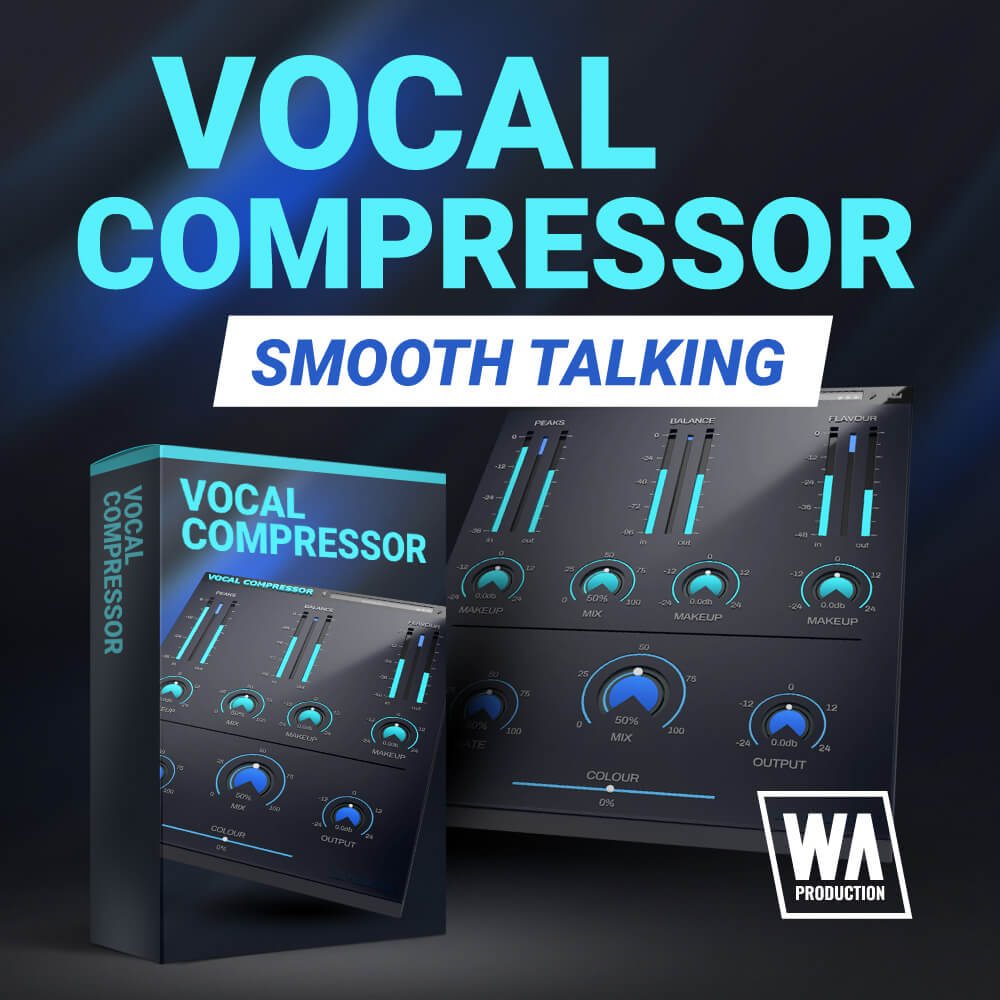
Vocal Compressor is a three-stage compressor from W. A. Production made for vocals. Audio passes in sequence through three compressors of different character, Peaks, Balance and Flavour, to control peaks, balance dynamics and add saturation in one plug-in.
The first stage, Peaks, removes sudden spikes to smooth the signal. The maker says lowering the threshold by a few dB is enough to hear it. The second stage, Balance, is a parallel compressor that leaves loud transients intact while raising softer parts, reducing the overall dynamic range.
The third stage, Flavour, has a built-in tape saturation curve that adds harmonics and grit. Other controls include a Gate dial for pops, clicks and noise, a Colour slider with a frequency curve tailored to vocals, a Master Mix ratio against the raw signal, and a click-free bypass.
The maker presents it for vocals while noting it also works on synths, bass, leads and other audio. Presets are sorted into themes. It runs on Windows 10/11 (64-bit) and macOS 10.15 or later in VST, AU, AAX and VST3 formats, and a PDF manual and tutorial video are included.
Key features
Three compression stages
Audio passes through Peaks, Balance and Flavour in series. Because each stage has its own role, it may suit gradual shaping instead of forcing one compressor to do everything.
Peaks stage
It reduces sudden amplitude spikes and prepares the signal for the next stage. The maker says a few dB of threshold is enough to hear it.
Balance stage
It keeps loud transients while raising softer parts. Mix and Makeup set the balance against the lightly compressed Peaks output.
Flavour stage
A tape saturation curve adds harmonics. The maker suggests starting subtly and adjusting the threshold while checking the vocal.
Gate and Colour
Gate reduces pops, clicks and noise, and Colour selects a frequency curve tailored to vocal processing.
Master Mix and metering
The ratio against the raw signal lowers the overall effect, and live meters show what each stage is doing.
Specifications
| Item | Details |
|---|---|
| Type | Vocal compressor (three stages) |
| Stages | Peaks / Balance / Flavour |
| Formats | VST / AU / AAX / VST3 |
| Supported OS | Windows 10/11 (64-bit), macOS 10.15 or later (64-bit) |
| AAX | Pro Tools 12 or higher |
| Included | PDF manual, tutorial video |
| Version | 1.2.0 (April 17, 2024, native Apple Silicon support) |
What is included and system requirements
- Plug-in (VST / AU / AAX / VST3)
- Themed presets
- PDF manual
- Tutorial video
- Resizable interface
- Native Apple Silicon (arm64) support from version 1.2.0
How to use it
- After installing, restart the DAW and scan for plug-ins.
- Insert Vocal Compressor on the vocal track.
- Lower the Peaks threshold by a few dB and check that sudden spikes are reduced.
- Lower the Balance threshold and set the balance with Mix and Makeup.
- Start Flavour subtly and adjust while listening to the vocal outline.
- Use Gate for noise and pops and choose a curve with Colour.
- Set the ratio against the raw signal with Master Mix and compare using bypass.
- Starting from a themed preset close to the source is also an option.
Where it may come in handy
Leveling sung vocals
Because compression is applied in three small steps, it may suit natural-feeling dynamic control of singing.
Speech and narration
Using Gate to reduce noise while leveling is one possible approach.
Streaming and podcasts
It may fit leveling out voice variation on a single track.
Synths, bass and leads
The maker states it can be used on sources other than vocals.
Who it may suit
- People who want to adjust vocal compression stage by stage
- Users who want parallel processing and a gate in one plug-in
- Home recorders who want to start shaping their voice from presets
- Users looking for a compressor that also works on non-vocal sources
Good to know before you buy
- The maker says the Balance stage needs a threshold of around 20 dB to work.
- Mac users on Apple Silicon should check the maker's compatibility information before purchasing.
- The AAX version requires Pro Tools 12 or higher.
How it differs from similar products
We do not pick a winner; the official figures are placed side by side.
W. A. Production SphereComp
Vocal Compressor has three stages (Peaks, Balance and Flavour) with a gate and a Colour slider. SphereComp is a single stage with a peak and RMS dual mode and 45 presets.
Price
Please check the official page for the price.
See Vocal Compressor on the product page
More of the same kind
We have introduced 85 compressors. Here are some of the others.
- Boz Digital Labs Manic Compressor
- Tokyo Dawn Labs TDR Molot GE
- Universal Audio 1176 Classic Limiter Collection
- Solid State Logic SSL Native X-ValveComp
- BLEASS BLEASS Sidekick
- Slate Digital The Monster
We have introduced 42 other products from W. A. Production.
- W. A. Production Presser by Aiden Kenway
- W. A. Production XTT by VINAI
- W. A. Production SphereComp
- W. A. Production Puncher 2
- W. A. Production DERES
For a side-by-side comparison scored on the same criteria, see our comparison of compressors.
See the full list in Product database: Effects.
Sources: waproduction.com pluginboutique.com (checked 2026-10-27)










Comments