
Disclosure: This page may contain affiliate links. Prices were checked on the date shown and may change.
An introduction to Waves CLA MixDown, based on information from the maker and distributors: what it does, how to use it and who it may suit. It is not scored.
I’ve taken my two favorite mix bus chains and put them under the hood of this supercharged plugin.
— Waves official site
What is CLA MixDown?
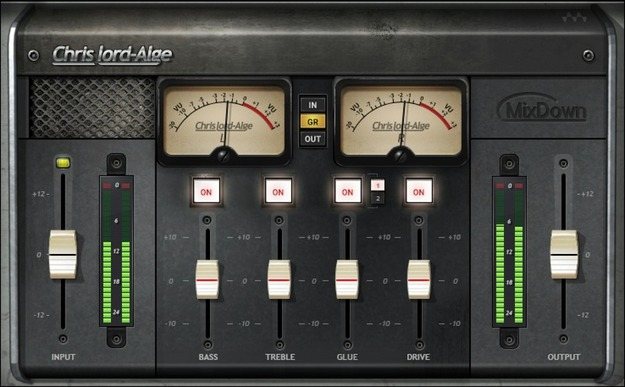
CLA MixDown is a Waves mix-bus plug-in made with Grammy-winning mixer Chris Lord-Alge. It combines processing commonly used on a mix bus: bass shelving EQ, treble EQ, glue compression and console saturation.
It offers two glue compressors, presented as two flavors of his mix bus compression. On top of that are an overdriven SSL-console style color stage and a finishing EQ with bass and treble curves.
It is built from four modules and the interface is described as simple. The product page mentions inserting it on the master bus, and also his own approach of using it on a master aux.
In his comment on usage, he suggests not only adding it at the end of a mix but inserting it before you start and mixing through it. It may be an option when you want mix-bus processing in one plug-in.
Key features
Two glue compressors
Two bus-style glue compressors are included. You may be able to switch between them to hear how they bind a song differently.
Four modules
The main mix-bus processors are grouped into four modules, which may suit you if you prefer one plug-in over a chain of several.
SSL-style console overdrive
A stage emulating an overdriven SSL console is included, intended for anything from light color to added grit.
Finishing EQ
An EQ with bass and treble curves for final tonal shaping on the bus.
Simple interface
The interface is described as simple, which may help when you want to adjust quickly during a mix.
Flexible placement
It can go on the master bus or on a master aux, and the page also describes mixing through it from the start.
Specifications
| Item | Details |
|---|---|
| Formats (Mac) | VST / AU / AAX |
| Formats (Windows) | VST / AAX |
| OS (Mac) | macOS Monterey 12 to Sequoia 15 |
| OS (Windows) | Windows 10 or later |
| License | Registration and activation through a Waves account |
What is included and system requirements
- Mac: macOS Monterey 12 / Ventura 13 / Sonoma 14 / Sequoia 15 (VST, AU, AAX)
- Windows: Windows 10 or later (VST, AAX)
- Four-module mix-bus layout
How to use it
- Create a Waves account (or log in if you already have one).
- In 'Register New Products', enter the serial number shown in your Plugin Boutique account.
- Download and install Waves Central, then log in.
- On the 'Install Products' tab, tick the product and click 'Install & Activate'.
- Open your DAW and insert the plug-in on a track or bus.
- Insert CLA MixDown on the master bus (or a master aux) and play the mix while switching between the two glue compressors.
Where it may come in handy
Mixing through it from the start
The product description suggests inserting it before you begin and mixing with it in place.
Final touch before export
Once the mix is nearly set, you could try the bus EQ and compression for a final adjustment.
Checking cohesion in a home-recorded song
On a multi-track song, you might use it to hear how the mix holds together on the bus.
Who it may suit
- People who want mix-bus processing in one plug-in
- People who want to try SSL-console style color
- People looking for a simple bus plug-in
Good to know before you buy
- A Waves account and license activation are required (for purchases through Plugin Boutique, the serial number is registered to a Waves account).
- Supported systems are listed as macOS Monterey 12 through Sequoia 15 on Mac and Windows 10 or later on Windows.
How it differs from similar products
We do not pick a winner; the official figures are placed side by side.
Waves OneKnob Pressure
CLA MixDown is a four-module mix-bus plug-in covering EQ, glue compression and console saturation. OneKnob Pressure switches between 10 compressor settings with a single knob.
Price
Please check the official page for the price.
See CLA MixDown on the product page
More of the same kind
Other introduction articles of the same kind.
- Hush Hush Pro
- IK Multimedia AmpliTube SVX 2
- McDSP Analog Channel
- Zynaptiq UNVEIL
- MAAT LINSurround
- AudioThing Wave Box
We have introduced 215 other products from Waves.
- Waves JJP Cymbals & Percussion
- Waves Eddie Kramer Bass Channel
- Waves InPhase
- Waves OneKnob Wetter
- Waves Waves Tune Real-Time
See the full list in Product database: Effects.
Sources: pluginboutique.com (checked 2026-10-27)










Comments