
Disclosure: This page may contain affiliate links. Prices were checked on the date shown and may change.
An introduction to Waves InPhase, based on information from the maker and distributors: what it does, how to use it and who it may suit. It is not scored.
Insert InPhase on a stereo track to solve left/right phase issues, or use the sidechain to fix phase compared to a reference (e.g., align overheads with drums).
— Waves official site
What is InPhase?
InPhase is a phase-correction plug-in from Waves. It is made for the phase problems that show up during mixing, such as shifts between multiple microphones on one source or a polarity flip caused by a miswired XLR cable.
It can be used in two ways: inserted on a stereo track to fix left/right phase issues, or with the sidechain input to align a track to a reference track. The store description gives aligning drum overheads with the rest of the kit as an example.
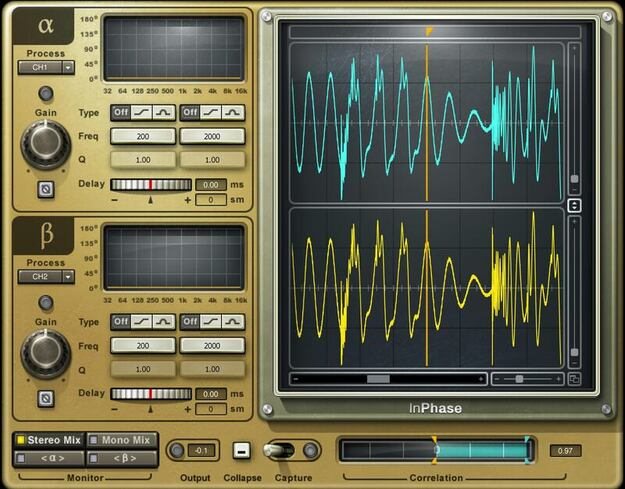
The display has two waveform views that update according to the processing, a curve showing phase shift across frequency, and a correlation meter showing how far tracks are in or out of phase. Waveforms can also be dragged along a timeline, so alignment can be done visually.
Mono and stereo versions are included, along with a dedicated version for live mixing. Monitoring can be set to the stereo mix, the mono mix or individual channels. Compared with the smaller InPhase LT, it adds items such as the sidechain input and the correlation meter.
Key features
Dual filters for frequency-specific correction
Two filters change phase only at chosen frequencies. They give another option when only part of the spectrum is misaligned rather than the whole signal.
Sidechain alignment to a reference
A sidechain input serves as the reference for phase alignment against another track. It may suit sources recorded with several mics, such as snare and overheads.
Move waveforms along a timeline
Waveforms are moved visually along a timeline to correct timing differences. It may suit users who would rather align by sight than type in values.
Delay-only control
A delay-only control compensates timing differences without the phase filters. It may be useful for offsets caused by microphone distance.
Correlation meter and phase curve
A correlation meter shows how much tracks are in or out of phase, and a curve shows the phase shift across the frequency line. Results can be checked visually as well as by ear.
Several monitoring modes
Monitoring can be set to the stereo mix, the mono mix or individual channels, so the change can be checked in mono while adjusting.
Mono, stereo and live versions
Mono and stereo versions plus a dedicated live-mixing version are included, covering both post-recording work and live use.
Specifications
| Item | Details |
|---|---|
| Maker | Waves |
| Type | Phase-correction plug-in |
| Versions | Mono, stereo and live |
| Mac OS | macOS Monterey 12, Ventura 13, Sonoma 14, Sequoia 15 |
| Windows OS | Windows 10 or later |
| Mac formats | VST / AU / AAX |
| Windows formats | VST / AAX |
What is included and system requirements
- InPhase (mono, stereo and live versions)
- The license is registered through Waves Central (a Waves account is required)
- Mac: VST / AU / AAX; Windows: VST / AAX
How to use it
- Create a Waves account and register the serial number shown after purchase.
- Download Waves Central, log in, then choose the product to install and activate.
- Insert InPhase on the track in your DAW whose phase you want to correct.
- For left/right issues on a stereo track, adjust the parameters directly.
- To use another track as the reference, send that track to the sidechain.
- Watch the waveform display and correlation meter while moving the delay and phase filters.
- Switch between mono and stereo monitoring to check how the sound changes in mono.
- Compare with the original and keep the setting only if it sounds better.
Where it may come in handy
Phase alignment between drum mics
It may help align drums recorded with several microphones, such as snare and overheads, using the sidechain to pick the reference.
Matching DI and miked bass
It may be used to line up timing and phase between a DI recording and a miked amp.
Fixing a polarity flip from wiring
It may help catch and correct a track whose phase was flipped by a miswired XLR cable.
Live mixing
Because a dedicated live version is included, it may be worth considering when phase between microphones needs checking on site.
Who it may suit
- People recording drums or other sources with several microphones who are concerned about phase
- People who record both DI and amp
- People who want to adjust phase while watching waveforms and a correlation meter
- People looking for a phase tool that also has a live-mixing version
Good to know before you buy
- Waves Central and a free Waves account are needed for license management.
- Formats are VST / AU / AAX on Mac and VST / AAX on Windows (AU is Mac only).
- Changing phase can change the tone, so compare against the original while working.
- Plugin Boutique sometimes shows time-limited discounts. Check the price at the time of purchase.
How it differs from similar products
We do not pick a winner; the official figures are placed side by side.
Waves InPhase LT
InPhase offers a sidechain input, a correlation meter, a phase-shift curve display and dual filters. InPhase LT moves phase with shelf or bell allpass filters and shifts a track's timing by plus or minus 20 ms.
Price
Please check the official page for the price.
See InPhase on the product page
More of the same kind
Other introduction articles of the same kind.
- Harrison Consoles Drum Flow
- Blue Cat Audio Blue Cat's Chorus
- sonible pure:unmask
- Karanyi Sounds Cloudmax 3
- Rhodes Vari-Amp
- Bogren Digital Ampknob BDM '75
We have introduced 215 other products from Waves.
- Waves OneKnob Louder
- Waves JJP Cymbals & Percussion
- Waves Nx Ocean Way Nashville
- Waves PAZ Analyzer
- Waves Waves Maserati ACG
See the full list in Product database: Effects.
Sources: pluginboutique.com (checked 2026-10-27)










Comments