
Disclosure: This page may contain affiliate links. Prices were checked on the date shown and may change.
An introduction to Waves Waves C1 Compressor, based on information from the maker and distributors: what it does, how to use it and who it may suit. It is not scored.
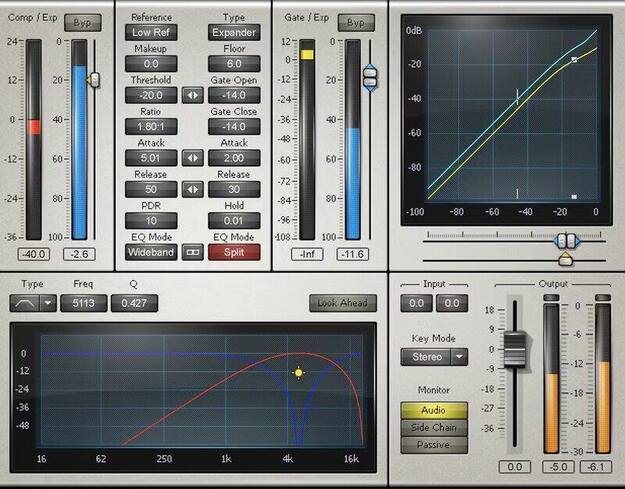
The classic C1 combines a musically pleasing dynamics sound with rich features and functionality: Compression, expansion, upward expansion, gating, dynamic filtering, sidechaining, and internal sidechain filtering—all in one plugin.
— Waves official site
What is Waves C1 Compressor?
Waves C1 Compressor combines compression, expansion, upward expansion, gating, dynamic filtering and sidechaining in a single plugin. The product description frames it as a tool for covering the full range of dynamics processing.
According to the description, C1 is not about adding color but about solving problems. Its clean, neutral sound is said to suit any source, which sets it apart from character compressors.
On the feature side it offers a soft knee, a built-in limiter, look-ahead, auto-release and auto-makeup gain. It also has an internal sidechain filter and up to three sidechains to which any number of channels can be linked.
Linking functions keep the balance between channels, and parameters can also be linked for easier editing. Formats are VST / AU / AAX on Mac and VST / AAX on Windows. The license is registered to a Waves account.
Key features
More than compression
Compression, expansion, upward expansion and gating are available in one plugin. It may be convenient when you want to keep dynamics work in a single tool instead of loading different plugins.
Soft knee and built-in limiter
The soft knee smooths the start of compression and the built-in limiter sets an output ceiling. This helps protect later stages from overload.
Look-ahead and auto-release
Look-ahead anticipates level changes and auto-release tracks the dynamics automatically. It may help when you prefer not to fine-tune every timing control.
Auto makeup gain
Output level is compensated according to the amount of compression, so levels stay steady for light or heavy settings. It also makes on/off comparisons easier.
Sidechain and filter
An internal sidechain filter and up to three sidechains are provided. It could be used to adjust only the detection signal when low frequencies trigger the compressor too much.
Linking
Both parameter linking and dynamics processing linking are available. They can keep the balance between channels on stereo material.
Specifications
| Item | Details |
|---|---|
| Type | Dynamics (compressor / expander / gate) |
| Maker | Waves |
| Formats | Mac: VST / AU / AAX; Windows: VST / AAX |
| OS | Mac: macOS Monterey 12 to Sequoia 15; Windows: Windows 10 or later |
| Store page | Plugin Boutique |
What is included and system requirements
- The plugin (C1 Compressor)
- Mac: macOS Monterey 12, Ventura 13, Sonoma 14, Sequoia 15 (VST / AU / AAX). Windows: Windows 10 or later (VST / AAX)
- Serial number shown in your Plugin Boutique user account (registered to a Waves account)
How to use it
- Create a Waves account at waves.com and activate it with the link sent by email.
- After logging in, choose Register New Products and enter the serial number shown in your Plugin Boutique user account.
- Download and install Waves Central, then log in with your Waves account.
- In the Install Products tab, tick the product and choose Install & Activate.
- Open your DAW and load the plugin as an insert on the target track or bus.
- Step through the presets first to see how each control behaves.
- Before bouncing, switch the plugin on and off at matched levels and compare.
Where it may come in handy
Evening out vocals
It may be worth trying the soft knee and auto-release to smooth louder and quieter phrases. The description positions it for situations where coloration is not wanted.
Gluing a drum bus
It could be placed across a drum bus, with look-ahead and the limiter holding peaks.
Gating
Used as a gate, it might reduce spill in narration or instrument recordings.
Sidechain use
Driven by another track, it could balance a bass or background music against another source.
Who it may suit
- People who want clean, neutral processing
- People who want compressor, gate and expander in one plugin
- People who want to try sidechain-based level control
- Users who want a single Waves dynamics plugin to start with
Good to know before you buy
- A Waves account and Waves Central are needed to register the license.
How it differs from similar products
We do not pick a winner; the official figures are placed side by side.
Waves H-Comp Hybrid Compressor
The C1 description frames it as neutral, aimed at solving problems, with compression, expansion, gating and sidechaining. H-Comp is described as inspired by SSL, API and V-series gear, with four selectable analog characters.
Price
Please check the official page for the price.
See Waves C1 Compressor on the product page
More of the same kind
We have introduced 16 gates and expanders. Here are some of the others.
- Sonnox Oxford Drum Gate 2
- FLUX:: Pure Expander
- GVST GVST GGate
- Black Salt Audio Silencer
- FLUX:: Pure DExpander
- DOTEC-AUDIO DeeGate
We have introduced 215 other products from Waves.
- Waves Primary Source Expander
- Waves Magma Springs
- Waves H-EQ Hybrid Equalizer
- Waves Q10 Equalizer
- Waves MetaFilter
See the full list in Product database: Effects.
Sources: pluginboutique.com (checked 2026-10-27)










Comments