
Disclosure: This page may contain affiliate links. Prices were checked on the date shown and may change.
An introduction to Waves Q10 Equalizer, based on information from the maker and distributors: what it does, how to use it and who it may suit. It is not scored.
Pinpoint Precision with True Transparency
— Waves official site
What is Q10 Equalizer?
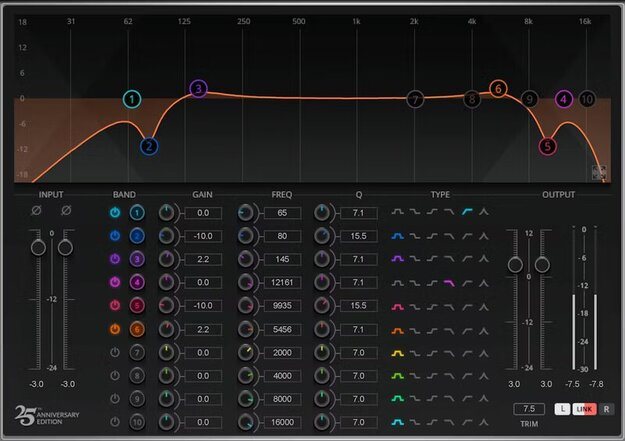
Q10 Equalizer from Waves is a 10-band parametric EQ. The product page says it has served the pro audio industry for 30 years and lasted because it solves problems.
The 25th-anniversary update keeps the transparency, versatility and efficiency while adding a proportional-Q curve, double-precision math and a modern interface that shows all bands or focuses on one.
Each band offers six curves (high-pass, low-pass, bell, proportional, high shelf, low shelf) with controls for Q, frequency and gain, and filters can be combined and stacked for ultra-deep, steep or broad curves.
Left and right channels can be equalized independently or linked. Numeric entry, a focus view and 50 factory and artist presets are included.
Key features
10 bands, 6 curves
Each of ten bands offers six curve types, so fine fixes and broad shaping can be done in one plug-in.
Stacked filters
Filters can be combined and stacked for ultra-deep, steep or broad curves.
Proportional-Q curve
A proportional-Q curve keeps Q proportional to gain.
Independent or linked channels
Left and right can be equalized independently or linked.
Interface and numeric entry
Choose a multitouch-friendly or space-saving legacy interface; focus view expands one band, and specific numeric values can be entered.
50 presets
Fifty factory and artist presets are included, so you can start from a preset and adjust.
Specifications
| Item | Details |
|---|---|
| Type | Parametric equalizer |
| Bands | 10 bands, 6 curves each |
| Presets | 50 |
| Mac | macOS Monterey 12 to Sequoia 15, VST, AU, AAX |
| Windows | Windows 10 or later, VST, AAX |
| List price | $99 (Plugin Boutique) |
What is included and system requirements
- Q10 Equalizer
- 50 factory and artist presets
- Formats: Mac VST/AU/AAX; Windows VST/AAX
- Requirements: macOS Monterey 12, Ventura 13, Sonoma 14, Sequoia 15 (VST, AU, AAX); Windows 10 or later (VST, AAX)
How to use it
- Create a Waves account, or log in if you already have one.
- Register the serial number shown in your Plugin Boutique account under Register New Products in your Waves account.
- Download, install and log in to the Waves Central app.
- In the Install Products tab, choose the product and click Install & Activate.
- Open your DAW and load the Waves plug-in from the plug-in list.
- Insert it on a track and pick a close preset.
- Adjust curve, frequency, Q and gain of the bands you need.
- Use focus view to examine one band closely.
- Compare on and off.
Where it may come in handy
Removing unwanted ranges
It may be used for pinpoint corrections with high-pass or narrow cuts.
Tone shaping
Bells and shelves may help refine the character of a source.
Stereo material
Separate channel processing could correct left/right differences.
Who it may suit
- People who want a 10-band parametric EQ
- People who need both fine and broad shaping
- People who like to start from presets
Good to know before you buy
- A Waves account and installation via Waves Central are required.
- The list price is the strike-through price on the sales page.
How it differs from similar products
We do not pick a winner; the official figures are placed side by side.
Waves Renaissance Equalizer
Q10 is a 10-band parametric, while Renaissance Equalizer is offered as 2-, 4- or 6-band components; both list at $99.
Price
$99 (Plugin Boutique, checked 2026-10-27). Prices can vary by region and promotion, so check the official page before buying.
See Q10 Equalizer on the product page
More of the same kind
We have introduced 122 EQs. Here are some of the others.
- Kuassa Kuassa EVE-AT4 Equalizer
- Tokyo Dawn Labs TDR SlickEQ M
- Antelope Audio UK-69
- Metric Halo MH Sonic EQ v4
- NUGEN Audio SEQ-ST
- Mellowmuse Mellowmuse EQ2V
We have introduced 215 other products from Waves.
- Waves V-EQ3
- Waves eMo Q4 Equalizer
- Waves Manny Marroquin EQ
- Waves Abbey Road RS56 Passive EQ
- Waves GEQ Graphic Equalizer
For a side-by-side comparison scored on the same criteria, see our comparison of EQs.
See the full list in Product database: Effects.
Sources: pluginboutique.com (checked 2026-10-27)










Comments