
Disclosure: This page may contain affiliate links. Prices were checked on the date shown and may change.
An introduction to Waves Primary Source Expander, based on information from the maker and distributors: what it does, how to use it and who it may suit. It is not scored.
Mixing live shows is a rollercoaster ride, where things constantly change. Mic bleed could be causing feedback that prevents you from turning up the PA.
— Waves official site
What is Primary Source Expander?
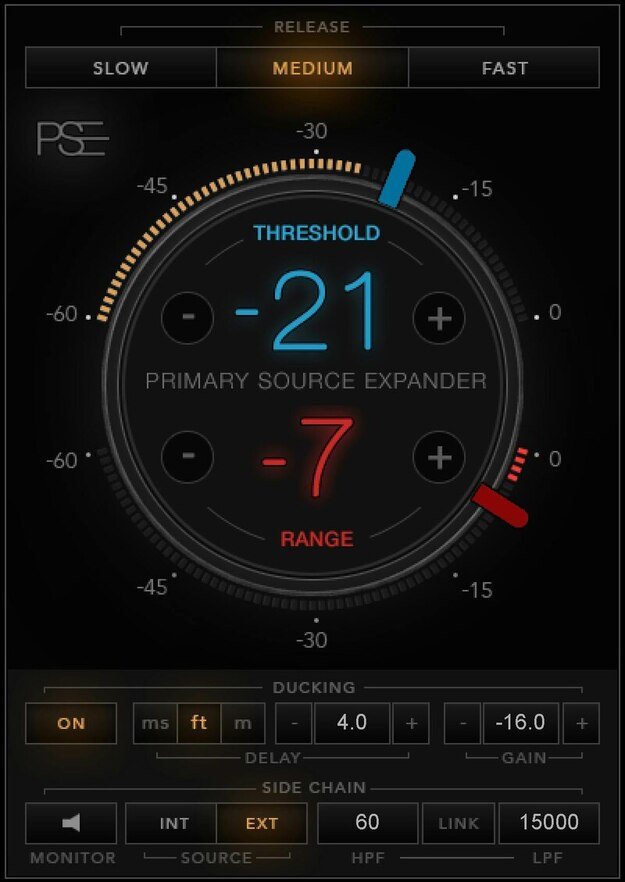
Primary Source Expander (PSE) is an expander-type plug-in from Waves. It is described as a tool for reducing mic bleed, meaning other sounds that leak into a microphone, in live-sound situations.
In live mixing, background sound while a singer is not singing, or sound that reaches the neighboring mic, can cause feedback or limit how far the PA can be turned up. PSE is presented as a way to deal with this by lowering sound that does not reach a set level.
The page says that in most cases the settings can be made once and left alone. It offers both internal and external sidechain, and the sidechain signal can be shaped with high-pass and low-pass filters.
Beyond live use, it is also described for live multitrack recordings, lavalier mics and panel discussions. It supports VST, AU and AAX on Mac, and VST and AAX on Windows.
Key features
Reducing mic bleed
As an expander, it turns down quieter sound so that what a mic picks up from other sources becomes less noticeable. It may help when you want to tidy background sound between vocal phrases or sound leaking in from neighboring mics.
More level before feedback
The description says higher mic levels can be reached before feedback appears. It may be worth trying in rooms where the PA is hard to turn up.
Internal and external sidechain
You can choose whether the detection signal comes from inside the plug-in or from an external source. High-pass and low-pass filters are available, so you can narrow the band that triggers the expander.
Ducking mode
A Ducking mode is provided for complicated live setups where finer control is needed. It may be useful when one signal should be lowered in response to another.
Release time presets
Release-time presets are provided to speed up setup. They may help when you want to try different recovery speeds quickly for different material.
Phase issues and stage sound
The listed features include reducing phase issues in live recordings, a more focused stage sound with less mic crosstalk, and improved monitoring for musicians on stage. It may be useful for both recording and monitoring.
Specifications
| Item | Details |
|---|---|
| Maker | Waves |
| Type | Expander (for live sound) |
| Formats (Mac) | VST / AU / AAX |
| Formats (Windows) | VST / AAX |
| OS (Mac) | macOS Monterey 12, Ventura 13, Sonoma 14, Sequoia 15 |
| OS (Windows) | Windows 10 or later |
| Sidechain | Internal / external, with HP/LP filters |
What is included and system requirements
- The plug-in itself (the license is registered to a Waves account)
- Formats: VST, AU and AAX on Mac; VST and AAX on Windows
- Installed and activated through the Waves Central app
How to use it
- Create a Waves account and register the serial number from your purchase under 'Register New Products'.
- Download the Waves Central app and log in with your account.
- On the 'Install Products' tab, select Primary Source Expander and install and activate it.
- In your DAW or live host, insert it on the channel where you want to reduce bleed.
- Start on a channel with plenty of bleed, using the internal sidechain.
- If needed, narrow the triggering band with the sidechain filters.
- Try the release-time presets to set how fast the sound returns, and adjust if the result sounds unnatural.
Where it may come in handy
Live mixing
It may be used to gain headroom before feedback in rooms where background sound or neighboring-mic leakage is a concern.
Live multitrack recordings
It may be worth trying to tidy mic crosstalk and phase problems in multitracks recorded on stage.
Panel discussions and talks
With several lavalier mics in use, it may help make voices leaking into the mics of people who are not speaking less noticeable.
Who it may suit
- People who struggle with mic bleed in small venues or small PA setups
- Those who want to clean up and finish multitrack live recordings
- Anyone recording several speakers at once for streams or talks
Good to know before you buy
- The license is managed through a Waves account and installation uses the Waves Central app.
- Formats differ by OS: there is no AU version on Windows.
- For live use, test it beforehand with your venue's equipment.
Price
Please check the official page for the price.
See Primary Source Expander on the product page
More of the same kind
We have introduced 16 gates and expanders. Here are some of the others.
- GVST GVST GGate
- Cockos ReaGate ReaPlugs
- Antelope Audio NEU-473A
- Metric Halo MH SuperGate v4
- Antelope Audio VP Gate Keeper II
- FLUX:: Pure DExpander
We have introduced 215 other products from Waves.
- Waves Waves C1 Compressor
- Waves C6 Multiband Compressor
- Waves JJP Cymbals & Percussion
- Waves Renaissance Axx
- Waves RS56 Passive Equalizer
See the full list in Product database: Effects.
Sources: pluginboutique.com (checked 2026-10-27)










Comments