
Disclosure: This page may contain affiliate links. Prices were checked on the date shown and may change.
An introduction to PSP Audioware PSP oldTimerMB, based on information from the maker and distributors: what it does, how to use it and who it may suit. It is not scored.
PSP oldTimerMB is a vintage-style multi-band compressor designed for demanding track processing, buss / mix compression, and mastering.
— PSP Audioware official site
What is PSP oldTimerMB?
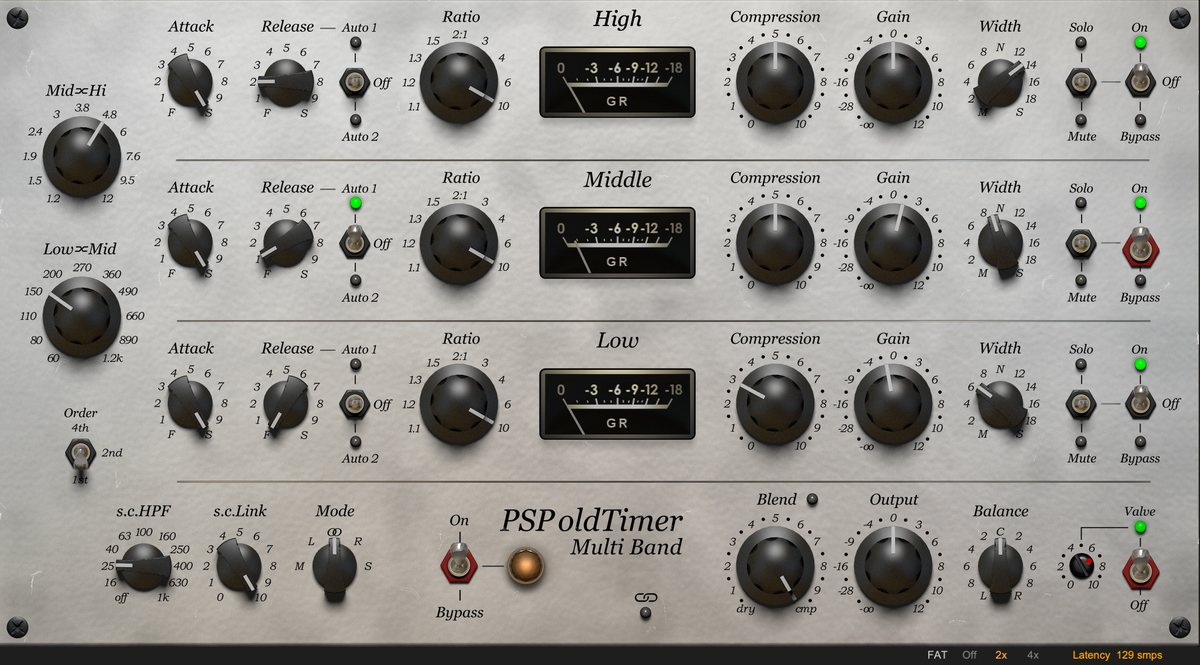
PSP oldTimerMB is a vintage-style three-band compressor from PSP Audioware of Poland. It is designed for track processing, buss and mix compression, and mastering, and is based on the algorithm of the company's PSP oldTimer compressor.
The signal is split into low, middle, and high bands, and each band has its own attack, release, ratio, compression amount, gain, stereo width, and solo/mute. The crossover order can be set to 1st, 2nd, or 4th, which changes how the bands blend into each other.
The output stage includes a switchable, adjustable valve emulation, described on the maker's page as an option for adding color. Advanced items include a side-chain high-pass filter, side-chain link amount, and a Blend control that mixes the compressed signal with the dry signal.
Internal processing uses 64-bit double-precision floats, and 32-bit and 64-bit floating-point audio streams are supported. Factory presets are included, and a 30-day trial is offered on the maker's site. Activation needs an iLok user ID, but no hardware dongle.
Key features
Three-band compression
Low, middle, and high bands are each handled by a separate compressor, which may let you tame one range without upsetting overall balance. The high and low bands can be switched off, so it can also work as a two-band or single-band compressor.
Selectable crossover order
1st, 2nd, or 4th order can be chosen. The manual describes 1st as a very smooth transition between bands, 2nd as the standard setting, and 4th as sharper and more exact.
Per-band attack and release
Attack and release are set with eleven-step knobs, from fast through medium times typical of opto or valve compressors to slow. Two auto-release modes are available.
Per-band stereo width
The Width knob sets a band anywhere from mono to widened, with the side component raised up to 200%. The manual mentions narrowing the low end toward mono as one technique.
Valve emulation
The output valve emulation can be switched on or off, and its depth is set with the Valve level control. An LED indicates how much saturation is being introduced.
Side-chain and channel processing options
The side-chain high-pass filter, link amount, and balance can be set. For separate L/R or M/S processing, the manual says to use two instances in series.
Blend and comparison tools
The Blend knob mixes dry and compressed sound for parallel processing. The preset bar offers A/B and COMPARE for checking settings against each other.
Specifications
| Item | Details |
|---|---|
| Type | Three-band compressor |
| Processing | 64-bit double-precision floating point |
| Formats | AudioUnit / AAX / VST / VST3 |
| Windows | Windows 7 to Windows 11 (64-bit only) |
| macOS | macOS 10.14 to macOS 15 Sequoia (Intel / Apple Silicon) |
| License | iLok account required (no dongle needed); activation in up to 3 locations |
| Trial | 30 days (macOS and Windows) |
| Included | Presets and user manual |
What is included and system requirements
- PSP oldTimerMB plugin
- Factory presets
- User manual (PDF)
- AudioUnit / AAX / VST / VST3
How to use it
- Create a free iLok account and install the iLok License Manager.
- After purchase, register the serial number in your PSP account and download the installer.
- Install and authorize the license with iLok License Manager (a 30-day trial is available).
- Insert PSP oldTimerMB on a track or bus in your DAW.
- Set the Low-Mid and Mid-High crossover frequencies and choose the crossover order.
- Raise Compression and Ratio on each band gradually while watching the gain reduction meters.
- Adjust attack and release by ear, and try the auto-release modes if needed.
- Finally check Output, Valve, and Blend, and compare before and after with Bypass and A/B.
Where it may come in handy
Drum and guitar buses
It may suit buses where low and high ranges need to be handled separately. Stereo width can also be set per band.
Glue on a whole mix
Applying gentle compression across three bands to tie a mix together is one possible use. The manual suggests roughly 3-5 dB of gain reduction when mixing.
Mastering
The maker lists mastering as an intended use. The manual suggests even less gain reduction for mastering, and mixing with the dry signal via Blend may be worth trying.
Compressing only a troublesome range
When one range of a source misbehaves, compressing just that band may help. Each band can be soloed, making checking easier.
Who it may suit
- Mixing and mastering users who want gentle multiband compression
- People who want to try the PSP oldTimer approach in three bands
- Those who also want per-band stereo width control
- Anyone who prefers to try a demo before buying
Good to know before you buy
- Activation requires an iLok account and the iLok License Manager; no hardware dongle is needed.
- Supported systems are listed as Windows 7 to 11 (64-bit) and macOS 10.14 to 15, including Apple Silicon.
- The PDF manual contains older system requirements; check the product page for current ones.
Price
$199 (PSP Audioware official site, checked 2026-10-27). Prices can vary by region and promotion, so check the official page before buying.
See PSP oldTimerMB on the product page
More of the same kind
We have introduced 85 compressors. Here are some of the others.
- Waves Renaissance Compressor
- Waves CLA-2A Compressor / Limiter
- FLUX:: Syrah
- DOTEC-AUDIO DeeCompressor
- Universal Audio Empirical Labs EL8 Distressor Compressor
- Pulsar Audio Pulsar 1178
We have introduced 12 other products from PSP Audioware.
- PSP Audioware PSP Audioware oldTimerME
- PSP Audioware PSP Flare
- PSP Audioware Lexicon PSP 42
- PSP Audioware PSP 285
- PSP Audioware PSP stompFilter
For a side-by-side comparison scored on the same criteria, see our comparison of compressors.
See the full list in Product database: Effects.
Sources: pspaudioware.com pspaudioware.net pluginboutique.com (checked 2026-10-27)










Comments