
Disclosure: This page may contain affiliate links. Prices were checked on the date shown and may change.
An introduction to Waves Renaissance Compressor, based on information from the maker and distributors: what it does, how to use it and who it may suit. It is not scored.
The Renaissance Compressor revives the warmth that made vintage analog compressors great
— Waves official site
What is Renaissance Compressor?
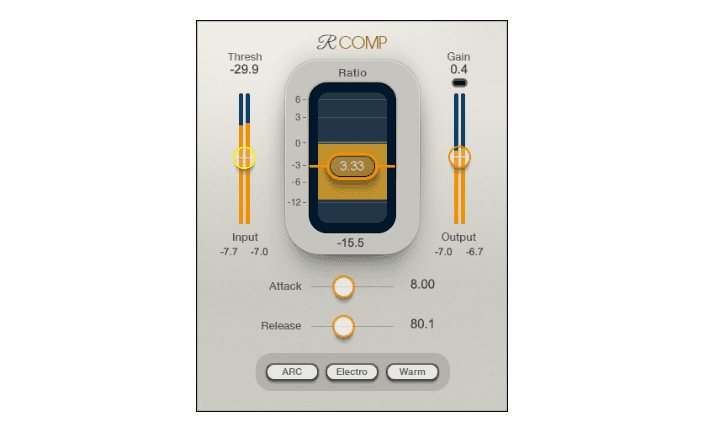
Renaissance Compressor (R-Comp) is a compressor plug-in from Waves. According to the Japanese distributor, it incorporates technology from Waves' C1 Parametric Compander and L1 Ultramaximizer and adds upward expansion to give it a character of its own.
Its main points are a streamlined interface with few controls and classic, warm compression. You can switch between two sets of attack and release behavior: a vintage-style optical (Opto) one and a modern electronic (Electro) one.
The Japanese distributor's page describes Opto mode as soft, vintage-style compression and Electro mode as harder compression with more punch. A Warm function adds harmonics to move the sound toward a warmer character.
A technology called ARC (Automatic Release Control) is presented as helping to keep gain reduction smooth even when the plug-in is pushed. It supports mono and stereo and runs in AAX Native, AudioSuite, AU and VST3 formats.
Key features
Opto and Electro modes
You can switch between a vintage-style optical curve and faster modern electronic timing. In one plug-in you may be able to try both softer compression and more defined compression.
Warm (added harmonics)
This function adds harmonics to the original signal for a warmer sound. Combined with compression, it can be used for a gentle coloration on vocals or instruments.
ARC automatic release
ARC adjusts release automatically to keep levels stable. It is presented as helping to keep gain reduction smooth even when pushed, which may reduce the effort of fine-tuning release.
Upward expansion
Along with compression, it has processing that lifts quiet parts, and both use a soft knee. It can be tried when you want to shape definition while keeping dynamics.
Limiter based on Ultramaximizer
A limiter based on the L1 Ultramaximizer catches peaks. It may spare you from adding a separate limiter when you want to tidy peaks at the end of compression.
Three skins and metering
Three skins change the look, and the metering includes a limiting indicator to confirm what is happening.
Specifications
| Item | Details |
|---|---|
| Type | Compressor (Opto / Electro modes) |
| Plug-in formats | AAX Native, AudioSuite, AU, VST3 |
| Channels | Mono / Stereo |
| Processing | Double-precision bit resolution |
| Supported OS (Mac) | macOS Ventura 13 / Sonoma 14 / Sequoia 15 / Tahoe 26 |
| Supported OS (Windows) | Windows 10 64-bit / Windows 11 |
What is included and system requirements
- Renaissance Compressor plug-in (mono / stereo)
- Formats: AAX Native, AudioSuite, AU, VST3
- SoundGrid version (as listed by the Japanese distributor)
How to use it
- Try the demo to check operation before installing.
- Rescan plug-ins in your DAW.
- Insert it on a vocal or instrument track.
- Switch between Opto and Electro and compare the feel of attack and release.
- Adjust threshold, ratio, attack, release and output gain.
- Raise Warm and check how harmonics change the sound.
- Toggle ARC and compare the difference in release behavior.
Where it may come in handy
Adding warmth to a vocal
Soft compression in Opto mode combined with harmonics from Warm could be tried. It may suit songs where you want a warmer impression of the voice.
Close-miked vocals and instruments
The Japanese distributor describes Electro mode as suited to close-miked vocals and instruments. It may be worth trying when you want more definition.
Leveling bass or guitar
ARC's automatic release could be used to even out levels without spending time on the release setting.
Finishing a mix
The limiter section that catches peaks lets you try compression and limiting in one plug-in.
Who it may suit
- People who want both vintage-style and modern-style compression
- People who want to add warm coloration to vocals and instruments
- People who do not want to spend time adjusting release
Good to know before you buy
- Waves offers perpetual licenses and subscriptions. A 7-day demo is mentioned on the Japanese distributor's page.
- The skins and metering are described on Plugin Boutique but not on the Japanese distributor's page.
- System support can vary by product, so check the official compatibility table for your host and OS.
How it differs from similar products
We do not pick a winner; the official figures are placed side by side.
Waves SSL G-Master Buss Compressor
Renaissance Compressor is a character compressor with Opto / Electro modes, Warm and ARC, usable on tracks and buses. G-Master is modeled on the SSL 4000 G master-bus compressor and offers Analog On / Off, Mix and a sidechain filter. No ranking is implied.
Price
Please check the official page for the price.
See Renaissance Compressor on the product page
More of the same kind
We have introduced 85 compressors. Here are some of the others.
- United Plugins Royal Compressor
- W. A. Production Presser by Aiden Kenway
- Harrison Multi-Band Compressor
- Universal Audio Capitol Mastering Compressor
- Solid State Logic SSL LMC+
- Cockos ReaComp ReaPlugs
We have introduced 215 other products from Waves.
- Waves SSL G-Master Buss Compressor
- Waves API 2500
- Waves PuigChild Compressor
- Waves V-Comp
- Waves Linear Phase Multiband Compressor
For a side-by-side comparison scored on the same criteria, see our comparison of compressors.
See the full list in Product database: Effects.
Sources: minet.jp pluginboutique.com (checked 2026-10-27)










Comments