
Disclosure: This page may contain affiliate links. Prices were checked on the date shown and may change.
An introduction to sonible pure:comp, based on information from the maker and distributors: what it does, how to use it and who it may suit. It is not scored.
pure:comp is a straightforward compression plug-in that can instantly control a track's dynamics – all at the touch of a single button.
— sonible official site
What is pure:comp?
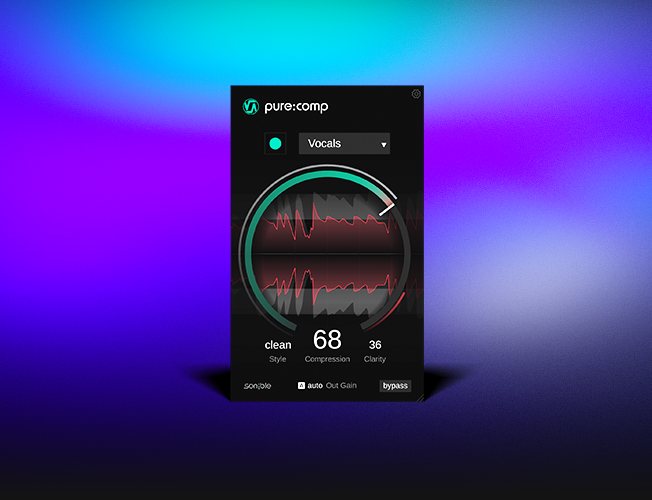
pure:comp is a compressor plug-in from sonible of Austria with a reduced control set. The company highlights AI-powered algorithms that set parameters automatically, using input-specific profiles to match the type of material being processed.
The threshold, ratio, attack and release found on a conventional compressor are combined into one compression parameter. That reduces the effort of balancing interdependent settings and is meant for moments when you want to concentrate on the creative side. A visual display shows how the compression is acting.
Two controls shape the result: Style and Clarity. Style toggles between clean, mixed and dirty to choose the character of the compression. Clarity applies spectral compression so that tonal imbalances are smoothed out dynamically, aiming at a more transparent sound.
Example uses from the company include making 808s punchy, reducing muddiness in a kick and strengthening a weak drum track. pure:comp is also part of the pure:bundle, and the product page offers a 30-day trial.
Key features
Automatic parametrization
AI-powered algorithms assemble compression settings to match the input, which may help if you want to skip finding a starting point by hand.
Input-specific profiles
Profiles adapt the processing to the type of signal, which may reduce how often you reset things between vocals, drums and other sources.
A single compression parameter
One control combines the roles of threshold, ratio, attack and release, so you mainly move the amount.
Style with three settings
Choose clean, mixed or dirty to change the character of the compression and compare the three on the same material.
Clarity (spectral compression)
This smooths tonal imbalances dynamically and can be tried when you want to ease muddiness or buildup.
Compression visualization
The display shows how the compression is acting on the signal, adding visual confirmation to what you hear.
Specifications
| Item | Details |
|---|---|
| Type | Compressor |
| Formats (Mac) | VST, VST3, AU, AAX |
| Formats (Windows) | VST, VST3, AAX |
| Channels | Mono, stereo |
| Sample rates | 44.1 kHz to 192 kHz |
| Authorization | Machine-based or iLok |
| Apple Silicon | Native |
| Latest version | 1.0.3 |
| OS | Windows 10 (64-bit) / macOS 10.12+ (official specifications) |
| CPU | Intel Core (i5), Apple Silicon |
| GPU | OpenGL 3.2 or later |
What is included and system requirements
- pure:comp plug-in
- Formats: VST, VST3, AU, AAX (no AU on Windows)
- 30-day trial (register on the official site)
- 40% EDU discount for students and lecturers (official site)
How to use it
- Register for the 30-day trial on the official site or buy and download the installer.
- After installation, complete authorization (machine-based or iLok).
- Rescan plug-ins in your DAW and insert pure:comp on the target track.
- Play audio and move the compression parameter while watching the visual display.
- Switch Style between clean, mixed and dirty to choose a character.
- Raise Clarity gradually and listen for whether tonal imbalances are smoothed.
- Compare with bypass at matched volume before deciding.
Where it may come in handy
Tightening kick or 808
As in the company's examples, it may help with reducing muddiness in low end or giving an 808 more power.
Strengthening drum tracks
On drums that feel weak, the dirty Style could add the character of the compression.
When you do not want to spend time on settings
Because one parameter does most of the work, it may be useful when sketching a mix quickly.
Smoothing vocals or instruments
Combining the clean Style with Clarity could even out volume differences without being obvious.
Who it may suit
- People who find compressor settings confusing
- People who want to find a compression direction quickly
- People who want to try the pure:bundle style of workflow
- People working with mono or stereo material
Good to know before you buy
- Supported channel formats are mono and stereo.
- Authorization is machine-based or iLok.
- The official specifications list macOS 10.12+ and Windows 10 (64-bit); Plugin Boutique lists macOS 10.9+, so check before buying.
- There is no AU version on Windows.
How it differs from similar products
We do not pick a winner; the official figures are placed side by side.
MeldaProduction MModernCompressor
pure:comp combines compression into one parameter and shapes the sound with Style and Clarity. MModernCompressor keeps the usual compression parameters and adds loudness and level-distribution metering, with up to 8 channels of surround.
Price
$39 (sonible official site, checked 2026-10-27). Prices can vary by region and promotion, so check the official page before buying.
See pure:comp on the product page
More of the same kind
We have introduced 85 compressors. Here are some of the others.
- Waves Waves H-Comp Hybrid Compressor
- Waves CLA-3A Compressor / Limiter
- FLUX:: Syrah
- Waves Renaissance Compressor
- W. A. Production Vocal Compressor
- Antelope Audio BA-6A
We have introduced 9 other products from sonible.
- sonible sonible entropy:EQ+
- sonible pure:unmask
- sonible sonible pure:bundle
- sonible pure:EQ
- sonible sonible Metering Bundle
For a side-by-side comparison scored on the same criteria, see our comparison of compressors.
See the full list in Product database: Effects.
Sources: sonible.com pluginboutique.com minet.jp (checked 2026-10-27)










Comments