
Disclosure: This page may contain affiliate links. Prices were checked on the date shown and may change.
An introduction to Acon Digital Remix:Drums, based on information from the maker and distributors: what it does, how to use it and who it may suit. It is not scored.
Remix:Drums is a new cutting-edge DAW plugin that instantly separates out drum stems from an existing loop or recording in real-time for a fast and intuitive workflow.
— Acon Digital official site
What is Remix:Drums?
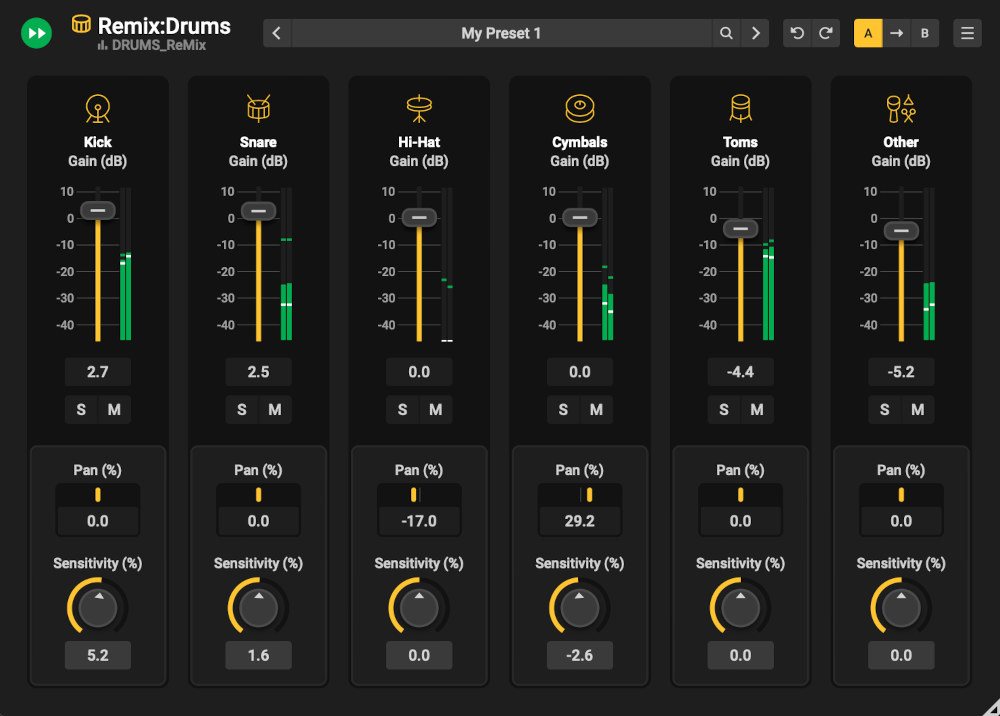
Remix:Drums is a drum-specific stem separation plugin from Acon Digital. Load a drum loop or recording in your DAW and it splits the audio into six parts: kick, snare, hi-hat, cymbals, toms and other. It is aimed at people who want to adjust only the drums inside an existing piece of audio.
According to the maker, processing runs in real time, so there is no offline render to wait for. You can raise the kick, remove the snare or lower the cymbals while the audio plays, which lets you rebuild a drum sound without re-recording it. The company also notes that no audio is sent over the internet.
The AI-based separation builds on the idea behind Acon Digital's Remix plugin. The screen is a simple layout of per-element faders and level meters, so it is easy to see what to touch the first time you use stem separation.
The license is perpetual, not a subscription. The maker's site also offers a free trial that does not require a credit card. It runs on Windows and macOS, including natively on Apple silicon.
Key features
Real-time split into six parts
Drums are separated into kick, snare, hi-hat, cymbals, toms and other. With no offline wait, you can hear each element's level change as the audio plays, which may help when you want to emphasize one part of a loop.
Sensitivity control per stem
Each stem has its own sensitivity setting that decides how much of the sound is picked up. You can tune by ear how much of other elements remains in a separated part, which may help when fine-tuning the result.
Level meters and faders
Every stem has a level meter, so the effect of a change shows immediately. You can raise the kick or lower the snare while watching the screen.
DAW automation support
All parameters can write to your DAW's automation lanes. It may be useful for changes over time, such as lowering the cymbals only in a chorus or removing the kick in a break.
Multiple outputs in supported hosts
In supported hosts, the stems can be sent to separate tracks. This makes it easier to add effects to just the kick or just the snare.
Resizable interface
The window size and scaling can be changed to suit your monitor, whether you work on a small laptop screen or a large display.
Specifications
| Item | Details |
|---|---|
| Separated parts | Kick / Snare / Hi-hat / Cymbals / Toms / Other (six stems) |
| Processing | Real time (AI separation) |
| License | Perpetual (no subscription) |
| Formats (Windows) | VST / VST3 / AAX |
| Formats (Mac) | AU / VST / VST3 / AAX |
| OS (Windows) | Windows 11 / 10 |
| OS (Mac) | OS X 10.13 or later (native on ARM64 and Intel) |
| RAM | 1 GB (4 GB or more recommended) |
| Free disk space | 1 GB |
| Display | 1366 x 768 (1920 x 1080 or higher recommended) |
What is included and system requirements
- Remix:Drums plugin (1.x)
- Windows 11 / 10 (Intel Core i5 or AMD multi-core; Core i7 or faster recommended)
- OS X 10.13 or later on Mac (native on Apple silicon and Intel)
- A host that supports VST / VST3 / AAX on Windows, or AU / VST / VST3 / AAX on Mac
- Pro Tools 2018 or higher (as stated by the maker)
- Listed hosts: Logic Pro, Pro Tools, Ableton Live, Cubase, Nuendo, Fender Studio Pro, Reaper, FL Studio, UA LUNA, Adobe Audition, Adobe Premiere, DaVinci Resolve, Reason and Media Composer
How to use it
- Create an Acon Digital account and note the activation code shown after purchase.
- Download the installer for your operating system from your account page and run it.
- Open your DAW and insert Remix:Drums on the drum track you want to work on, whether a loop or a recording.
- Enter the saved activation code to authorize the plugin the first time you open it.
- Play the drums and move each element's fader, such as kick or snare, to hear the change.
- If other elements are audible in a separated part, adjust that stem's sensitivity.
- To process stems on separate tracks, set up multiple outputs in a supported host and send each stem to its own track.
- To change the balance over time, write automation.
Where it may come in handy
Rearranging a loop you already own
It may suit situations where you emphasize only the kick of a sample-pack drum loop or lower the hi-hat to fit your track. It could be handy for loop-based beat making.
Balancing recorded drums
You could try lowering the cymbals a little or adding more snare from overhead or room-mic audio. It may help tidy up recordings that are hard to redo.
Remix and DJ-style editing
It is intended for pulling the drums out of existing audio and layering other elements or reshaping the groove. The maker describes it as a tool for producers, remixers and DJs.
Processing stems on separate tracks
In a host that supports multiple outputs, you may be able to give the kick a compressor and the snare a reverb independently.
Who it may suit
- People who want to rebalance drum loops or recordings after the fact
- People who want to swap drum elements in remixes or beat making
- People who want to process drum parts separately in their DAW
- People who prefer a perpetual license
Good to know before you buy
- Separation results depend on the audio, so it may help to try your own material with the free trial first.
- Multiple outputs require a host that supports that feature.
- Pro Tools 2018 or higher is listed by the maker.
- The sister product DeBleed:Drums, sold separately, targets spill removal on close-miked tracks.
How it differs from similar products
We do not pick a winner; the official figures are placed side by side.
Acon Digital DeBleed:Drums
Acon Digital lists Remix:Drums at $49 and DeBleed:Drums at $99. The former splits drums into six elements so you can adjust each level; the latter removes spill from other drums that leaked into close-miked tracks.
Price
$49 (Acon Digital official site, checked 2026-10-27). Prices can vary by region and promotion, so check the official page before buying.
See Remix:Drums on the product page
More of the same kind
Other introduction articles of the same kind.
- MAAT FiDef JENtwo
- Klevgrand REAMP
- Klevgrand DAW Cassette
- Arturia Pre TridA
- W. A. Production TriVox
- Rob Papen MasterMagic
We have introduced 8 other products from Acon Digital.
- Acon Digital Extract:Dialogue 2
- Acon Digital Remix
- Acon Digital Verberate Immersive 2
- Acon Digital DeVerberate 3
- Acon Digital Verberate 2
See the full list in Product database: Effects.
Sources: acondigital.com pluginboutique.com (checked 2026-10-27)










Comments