
Disclosure: This page may contain affiliate links. Prices were checked on the date shown and may change.
An introduction to Acon Digital Extract:Dialogue 2, based on information from the maker and distributors: what it does, how to use it and who it may suit. It is not scored.
Instantly isolate dialogue from background noise and reverb
— Acon Digital official site
What is Extract:Dialogue 2?
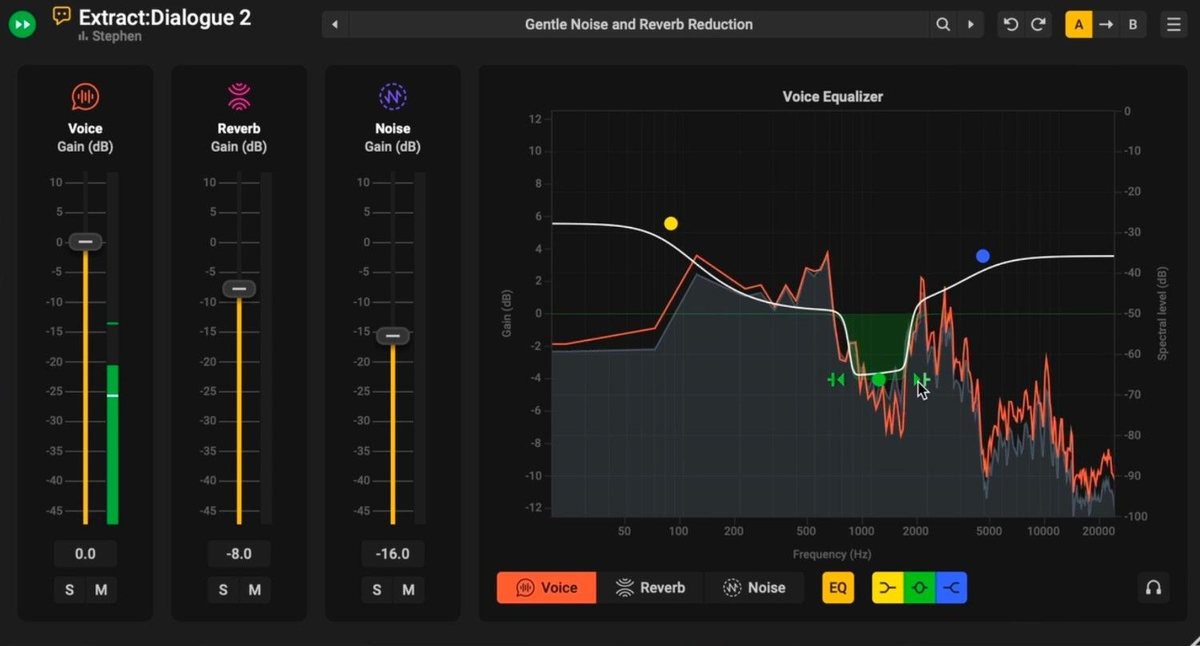
Extract:Dialogue 2 is a plug-in from Acon Digital for removing background noise and reverb from dialogue and speech. It is built mainly for dialogue cleanup in film, TV and streaming, and uses current AI models to treat voice, reverb and noise as three separate components in real time.
Compared with the original Extract:Dialogue, the major additions are reverb reduction, per-channel EQ and true stereo processing. In stereo processing, independent AI models are applied to the mid and side channels, which is described as keeping the centre dialogue clean while preserving natural width.
The interface centres on three channels: Voice, Reverb and Noise. Each has a fader, mute and solo, so one component can be auditioned and each reduction amount set separately. Sensitivity is also adjustable per component, with frequency-dependent curves.
Formats are VST, VST3 and AAX on Windows and AU, VST, VST3 and AAX on Mac, with native Apple silicon support. It is a one-time purchase with no subscription, and the official site offers a free trial that needs no credit card.
Key features
Independent channel control
Voice, Reverb and Noise each have a fader, mute and solo, so noise can be reduced without losing voice presence. It may help with interview cleanup.
Per-channel sensitivity
How much signal counts as voice, reverb or noise can be set for each, helping avoid over- or under-processing.
Frequency-focused detection
Sensitivity has frequency-dependent curves, so processing can be concentrated on a troublesome range such as low rumble or high-frequency reflections.
Per-channel EQ
Each component has its own EQ, for example softening reverb brightness without removing it, or clearing rumble while keeping natural ambience.
Stereo processing and stem outputs
True stereo processing applies separate AI models to mid and side. Multi-output routing lets dialogue, reverb and noise be exported as separate stems.
Automation and monitoring tools
Every Voice, Reverb and Noise control can be automated. A/B comparison, undo/redo, presets and an Audition mode for hearing what is removed are included.
Specifications
| Item | Details |
|---|---|
| Type | AI dialogue noise and reverb removal |
| Formats (Windows) | VST, VST3, AAX |
| Formats (Mac) | AU, VST, VST3, AAX (ARM64 / Intel) |
| Windows | Windows 7 / 8.x / 10 / 11 |
| macOS | OS X 10.13 or later |
| Requirements | 1 GB RAM (4 GB+ recommended), 1 GB free disk space |
| Display | 1366×768 (1920×1080 or higher recommended) |
| License | One-time purchase, no subscription |
| Price | $99 (official site) |
What is included and system requirements
- Extract:Dialogue 2 plug-in
- Formats: VST, VST3, AAX on Windows; AU, VST, VST3, AAX on Mac
- Requirements: Windows 7+, OS X 10.13+, 1 GB RAM (4 GB+ recommended)
- Hosts: AAX needs Pro Tools 12 or later (12.8.3 or later on Mac)
How to use it
- Try the free trial from the official site or buy the full version.
- After installation, rescan plug-ins in the DAW.
- Load Extract:Dialogue 2 as an insert on the dialogue track.
- Raise the noise and reverb reduction gradually with the three sliders.
- Use Audition mode to hear what is being removed and check that the voice is intact.
- Fine-tune with per-channel sensitivity and EQ if needed.
- Use A/B comparison to hear before and after, or compare settings.
- To use stems, set up multi-output routing and export dialogue, reverb and noise separately.
Where it may come in handy
Interviews and documentary
It may be tried on recordings with background noise and room reflections.
Podcasts and voice-over
It might suit voices recorded in a reverberant room.
ADR and location sound
It could help bring location sound and ADR closer together.
Exporting stems
Dialogue, reverb and noise stems can be balanced separately in the mix.
Who it may suit
- Users cleaning dialogue for video or streaming
- Users correcting the recording environment of podcasts or voice-over
- Users who want to adjust noise and reverb separately
- Users who prefer a one-time purchase to a subscription
Good to know before you buy
- It is built mainly for dialogue and speech cleanup rather than music production; a retailer review also notes it is aimed at speech.
- A free trial is available on the official site (no credit card needed).
- Acoustica 8 Premium includes this product together with other cleaning tools.
Price
$99 (Acon Digital official site, checked 2026-10-27). Prices can vary by region and promotion, so check the official page before buying.
See Extract:Dialogue 2 on the product page
More of the same kind
Other introduction articles of the same kind.
- Apogee Soft Limit Native Plugin – Analog Tape Emulation
- W. A. Production BassShaper
- Waves Playlist Rider
- Lese Eigen
- Antelope Audio VP Drum-All-Nite
- Mastering The Mix FASTER MASTER
We have introduced 8 other products from Acon Digital.
- Acon Digital Remix
- Acon Digital Remix:Drums
- Acon Digital DeVerberate 3
- Acon Digital DeFilter
- Acon Digital Verberate Immersive 2
See the full list in Product database: Effects.
Sources: acondigital.com pluginboutique.com (checked 2026-10-27)










Comments