
Disclosure: This page may contain affiliate links. Prices were checked on the date shown and may change.
An introduction to Softube Empirical Labs Trak Pak for Console 1, based on information from the maker and distributors: what it does, how to use it and who it may suit. It is not scored.
Featuring Lil FrEQ's EQ/de-ess and Mike-E's comp/sat on the Console 1 sections
— Softube official site
What is Empirical Labs Trak Pak for Console 1?
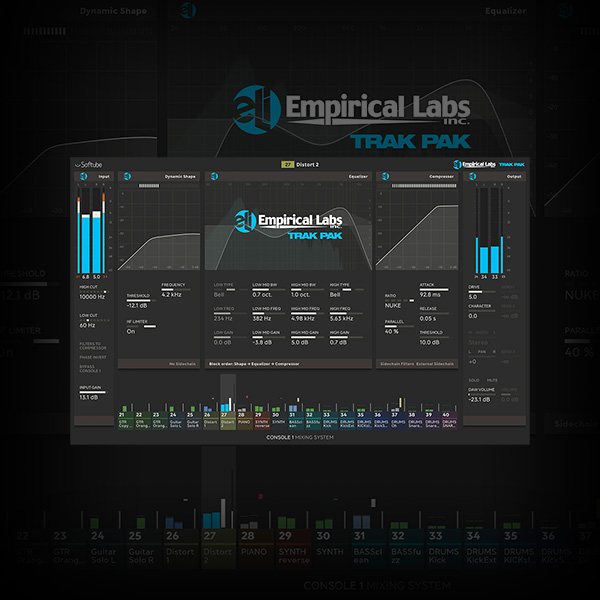
Empirical Labs Trak Pak for Console 1 is a channel strip expansion for Softube's Console 1 mixing system. It maps parts of two Empirical Labs (ELI) hardware units, the Lil FrEQ EQ/de-esser and the Mike-E compressor/saturator, onto the Console 1 sections.
Softube says it was made in partnership with Dave Derr, the designer behind ELI. EQ and de-essing come from Lil FrEQ, while compression and distortion come from Mike-E, and the maker positions the pairing as a mixing channel strip configured for Console 1.
The Console 1 sections run in this order: Input (high-pass and low-pass), Shape (de-esser and HF limiter), Equalizer, Compressor and Drive. Because every track uses the same layout, it is easy to treat many channels with the same hand movements, which is the advantage of working with Console 1.
One point to note is that the product assumes Console 1. It is not a stand-alone plugin to insert in a DAW. Softube lists it at $199. It is also offered as part of the maker's Flow subscription suites.
Key features
Lil FrEQ EQ and filters
A four-band parametric EQ whose low and high bands can switch to fixed-frequency shelves, with gain of +/-14 dB. The high-pass and low-pass filters are 18 dB/octave, and the low-pass was newly designed for this product.
De-esser and HF limiter
The DS (de-esser) and HF (high-frequency limiter) functions of Lil FrEQ sit in the Console 1 Shape section. You may try them with the compressor when you want to tame sibilance or harsh highs.
Mike-E compressor
This is the compression section of the Mike-E CompSat, said to be based on the Distressor. Ratios are BYP / 1:1 / 2:1 / 4:1 / 8:1 / NUKE, with attack from 0.9 to 100 ms and release from 0.05 to 0.5 s.
Drive (saturation)
A section based on the multistage soft-clipping of the Mike-E saturator. You set the amount of distortion with a control separate from the compressor.
Console 1 workflow
It is built for the Console 1 way of working, with each section reachable on hardware knobs. The same function stays in the same place from track to track, which suits people who like to mix with their hands.
Also in Flow suites
It is also included in Softube's Flow Mixing Suite and Flow Complete Suite subscriptions, so buying separately is not the only route.
Specifications
| Item | Details |
|---|---|
| Type | Channel strip expansion for Console 1 |
| Modeled hardware | Empirical Labs Lil FrEQ / Mike-E |
| High-pass / low-pass | 18 dB/octave |
| EQ | 4-band parametric, +/-14 dB, LF/HF switchable to shelves |
| Compressor ratios | BYP / 1:1 / 2:1 / 4:1 / 8:1 / NUKE |
| Attack | 0.9 ms to 100 ms |
| Release | 0.05 s to 0.5 s |
| Formats | AU / VST / VST3 / AAX |
| Sample rates | 44.1 / 48 / 88.2 / 96 / 176.4 / 192 kHz |
What is included and system requirements
- A Softube account and an iLok account (no physical iLok required)
- macOS Sonoma 14 / Sequoia 15 / Tahoe 26 (per Softube)
- Windows 10 (64-bit) / Windows 11
- A DAW that supports AU, VST, VST3 and/or AAX
- Internet access to download installers and manage licenses
- Up to three activations per license (per Softube)
- Requires Console 1 (per the maker's note)
How to use it
- Create a Softube account and check the license after purchase.
- Get the latest iLok License Manager and put the license in your account.
- Download and run the Softube installer.
- Connect Console 1, start the software and choose Trak Pak from the channel strip list.
- Set the high-pass and low-pass in the Input section.
- Use the Shape section's de-esser or HF limiter as needed.
- Shape the tone in the Equalizer, then finish with Compressor and Drive.
- Repeat the same hand movements on other tracks to build a consistent setup.
Where it may come in handy
Shaping vocal sibilance and body
De-esser, EQ and compressor can be reached in one channel, so you may be able to shape a vocal in a single place.
Adding punch to drums or bass
You could try combining Drive and the compressor to add energy or grit.
Keeping several tracks consistent
Console 1 lets you place the same strip on every track, which may suit setting up a whole group in the same way.
Who it may suit
- Console 1 owners who want another channel strip
- People who want EQ, de-essing, compression and saturation in one flow
- People who prefer mixing with hardware knobs
Good to know before you buy
- Softube's Console 1 is required.
- An iLok account is required for licensing, though no physical iLok is needed.
- It is also included in the Flow subscription suites.
- Softube lists a 20-day trial and 14-day returns.
How it differs from similar products
We do not pick a winner; the official figures are placed side by side.
Softube Summit Audio Grand Channel
Softube lists Trak Pak at $199 and Summit Audio Grand Channel at $299. The former is for Console 1 and combines ELI EQ, de-esser, compressor and drive; the latter is a channel strip combining the Summit Audio EQF-100 and TLA-100A.
Price
Please check the official page for the price.
See Empirical Labs Trak Pak for Console 1 on the product page
More of the same kind
We have introduced 51 channel strips. Here are some of the others.
- Solid State Logic SSL Native Drumstrip
- Waves SSL EV2 Channel
- Antelope Audio VEQ-4K BROWN
- Antelope Audio DRM-60
- Solid State Logic SSL 4K E
- Solid State Logic SSL 4K G
We have introduced 8 other products from Softube.
- Softube Summit Audio Grand Channel
- Softube Softube American Class A
- Softube Chandler Limited Zener-Bender for Console 1
- Softube Fix Phaser
- Softube Weiss Deess
See the full list in Product database: Effects.
Sources: softube.com pluginboutique.com (checked 2026-10-27)










Comments