
Disclosure: This page may contain affiliate links. Prices were checked on the date shown and may change.
An introduction to Antelope Audio DRM-60, based on information from the maker and distributors: what it does, how to use it and who it may suit. It is not scored.
The DRM-60 brings the smooth, musical response of vintage tube compression and preamp circuitry straight into your DAW.
— Antelope Audio official site
What is DRM-60?
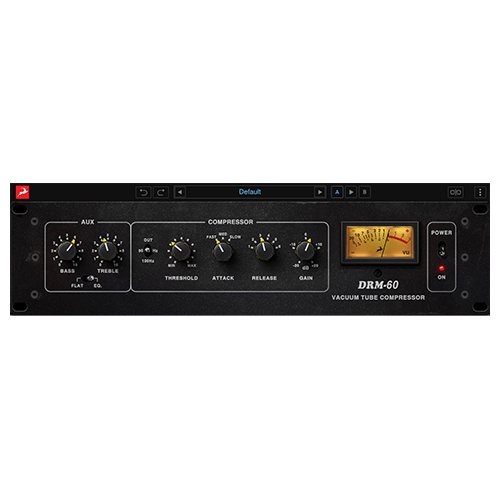
DRM-60 is a channel-strip-style plugin from Antelope Audio that combines a tube compressor, preamp and EQ. The product page describes it as modeled on a classic hardware unit with modern controls added.
The compressor has a soft-knee design with a wide threshold range. Attack has three settings (Fast, Medium, Slow) and release has six, including a program-dependent position that adapts to the material.
High-pass filter options of 50 Hz and 100 Hz keep low-frequency energy from triggering the compressor unnecessarily, and makeup gain goes up to +20 dB.
Turning on the AUX section adds gentle tube-style saturation and a two-band bass/treble shelving EQ; it can be bypassed for compression only. It is a native plugin and is part of the Antelope Cosmos collection.
Key features
Soft-knee tube compression
A soft-knee compressor with a wide threshold range, which may suit taming peaks and gluing transients.
Three attacks, six releases
Attack is Fast, Medium or Slow and release has six settings, one of them program-dependent so it adapts to the material.
High-pass filter
50 Hz and 100 Hz options keep low frequencies from triggering the compressor, which may help on buses with bass and kick.
Up to +20 dB makeup
Makeup gain up to +20 dB restores level after compression.
Preamp and shelving EQ
The AUX section adds gentle tube-style saturation and bass/treble shelving to add weight or sparkle.
Works on many sources
The product page says it can be used on vocals, guitars, drums and mix buses.
Specifications
| Item | Details |
|---|---|
| Type | Tube compressor + preamp + 2-band EQ |
| Attack | Fast / Medium / Slow |
| Release | 6 settings (including program-dependent) |
| High-pass filter | 50 Hz / 100 Hz |
| Makeup gain | Up to +20 dB |
| Versions | Native (in DAW) |
What is included and system requirements
- Native plugin (runs on macOS or Windows)
How to use it
- After purchase, register the license and install the plugin with the installer.
- Insert DRM-60 in your DAW on a vocal, drum track or bus.
- Move the threshold to set how much compression is applied.
- Choose attack and release settings and compare their behavior.
- If it reacts too much to low frequencies, set the high-pass filter to 50 Hz or 100 Hz.
- Restore level with makeup gain as needed.
- Turn on the AUX section and listen to the saturation and bass/treble changes.
Where it may come in handy
Smoothing vocal levels
The gentle compression may be useful for evening out a vocal.
Adding punch to drums and bass
The product page lists adding punch to drums as an example.
Warming acoustic instruments
The AUX section’s shelving EQ and saturation may add body to acoustic sources.
Who it may suit
- People who want compression, preamp and EQ in one plugin
- Those who want tube-style saturation alongside compression
- Antelope Cosmos users who want to try it with other plugins
Good to know before you buy
- Native only; no Synergy Core real-time version is mentioned.
- System requirements are available through the “View system requirements” link on the product page.
- A 14-day free trial of Antelope Cosmos is offered.
- The product page does not name the original hardware unit.
Price
$149 (Plugin Boutique, checked 2026-10-27). Prices can vary by region and promotion, so check the official page before buying.
See DRM-60 on the product page
More of the same kind
We have introduced 51 channel strips. Here are some of the others.
- Harrison Consoles 32Classic Channel Strip
- Solid State Logic Solid State Logic SSL 4K B
- Solid State Logic SSL 4K G
- Softube Softube American Class A
- Solid State Logic SSL Native Vocalstrip 2
- McDSP Channel G
We have introduced 54 other products from Antelope Audio.
- Antelope Audio VEQ-4K BROWN
- Antelope Audio Antelope Audio VEQ-4K PINK
- Antelope Audio VEQ-4K BLACK
- Antelope Audio InTune Chorus
- Antelope Audio VP Drum-All-Nite
See the full list in Product database: Effects.
Sources: en.antelopeaudio.com pluginboutique.com (checked 2026-10-27)










Comments