
Disclosure: This page may contain affiliate links. Prices were checked on the date shown and may change.
An introduction to Softube Summit Audio Grand Channel, based on information from the maker and distributors: what it does, how to use it and who it may suit. It is not scored.
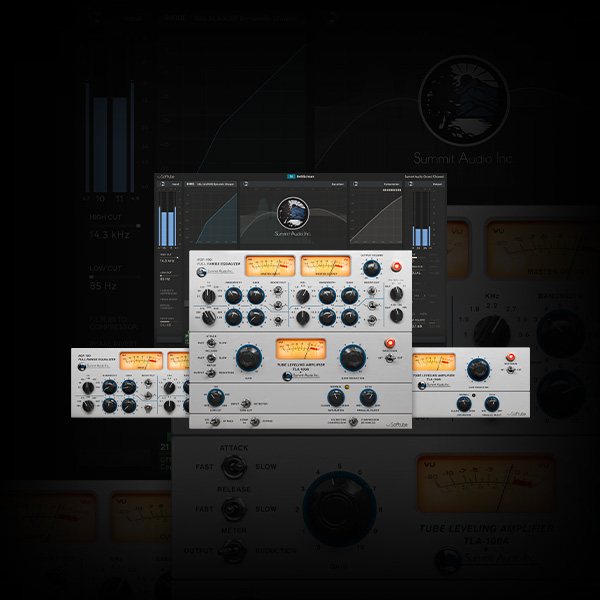
Combining the smooth operating EQF-100 parametric passive equalizer with the mild but authoritative TLA-100A compressor, Summit Audio Grand Channel is a highly versatile channel strip.
— Softube official site
What is Summit Audio Grand Channel?
Summit Audio Grand Channel is a channel strip plugin from Softube. It puts the Summit Audio EQF-100 parametric passive equalizer and the TLA-100A tube compressor in one window.
Softube explains that combining them has a practical benefit: the compressor affects the equalizer and the equalizer affects the compressor, so adjusting them together can be easier. The signal goes through the EQ first and the compressor second by default, and one switch reverses the order.
The EQF-100 and TLA-100A are described as combining vintage tube design with a modern sense of how a unit should last. The plugin adds extras not found in the original hardware: parallel compression, saturation control and low-cut filtering on the input or detector.
It is also Console 1 ready, so you can control it from Console 1 hardware, but Console 1 is not required. It works as a normal plugin in a DAW. Softube lists it at $299.
Key features
EQF-100 and TLA-100A together
A passive EQ and a compressor are handled in a single plugin. It may reduce the effort of hunting for several plugins on every track when you want the basic mix processing in one place.
Switchable processing order
One switch swaps the order of the EQ and compressor. It may help when you want to compare EQ-after-compressor with the reverse.
Individual bypass per unit
The EQ and compressor can be bypassed separately, which saves CPU for the side you are not using. This helps when only one of them is needed.
Plugin-only additions
Parallel compression, saturation control and low-cut filtering on input or detector are added. They may be useful for blending the dry signal with compression or reducing the compressor's reaction to low frequencies.
Components modeled one by one
Softube says the behavior of frequency, phase, distortion, attack and release was modeled to follow analog behavior closely.
Console 1 ready
With Console 1, each section can be reached on hardware knobs. It also supports Softube's Extended Features, with easy-access panels.
Specifications
| Item | Details |
|---|---|
| Type | Channel strip (EQ + compressor) |
| Included units | Summit Audio EQF-100 / TLA-100A |
| Processing order | EQ then compressor by default (switchable) |
| Extras | Parallel compression / saturation control / low-cut (input or detector) |
| Console 1 | Supported (not required) |
| Formats | AU / VST / VST3 / AAX |
| Sample rates | 44.1 / 48 / 88.2 / 96 / 176.4 / 192 kHz |
| OS | macOS Sonoma 14 / Sequoia 15 / Tahoe 26, Windows 10 (64-bit) / 11 |
What is included and system requirements
- A Softube account and an iLok account (no physical iLok required)
- macOS Sonoma 14 / Sequoia 15 / Tahoe 26 (per Softube)
- Windows 10 (64-bit) / Windows 11
- A DAW that supports AU, VST, VST3 and/or AAX
- Internet access to download installers and manage licenses
- Up to three activations per license (per Softube)
How to use it
- Create a Softube account and check the license you bought.
- Get the latest iLok License Manager.
- Download and run the Softube installer.
- Insert Grand Channel on a track in your DAW.
- With the default EQ-then-compressor order, set the overall tone with the EQ first.
- Use the compressor to give the sound more cohesion.
- To change the order, flip the processing-order switch and compare.
- Use parallel compression or low-cut filtering as needed.
Where it may come in handy
Vocals and acoustic instruments
You could try adding warmth with the EQ and keeping the part steady with the compressor.
Cohering bass or mandolin
Swapping the processing order and comparing may help you adjust thickness.
Gluing a master bus
Softube mentions using the TLA-100A on a master bus to pull a mix together, so you may try it lightly.
Who it may suit
- People who want EQ and compression in a single plugin
- People interested in the Summit Audio hardware lineup
- Console 1 owners or those planning to buy one
Good to know before you buy
- An iLok account is required for licensing, though no physical iLok is needed.
- It is also included in the Flow subscription suites.
- Upgrade pricing, where available, appears after you sign in (per Softube).
- Softube lists 14-day returns and a 20-day trial.
How it differs from similar products
We do not pick a winner; the official figures are placed side by side.
Softube Empirical Labs Trak Pak for Console 1
Grand Channel is $299 and does not require Console 1, while Trak Pak is $199 and assumes Console 1. The former is based on the EQF-100 and TLA-100A, the latter on Lil FrEQ and Mike-E.
Price
Please check the official page for the price.
See Summit Audio Grand Channel on the product page
More of the same kind
We have introduced 51 channel strips. Here are some of the others.
- Waves Scheps Omni Channel 2
- Antelope Audio Antelope Audio VEQ-4K PINK
- AudioThing Space Strip
- Eventide EChannel
- McDSP Channel G
- Wave Arts TrackPlug 7
We have introduced 8 other products from Softube.
- Softube Softube American Class A
- Softube Empirical Labs Trak Pak for Console 1
- Softube Chandler Limited Zener-Bender for Console 1
- Softube Fix Phaser
- Softube Softube Parallels
See the full list in Product database: Effects.
Sources: softube.com pluginboutique.com (checked 2026-10-27)










Comments