
Disclosure: This page may contain affiliate links. Prices were checked on the date shown and may change.
An introduction to W. A. Production DERES, based on information from the maker and distributors: what it does, how to use it and who it may suit. It is not scored.
DERES isn't just guessing which frequencies need attention. It's working from the mathematical playbook of sound harmonics
— W. A. Production official site
What is DERES?
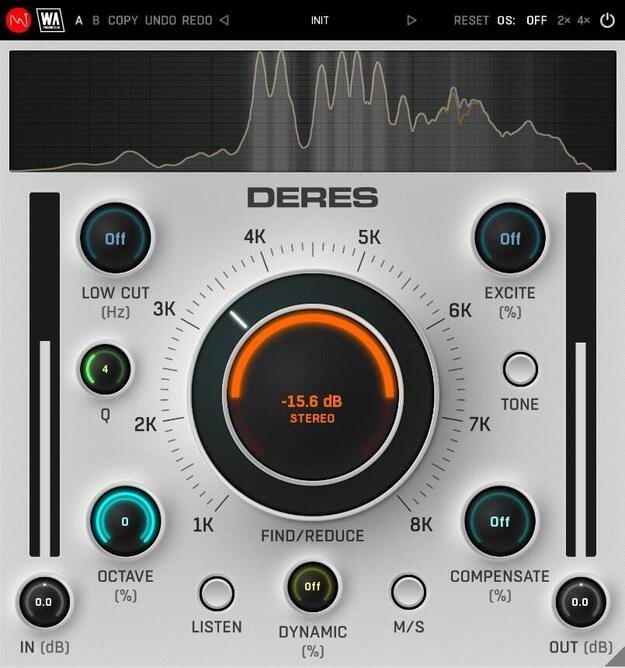
DERES is a de-resonance plugin from W. A. Production. It is meant for finding and reducing prominent resonances and unwanted overtones that tend to appear when synths or basses are layered.
The maker explains that, unlike a typical EQ that targets a single frequency, it can process the multiple harmonics of a chosen frequency together. It uses the mathematics of harmonics to find resonances that are easy to overlook.
The Listen button exaggerates the problem band, and the Find knob sweeps 1 to 8 kHz to locate the trouble spot. Reduce sets the amount, Q sets the width and Octave processes related harmonics together.
You can choose a static mode that reduces by a constant amount or a dynamic mode that acts only when needed. Compensation functions help avoid a flat sound after reduction.
Key features
Find resonances with Listen and Find
The Listen button exaggerates the problem band and the Find knob sweeps 1 to 8 kHz. It may help locate muddy or harsh peaks in layered sounds.
Octave for related harmonics
The Octave knob reduces harmonics related to the chosen frequency together, which may help when a single-point EQ is not enough.
Static and dynamic modes
Static mode reduces by a constant amount, while dynamic mode acts only when needed, which you may try for more musical results.
Compensation tools
Tone adjusts tonal balance with a convolution response, Compensate lifts neighboring frequencies to offset darkness, and Excite adds air.
Spectrum display and A/B
A live spectrum at the top shows what is happening to the signal. A/B comparison, copy/paste and undo/redo are included.
Presets and manual
Many factory presets range from subtle correction to broader change. A PDF manual and a tutorial video are included.
Specifications
| Item | Details |
|---|---|
| Type | De-resonance plugin |
| Find range | 1 to 8 kHz |
| Modes | Static / Dynamic |
| Other functions | Mid/Side mode, low cut, Tone, Compensate, Excite |
| Interface | Vector graphics, resizable |
| Formats (Windows) | VST2 / VST3 / AAX |
| Formats (Mac) | VST2 / VST3 / AAX / AU |
| OS (Windows) | Windows 8 or later (64-bit only) |
| OS (Mac) | macOS 10.10 or later (64-bit only) |
| Pro Tools | AAX requires Pro Tools 11 or higher |
What is included and system requirements
- DERES plugin
- Many factory presets
- PDF manual and tutorial video
- Windows 8 or later (64-bit): VST2 / VST3 / AAX
- macOS 10.10 or later (64-bit): VST2 / VST3 / AAX / AU
- AAX requires Pro Tools 11 or higher
- Mac Apple silicon users should check the current compatibility status before buying (per Plugin Boutique)
How to use it
- After purchase, check the installer and license in your Plugin Boutique account.
- Run the installer and restart your DAW.
- Insert DERES on the track where resonances bother you.
- Press Listen and sweep Find between 1 and 8 kHz to locate the prominent resonance.
- Set the amount with Reduce and the width with Q.
- If needed, use Octave to reduce related harmonics too.
- Switch to dynamic mode and try it acting only when necessary.
- If the sound turns flat, use Compensate, Tone and Excite to rebalance it.
Where it may come in handy
Cleaning up layered synths and bass
When stacked instruments get muddy, you could find and reduce resonances.
Tidying pad and string backgrounds
You may use Tone and related controls to adjust the balance of supporting instruments.
Prep before mixing
The maker recommends cleaning up before the mixdown, lightly reducing resonances on each source.
Who it may suit
- People who want to tidy muddy or harsh resonances in layered sounds
- People who want a tool that handles harmonics together rather than a plain EQ
- People who want to try de-resonance in a simple tool
Good to know before you buy
- No listening evaluation is given here.
- On Apple silicon Macs, check compatibility before purchase.
- AAX is supported for Pro Tools 11 and higher.
Price
Please check the official page for the price.
More of the same kind
Other introduction articles of the same kind.
- Acon Digital Remix
- Cockos ReaFIR ReaPlugs
- IK Multimedia T-RackS Sunset Sound Studio Reverb
- Kuassa Amplifikation VVV
- AudioThing Wave Box
- Soundtoys Devil-Loc Deluxe
We have introduced 42 other products from W. A. Production.
- W. A. Production Biggifier by Aden
- W. A. Production DJFX
- W. A. Production Noizzer
- W. A. Production SphereQuad
- W. A. Production Fundamental Bass
See the full list in Product database: Effects.
Sources: pluginboutique.com (checked 2026-10-27)










Comments