
Disclosure: This page may contain affiliate links. Prices were checked on the date shown and may change.
An introduction to Waves Brauer Motion, based on information from the maker and distributors: what it does, how to use it and who it may suit. It is not scored.
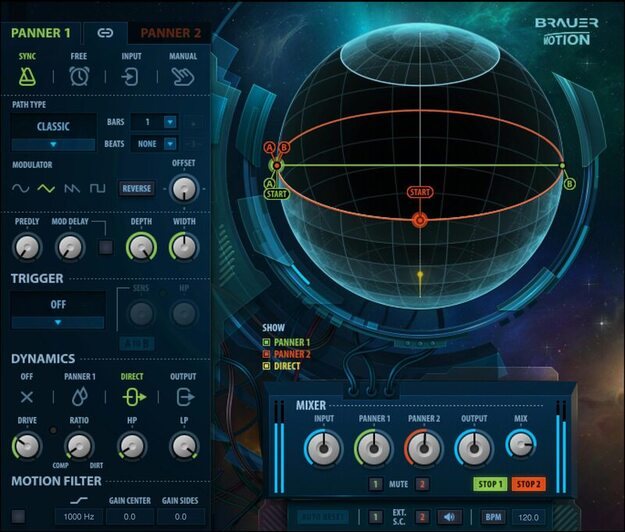
Brauer Motion takes panning into a new world of spherical motion that goes beyond conventional left/right panning.
— Waves official site
What is Brauer Motion?
Brauer Motion is a Waves auto-panner plugin, an effect that moves a sound's position automatically. The description says it takes panning beyond conventional left/right into spherical motion.
It was created with Grammy-winning mix engineer Michael Brauer, who is noted for his use of space on mixes for Coldplay, Florence and the Machine and John Mayer.
Motion can range from a subtle effect on pads and reverb to extreme roller-coaster movement. Examples given include nudging percussion so it does not feel static and moving background vocals off-center to make room for the lead.
The design is two linkable auto-panners, each with four panning paths. There are five triggering options, plus tempo sync and flexible modulation.
Key features
Two linkable auto-panners
Two linkable auto-panners each offer four paths. You may combine them to build more complex motion.
Spherical movement
Beyond left and right, you can bring sounds forward or push them back in the stereo field, an option when you want to add a sense of depth.
Five triggers and tempo sync
Five triggering options decide when motion starts, and tempo sync lets the motion follow the song's rhythm.
Flexible modulation
Fine control over how the motion changes, which may help add slow movement to pads or orchestral sections.
Keeping static sounds alive
One suggested use is shifting percussion subtly so it does not feel static.
Placing background vocals
Moving background vocals off-center to make room for the lead vocal is given as an example.
Specifications
| Item | Details |
|---|---|
| Type | Auto-panner |
| Developed with | Michael Brauer (mix engineer) |
| Panners | Two linkable (four paths each) |
| Triggers | Five |
| Sync | Tempo sync |
| Formats (Mac) | VST / AU / AAX |
| Formats (Windows) | VST / AAX |
| OS | macOS Monterey 12 to Sequoia 15 / Windows 10 or later |
What is included and system requirements
- Mac: macOS Monterey 12 / Ventura 13 / Sonoma 14 / Sequoia 15 (VST / AU / AAX)
- Windows: Windows 10 or later (VST / AAX)
- A Waves account and installation and license registration via the Waves Central app (per Plugin Boutique)
How to use it
- Create a Waves account (or log in) and activate it with the confirmation email.
- Register the serial number shown in your Plugin Boutique account under "Register New Products" at Waves.
- Download and install the Waves Central app and log in.
- Choose this product on the "Install Products" screen and install it.
- Insert Brauer Motion on the track or bus you want to move.
- Choose the panner path and trigger, and set the tempo-synced rate.
- Raise the amount gradually and find a point that does not feel unnatural in the song.
Where it may come in handy
Adding drift to pads and reverb
You may use subtle motion to add change to the space.
Repositioning background vocals
You could move them off-center to make room for the lead.
Moving percussion
A small amount of motion may soften a fixed feeling.
Who it may suit
- People who want to try an effect that moves sounds
- People who want to add motion to pads or backing vocals
- Existing Waves plugin users
Good to know before you buy
- No listening evaluation is given here.
- Installation through Waves Central and a Waves account are required.
Price
Please check the official page for the price.
See Brauer Motion on the product page
More of the same kind
We have introduced 18 stereo and imaging tools. Here are some of the others.
- Harrison Tremolo Panner
- Mastering The Mix STEREOVAULT
- W. A. Production Dynawide
- Solid State Logic SSL Fusion Stereo Image
- Sound Particles Space Controller Standard
- Zynaptiq WIDE
We have introduced 215 other products from Waves.
- Waves Waves PS22 Stereo Maker
- Waves Renaissance Equalizer
- Waves Tape, Tubes & Transistors
- Waves Curves Resolve
- Waves Submarine
See the full list in Product database: Effects.
Sources: pluginboutique.com (checked 2026-10-27)










Comments