
Disclosure: This page may contain affiliate links. Prices were checked on the date shown and may change.
An introduction to Waves JJP Bass, based on information from the maker and distributors: what it does, how to use it and who it may suit. It is not scored.
JJP Bass isn’t about variations on a specific bass tone—but finding the perfect bass color for any musical context.
— Waves official site
What is JJP Bass?
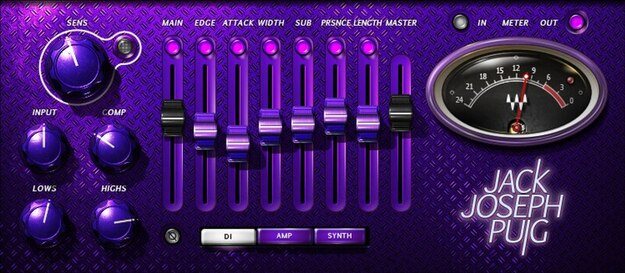
JJP Bass is a bass effect from Waves, developed with Grammy-winning producer and engineer Jack Joseph Puig. The description says it is not about one specific bass tone but about finding a suitable bass color for the musical context.
One click optimizes the effects for direct, synth or amplified bass, so material recorded in different ways can start from the same screen.
Multiple parallel processors work internally, layering processed sound over the bass while keeping its core character. It is described as suited to hip-hop, EDM, rock and jazz bass.
The controls include compression and low/high EQ, Presence for cutting through, Attack for the initial transient, Width, Edge for a hint of growl, and Sub for low-end support.
Key features
Direct, synth and amplified starting points
One click switches the optimization between direct, synth and amplified bass, which may help when basses are recorded differently.
Parallel layering keeps character
Several effects are layered in parallel, so weight or definition can be added while the essential character stays.
Compression and low/high EQ
Compression and low/high EQ anchor the foundation, which could be a first step in settling the bass in a mix.
Presence for cluttered mixes
The Presence control helps the bass cut through in a busy arrangement.
Attack and Edge
Attack shapes the start of notes and Edge adds a hint of growl. It might help balance finger and pick playing.
Width and Sub
Width can spread a signal into stereo or animate a mono track. Sub pushes the low end and is described as working well with kicks.
Fatten and lengthen notes
The decay of a note can be magnified to fatten and lengthen its body, which could be tried when short notes sound thin.
Specifications
| Item | Details |
|---|---|
| Maker | Waves |
| Designer | Jack Joseph Puig |
| Category | Bass effect (enhancer) |
| Formats (Mac) | VST / AU / AAX |
| Formats (Windows) | VST / AAX |
| OS | macOS Monterey 12 to Sequoia 15, Windows 10 or later |
What is included and system requirements
- Mac: macOS Monterey 12, Ventura 13, Sonoma 14, Sequoia 15 (VST / AU / AAX)
- Windows: Windows 10 or later (VST / AAX)
- The license is registered to a Waves account and installed with the Waves Central app
How to use it
- After buying at Plugin Boutique, the serial number appears in your user account.
- Create a Waves account (or log in) and open the confirmation link sent by email.
- In the Waves account choose Register New Products and enter the serial number.
- Download and install the Waves Central app and log in with the Waves account.
- On the Install Products tab tick this product and press Install & Activate.
- Open the DAW, pick the plug-in from the list and insert it on a track.
- Step through the presets first to learn what each control does, then fine-tune.
Where it may come in handy
Fitting a DI bass into a song
It might be tried to shape the outline and weight of a bass recorded straight into an audio interface.
Adding character to a synth bass
Edge and the parallel layering could add expression to a programmed synth bass.
Working out low end with the kick
The Sub control could be explored together with the kick in the low range.
Who it may suit
- People who want bass processing with few controls
- Home recordists who work with DI, synth or amplified bass
- Users looking for a bass tool across several genres
Good to know before you buy
- A Waves account is required to register the license.
- Information is based on the Plugin Boutique product page.
How it differs from similar products
We do not pick a winner; the official figures are placed side by side.
Waves JJP Drums
JJP Bass is for bass and switches between direct, synth and amplified setups. JJP Drums is for snare, kick and toms and has 30 presets.
Price
Please check the official page for the price.
See JJP Bass on the product page
More of the same kind
Other introduction articles of the same kind.
- UJAM Finisher RETRO
- Slate Digital Fresh Air
- McDSP SA-2 Dialog Processor
- Zynaptiq MORPH 3 PRO
- Klevgrand Grand Finale
- MeldaProduction MMatcher
We have introduced 215 other products from Waves.
See the full list in Product database: Effects.
Sources: pluginboutique.com (checked 2026-10-27)










Comments