
Disclosure: This page may contain affiliate links. Prices were checked on the date shown and may change.
An introduction to Waves Dugan Speech, based on information from the maker and distributors: what it does, how to use it and who it may suit. It is not scored.
Dugan Speech controls gain automatically, in real time.
— Waves official site
What is Dugan Speech?
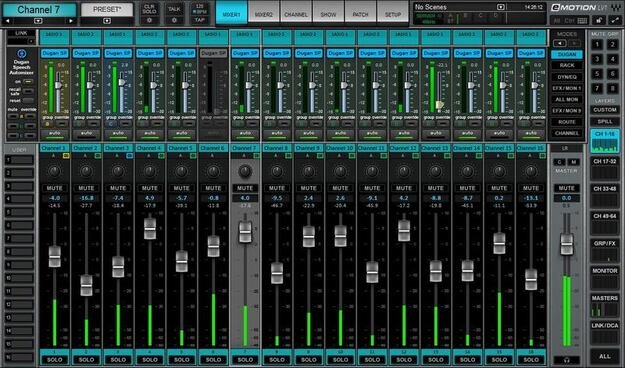
Dugan Speech is a plug-in from Waves, developed with auto-mixer inventor Dan Dugan, that adjusts the gain of multiple microphones automatically. It targets scenes where several people speak, such as panel discussions, corporate events, talk shows and houses of worship.
Using many mics at once causes feedback, comb filtering, noise and people talking over each other. Dugan Speech controls gain in real time in those situations, and the product page says it can handle up to 64 mics.
When only one person speaks it lowers the gain of the other mics, and when several people speak it shares gain across channels. Level changes are described as smooth rather than the abrupt action of a noise gate.
It works with the Waves eMotion LV1 mixer and with other consoles through SuperRack SoundGrid or SuperRack Performer. It is the software version of the Dugan Automatic Mixing Controllers.
Key features
Automatic gain following the speaker
The active mic is favored and the others are turned down; when several speak, gain is shared. It may reduce the fader work in multi-mic settings.
Smoother than gating
Level changes are smooth, unlike the abrupt action of a noise gate. It may be worth trying when you want conversation to stay natural.
Channel override
Specific mics, such as a host's, can be prioritized. It may help keep a moderator's voice clear.
Channel sensitivity
Channel sensitivities can be adjusted while mixing automatically, for example for a quieter speaker.
Recall Safe and metering
A Recall Safe mode keeps snapshots from changing settings, and a gain bar graph and input level metering are included.
Specifications
| Item | Details |
|---|---|
| Type | Automatic mic mixer |
| Channels | Up to 64 mics (per the product page) |
| Modes | Automix On / Off (unity gain inputs) |
| Mac | macOS Monterey 12, Ventura 13, Sonoma 14, Sequoia 15 |
| Windows | Windows 10 or later |
What is included and system requirements
- Dugan Speech plug-in
- Supported OS: macOS 12 to 15, Windows 10 or later
- Used with eMotion LV1, or with other consoles via SuperRack SoundGrid / SuperRack Performer
How to use it
- Activate the license in your Waves account.
- Set up channels for the multiple mics in eMotion LV1 or SuperRack.
- Assign Dugan Speech to each mic channel.
- Set the mode to Automix On to start automatic mixing.
- Use the override for channels you want prioritized, such as the host.
- Adjust sensitivities and watch the gain bar graph.
Where it may come in handy
Panel discussions
It may help when speakers alternate and you want idle mics turned down.
Services and lectures
It may help reduce the chance of feedback when many mics are open.
Talk shows and corporate events
It may let you favor the host's mic while balancing guests automatically.
Who it may suit
- Sound operators for events or streams with many mics
- Users of Waves eMotion LV1 or SuperRack
- People who want to cut back on manual fader work
Good to know before you buy
- Use is described with eMotion LV1 or via SuperRack SoundGrid / SuperRack Performer.
- Automix Off passes inputs at unity gain.
Price
Please check the official page for the price.
See Dugan Speech on the product page
More of the same kind
Other introduction articles of the same kind.
- W. A. Production SphereQuad
- Sound Radix Auto-Align Post 2
- Session Loops VocalNet
- accentize dxLevel
- Solid State Logic SSL Fusion Transformer
- Wave Arts Dialog 2
We have introduced 215 other products from Waves.
See the full list in Product database: Effects.
Sources: pluginboutique.com (checked 2026-10-27)










Comments