
Disclosure: This page may contain affiliate links. Prices were checked on the date shown and may change.
An introduction to Eventide MicroPitch Immersive, based on information from the maker and distributors: what it does, how to use it and who it may suit. It is not scored.
With up to 16 channels of spatialized, detuned delays, plus modulation, EQ, and crossfeed controls, MicroPitch Immersive excels in creating an immersive space with boundaries that reflect, move, diffuse, and dissolve.
— Eventide official site
What is MicroPitch Immersive?
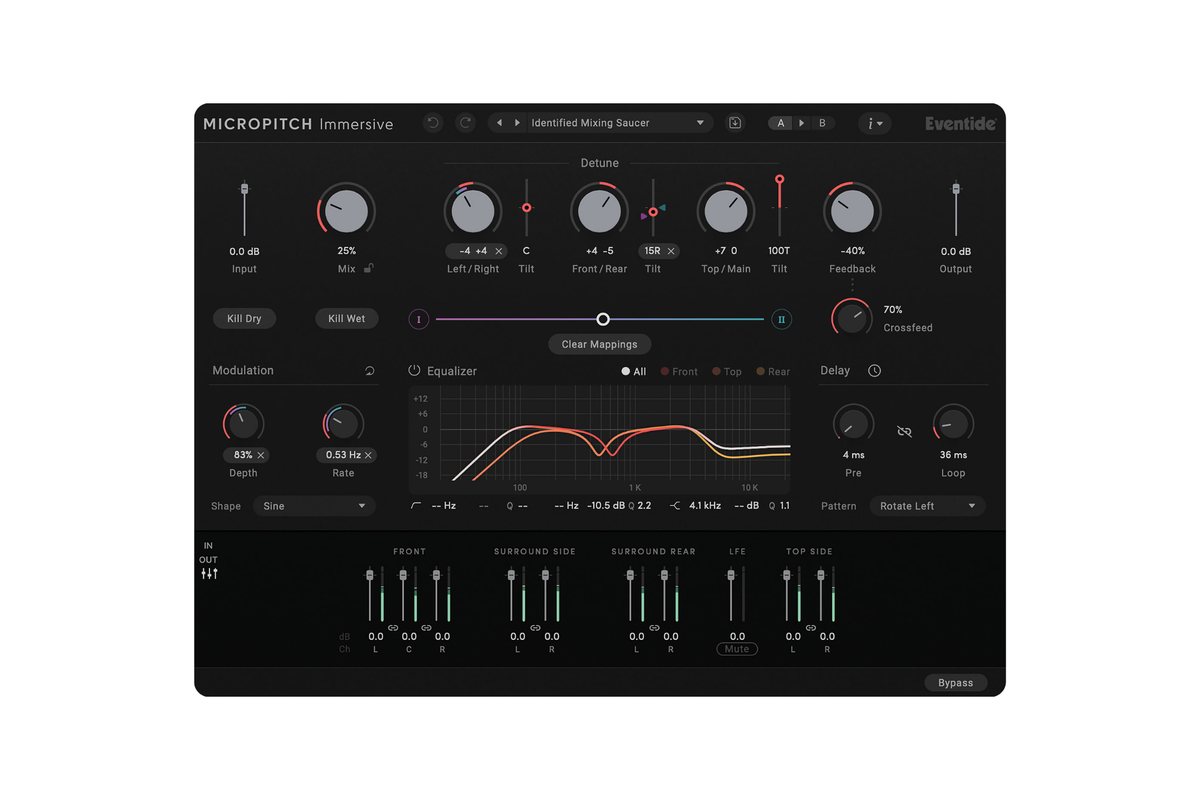
MicroPitch Immersive is a delay and pitch plug-in that Eventide designed from the ground up for immersive work such as Dolby Atmos and surround. It carries the idea of the stereo MicroPitch effect beyond left and right into front-to-back and height directions.
Its core is a set of slightly detuned delays distributed across up to 16 speaker channels. According to the official description, modulation, EQ and crossfeed controls are included as well, aiming at spaces whose boundaries reflect, move, diffuse and dissolve.
Eventide traces the MicroPitch effect from the H910 in the mid-1970s through the H3000 and today's H9000 to the MicroPitch plug-in. This product extends the idea of widening a mix through decorrelated, slightly shifted sound into three dimensions.
It runs on Windows (AAX, VST2, VST3) and macOS (AAX, AU, VST3), and authorization needs a free iLok account (no physical dongle is required). A free 14-day demo is offered on the official page.
Key features
Detuned delay across up to 16 channels
Detuned delays can be placed across multiple speakers to widen a source in 3D space. Eventide notes that adding feedback or raising crossfeed gives a reverb-like sheen. It may suit immersive mixes where depth is wanted without losing the presence of the source.
Extended delay and modulation
Slapbacks, pitch modulation for movement, and patterned motion through Loop Delay are supported. Settings range from adding a touch of space to drastic pitch-shifting effects, all on one interface.
Wide channel-layout support
Mono, stereo, LCR, quadraphonic, 5.0 to 5.1.4, 7.0 to 7.1.6 and 9.0.4 to 9.1.6 layouts are supported. The same controls apply to every layout, and Eventide says no menu diving is needed.
Tilt controls and per-zone EQ
Left/Right, Front/Back and Top/Main Detune can be tilted for asymmetrical detuning. Front, top and rear speakers can be equalized separately, so the character of the effect can be shaped around the listener.
Morph between two settings
Movement between two distinct settings is smooth and seamless. It may help when a changing effect is wanted in sound design.
Levels, Kill, Freeze and Mix Lock
The Levels section sets individual speaker levels quickly. Kill Dry, Kill Wet and Freeze suit drastic effects, and Mix Lock keeps the wet/dry balance constant while presets or settings are auditioned.
Interface and presets
The resizable interface offers undo/redo and A/B comparison, and over 40 presets are included. A workable approach is to start from a preset and adjust it.
Specifications
| Item | Details |
|---|---|
| Channel layouts | Mono, stereo, LCR, quadraphonic, 5.0-5.1.4, 7.0-7.1.6, 9.0.4-9.1.6 |
| Windows | Windows 10+, x64 / AAX, VST2, VST3 (64-bit) |
| macOS | macOS 10.14+, Intel and Apple Silicon / AAX, AU, VST3 (64-bit) |
| Authorization | iLok account required (no physical dongle) |
| Presets | Over 40 |
| Demo | 14-day demo |
What is included and system requirements
- MicroPitch Immersive plug-in
- Windows: AAX, VST2, VST3 (64-bit)
- macOS: AAX, AU, VST3 (64-bit, Intel and Apple Silicon)
- Over 40 presets
- Eventide lists testing in Logic Pro, Pro Tools (with the Dolby Atmos Renderer) and Nuendo
How to use it
- Try the free 14-day demo from the official page to check that it runs in your setup.
- Prepare a free iLok account and authorize the plug-in after purchase.
- Create an immersive (for example Atmos) track or bus in the DAW and match the channel layout.
- Insert MicroPitch Immersive on that track or bus.
- Pick a nearby preset and turn on Mix Lock to audition other presets at the same wet/dry balance.
- Adjust Detune and Delay, and use the Tilt controls for left/right, front/back and top/main bias.
- Shape the character and amount with the Front, Top and Rear EQ and the per-speaker Levels.
- Add Feedback, Crossfeed or Loop Delay if needed, and use A/B comparison to check the result.
Where it may come in handy
Spreading an Atmos music mix
Placing detuned delays across several speakers may be one way to widen guitars or vocals in a 3D space.
Post-production space
Tilt and Morph may suit adding depth and movement to ambience or sound effects.
Game audio and sound design
Drastic settings with Kill Dry or Freeze, and the patterned motion of Loop Delay, may suit stylized sound design.
Who it may suit
- People mixing, or starting to mix, in Dolby Atmos or surround
- People who want to use the MicroPitch approach in immersive formats
- Sound designers working on spatial effects for film and games
Good to know before you buy
- The product assumes a DAW and setup that handles immersive (multichannel) formats. Eventide lists Logic Pro, Pro Tools and Nuendo as test hosts.
- A free iLok account is required (no physical dongle).
- Eventide lists a crossgrade for owners of stereo Blackhole, MicroPitch and Anthology XII, and a discount when both Immersive plug-ins are bought together.
Price
$199 (Eventide official site, checked 2026-10-27). Prices can vary by region and promotion, so check the official page before buying.
See MicroPitch Immersive on the product page
More of the same kind
We have introduced 62 delays. Here are some of the others.
- Waves CLA Epic
- Solid State Logic SSL Native X-Echo
- Slate Digital Stellar Echo SD-201
- Cherry Audio Stardust 201 Tape Echo
- Metric Halo MH DirtyDelay v4
- Arturia Delay ETERNITY
We have introduced 21 other products from Eventide.
- Eventide H3000 Band Delays Mk II
- Eventide Precision Time Align
- Eventide Spring
- Eventide EQ65
- Eventide CrushStation
For a side-by-side comparison scored on the same criteria, see our comparison of delays.
See the full list in Product database: Effects.
Sources: eventideaudio.com pluginboutique.com (checked 2026-10-27)










Comments