
Disclosure: This page may contain affiliate links. Prices were checked on the date shown and may change.
An introduction to Audified MixChecker Pro, based on information from the maker and distributors: what it does, how to use it and who it may suit. It is not scored.
Simulate the devices and environment of your audience to make your mix exceptional for everyone!
— Audified official site
What is MixChecker Pro?
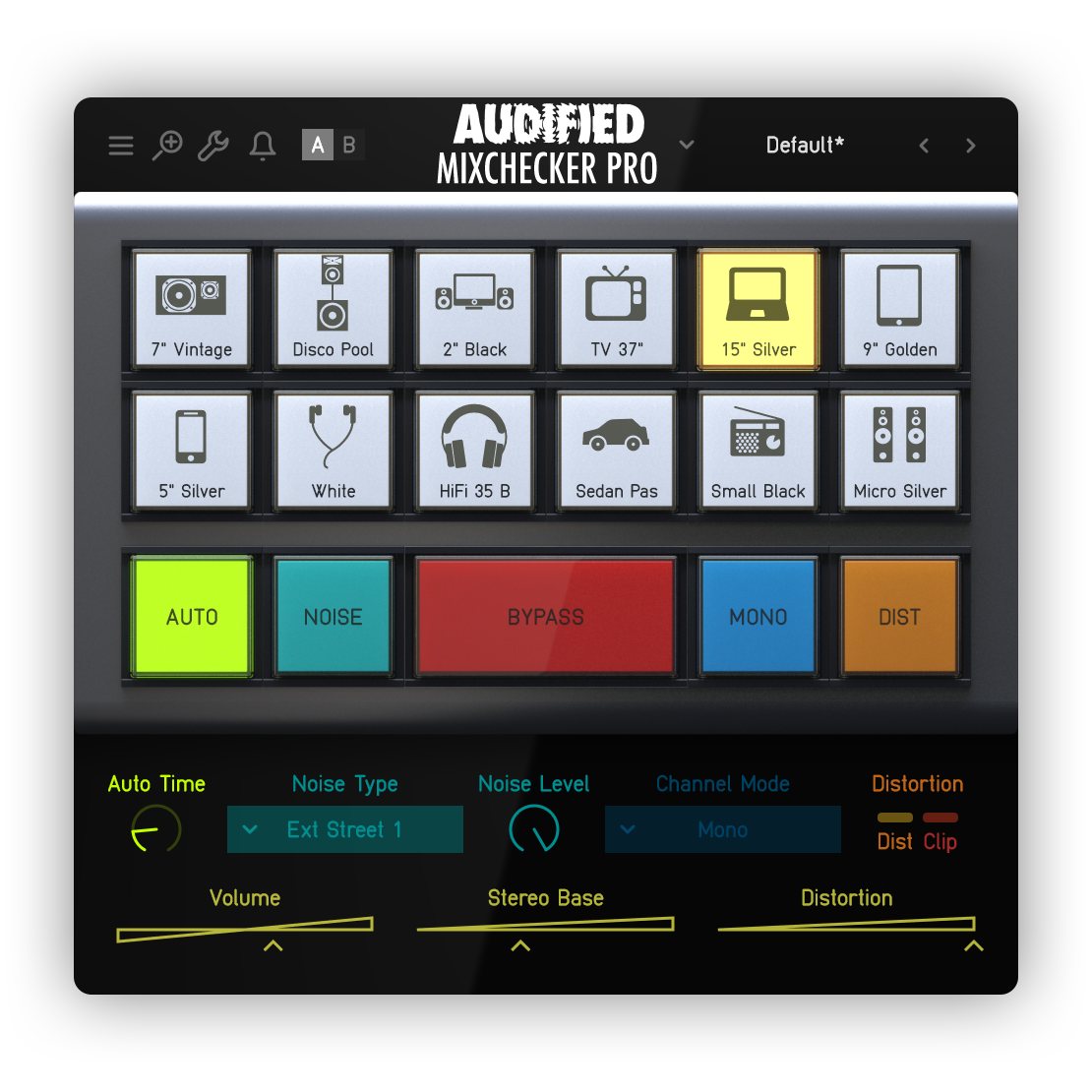
MixChecker Pro from Audified is a plugin for checking how a mix translates. It reproduces how your mix sounds on devices listeners actually use, such as phones, laptops, TVs, earbuds and club PAs, through your studio monitors.
The maker says it models more than 60 real-world devices. You can assign devices to buttons and set the stereo width, volume and distortion amount per button. Saved button sets can be recalled to switch quickly between devices.
Background noise comes in 14 types, and device-specific distortion and clipping can be reproduced. According to Plugin Boutique, choosing a headphone device also simulates outside noise passing through the headphones. An auto-scroll function steps through devices automatically.
Remote control from a web browser, iOS and Android lets you walk around the studio while checking. The official price is $99, and a free trial is available. Formats are VST3 and AAX on Windows, and VST3, AAX and AU on Mac.
Key features
60+ device simulations
Devices are organized into categories such as laptops, phones, TVs, earbuds and PA systems. The maker says the characteristics were newly measured and the processing engine rebuilt rather than relying on simple impulse responses.
Button sets
Devices can be assigned to buttons, each with its own stereo width, volume and distortion level. The same device can be placed on several buttons with different settings.
Background noise and distortion
One of 14 ambient noise types can be mixed in, and device-specific distortion is modeled, which may help when you want to check under more realistic conditions.
Stereo modes and auto-scroll
Mono, channel swap and listening to each channel separately are available. Auto-scroll steps through devices at a set interval.
Remote control
It can be controlled from a web browser, phone or tablet, so you can step away from the monitors and listen while moving around the room.
Specifications
| Item | Details |
|---|---|
| Maker | Audified |
| Type | Mix-reference plugin |
| Devices | 60+ (per the maker) |
| Background noise | 14 types (per the maker) |
| Formats | Windows: VST3, AAX / Mac: VST3, AAX, AU (official) |
| OS | Windows 7 or later, macOS 10.14 or later (Apple silicon native) |
| Disk space | 400 MB |
| Memory | 4 GB or more |
| Trial | Available |
What is included and system requirements
- The MixChecker Pro plugin
- OS: Windows 7 or later / macOS 10.14 or later (Apple silicon native)
- Formats: VST3, AAX (Windows); VST3, AAX, AU (Mac)
- Remote control from a browser, iOS and Android
How to use it
- Try the trial from the official site to confirm it works in your DAW.
- Load MixChecker Pro at the end of the master chain.
- In Edit mode, assign the devices you want to buttons.
- Set stereo width, volume and distortion per button and save them as a set.
- Return to normal mode and switch buttons to compare the mix on each device.
- Add background noise to check under conditions closer to real listening.
- Bypass or remove the plugin before bouncing the mix.
Where it may come in handy
Checking how a mix sounds on phones and earbuds
It may reduce the need to export and listen on a phone, since you can check inside the DAW.
Balancing streaming and game audio
It may help when your audience listens on varied devices such as laptop or TV speakers.
Club-oriented tracks
You can pick PA devices to anticipate how the low end may behave in a club.
Mono compatibility checks
The mono button lets you quickly check the balance in mono.
Who it may suit
- People who want to check how a home-studio mix translates to other devices
- Users who want to reduce the number of exports
- Those who want to save settings and switch devices quickly
Good to know before you buy
- Bypass or remove the plugin before exporting, as it processes the output with device simulations.
- The simulations are a guide to how real devices sound; what you hear still depends on your environment.
- A higher tier with more devices, MixChecker ULTRA+, is offered at $149.
How it differs from similar products
We do not pick a winner; the official figures are placed side by side.
MixChecker ULTRA+
MixChecker Pro covers over 60 devices at $99, while ULTRA+ covers over 90 pro-audio and consumer devices at $149 (both per Audified). ULTRA+ also adds analysis modules.
Price
$99 (Audified official site, checked 2026-10-27). Prices can vary by region and promotion, so check the official page before buying.
See MixChecker Pro on the product page
More of the same kind
Other introduction articles of the same kind.
- Sound Particles Brightness Panner 2
- Waves Sub Align
- AudioThing Megaphone
- McDSP SA-2 Dialog Processor v7
- W. A. Production SphereQuad
- Kuassa EFEKTOR Rotarion
We have introduced 6 other products from Audified.
- Audified RZ062 Equalizer
- Audified U73b Compressor
- Audified U78 Saturator
- Audified Linda IronVerb
- Audified 1A Equalizer
See the full list in Product database: Effects.
Sources: audified.com pluginboutique.com (checked 2026-10-27)










Comments