
Disclosure: This page may contain affiliate links. Prices were checked on the date shown and may change.
An introduction to Harrison Audio Bass Flow, based on information from the maker and distributors: what it does, how to use it and who it may suit. It is not scored.
Harrison Bass Flow is a channel strip plugin designed for mixing bass instruments.
— Harrison Audio official site
What is Bass Flow?
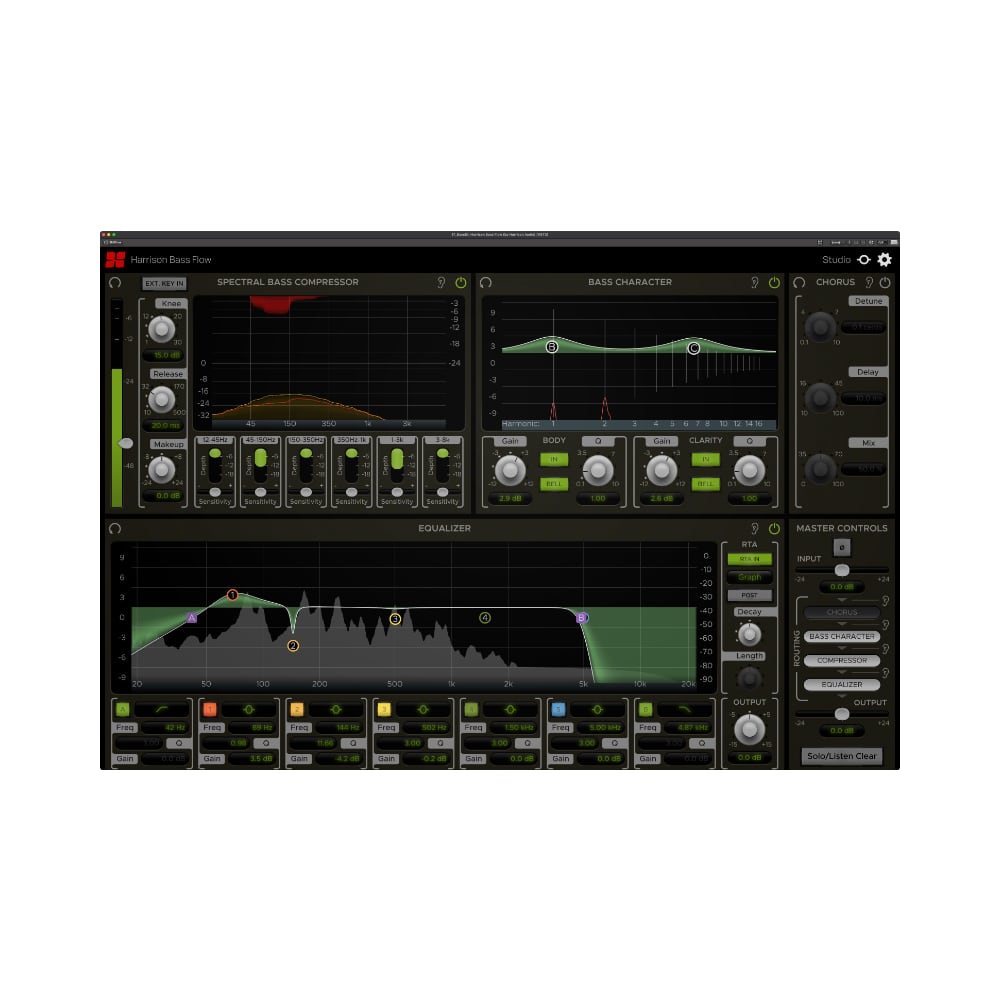
Bass Flow is a channel strip plug-in for bass from Harrison Audio (Harrison Consoles). It brings four processing modules and a master section for input, output and routing into one window.
The four modules are Bass Character, an EQ that follows the pitch of the played note, a spectral compressor made for bass, a 5-band equalizer with two extra filter bands, and a chorus. Each module has its own bypass, solo and reset controls.
The processing order can be rearranged by dragging items in the routing list, with signal flowing from top to bottom. Ear icons next to each item set listen points so you can hear the chain only up to that position, which may help when you want to compare different orders.
The design targets problems such as fret buzz, amp or room resonances and lack of clarity on electric bass, handled inside a single plug-in. It may suit people who want to shape a bass track without splitting the work across several separate plug-ins.
Key features
Bass Character follows pitch
An EQ that follows the pitch of each note and boosts or cuts the harmonics within it, changing the character of the bass. It has two bands: Body for weight and Clarity for definition, which lets you adjust low-end size and articulation separately.
6-band spectral bass compressor
A multiband compressor with six bands focused on the low end, each with Depth and Sensitivity controls. It also offers Threshold, Knee, Release, Makeup and an external key input. It may be useful when only certain bands of a bass part misbehave.
5-band EQ plus two filters
Five bands plus two additional filter bands, each with adjustable frequency, gain, shape and Q. An output trim and an optional real-time analyzer (RTA) are included. Bands can be handled directly on the graph, so you can check the low end visually while working.
Chorus with two voices
A chorus that adds two pitch-shifted voices, one above and one below the input. Detune, Delay and Mix set the amount, offset and blend with the dry signal. It may be an option when you want to add motion or presence to a bass.
Reorderable routing and listen points
Drag the four modules into a new order and use the ear icons to audition up to a given point. A Solo/Listen Clear button resets active solos and listen points. It suits experiments such as placing the compressor before or after the EQ.
Per-module bypass, solo and reset
Each module has In, Solo and Reset buttons on its top bar. Solo bypasses everything outside that module except polarity and input/output trim, so you can hear what each stage contributes.
Specifications
| Item | Details |
|---|---|
| Type | Channel strip for bass (4 modules) |
| Modules | Bass Character / spectral bass compressor (6 bands) / EQ (5 bands + 2 filters) / chorus |
| Master section | Polarity switch, input and output trim, routing order |
| Supported OS | macOS 10.9 or later / Windows 7 or later |
| Authorization | iLok account (14-day free trial available) |
What is included and system requirements
- Bass Character (pitch-tracking EQ)
- Spectral bass compressor
- 5-band equalizer with two filters and RTA
- Chorus
- Master section (polarity, trim, routing)
- 14-day free trial (official store)
How to use it
- Buy from the Harrison store or Plugin Boutique and register the license to your iLok account.
- Run the installer and restart your DAW.
- Load Bass Flow as an insert on the bass track.
- Adjust the input trim in the master section so the meters stay below clipping.
- Move Body and Clarity in Bass Character to find a balance of weight and definition.
- Set the compressor Threshold, then adjust Depth and Sensitivity for the bands that need control.
- Add EQ and chorus as needed, and rearrange the routing order to compare how it behaves.
- Use each module's Solo and bypass to check what the processing is contributing.
Where it may come in handy
Home-recorded electric bass
You might tame fret buzz or resonances with the spectral compressor and then shape definition with Bass Character.
Programmed synth bass
Body may help set low-end weight, and the chorus can add some movement.
Checking balance before export
With the RTA shown, you could fine-tune low-frequency balance by eye while adjusting the EQ.
Who it may suit
- People who want to handle bass processing in one plug-in
- Those who need to address specific low-end issues such as fret buzz or resonances
- Users who like to experiment with processing order
Good to know before you buy
- An iLok account (free) is needed for authorization.
- The official store describes a 14-day free trial.
- Supported systems are listed as macOS 10.9 or later and Windows 7 or later (per Plugin Boutique).
Price
$99 (Harrison Audio official site, checked 2026-10-27). Prices can vary by region and promotion, so check the official page before buying.
See Bass Flow on the product page
More of the same kind
We have introduced 51 channel strips. Here are some of the others.
- Solid State Logic SSL Guitarstrip
- Antelope Audio Antelope Audio VEQ-4K PINK
- Waves Magma Tube Channel Strip
- AudioThing Space Strip
- Softube Softube American Class A
- Harrison Consoles 32Classic Channel Strip
See the full list in Product database: Effects.
Sources: store.harrisonaudio.com pluginboutique.com (checked 2026-10-27)










Comments