
Disclosure: This page may contain affiliate links. Prices were checked on the date shown and may change.
An introduction to Harrison Consoles MPC Channel Strip, based on information from the maker and distributors: what it does, how to use it and who it may suit. It is not scored.
The MPC Channel is an all-in-one signal processing suite for mixing and editing audio in post-production film.
— Harrison Consoles official site
What is MPC Channel Strip?
MPC Channel Strip is a channel strip plugin from Harrison, the Nashville-based console maker, aimed at film and post-production mixing. A channel strip puts the processing a single track usually needs, such as EQ and compression, into one plugin. According to the maker, it uses the same DSP as Harrison's MPC (Motion Picture Console) used in film studios.
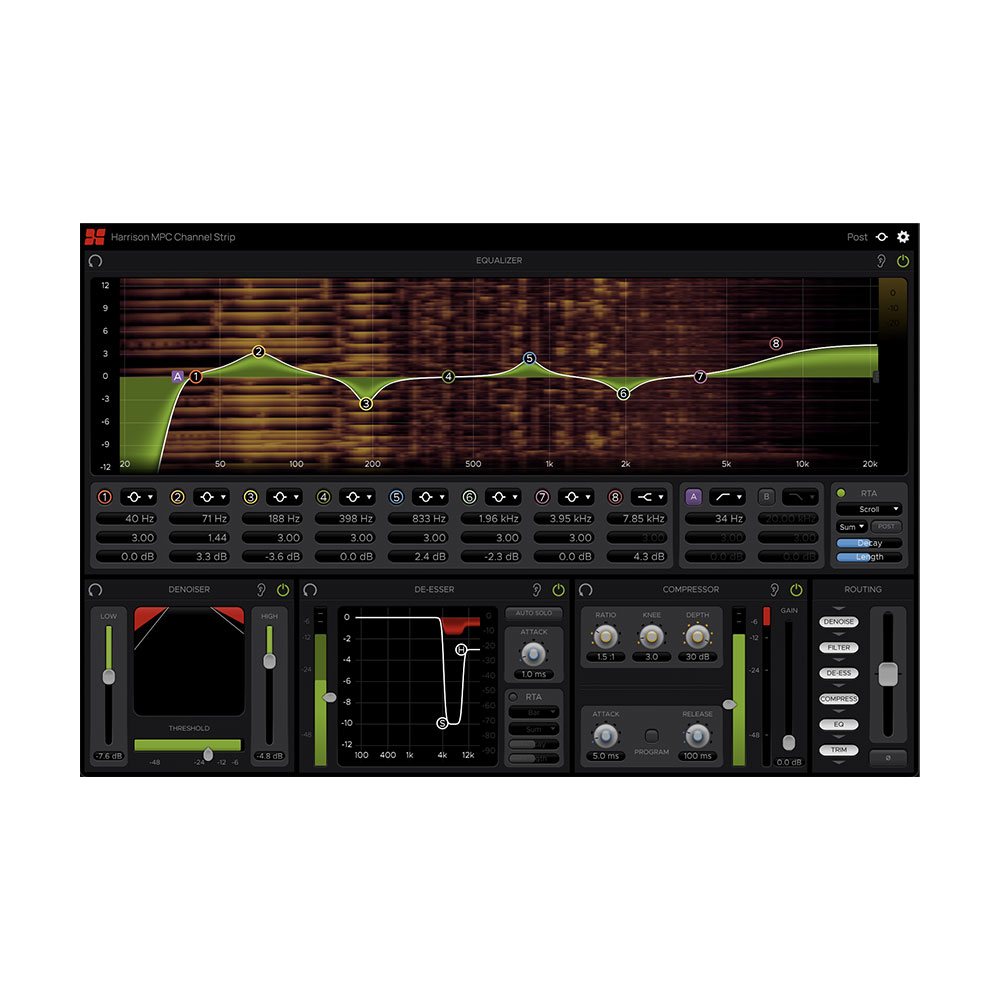
It has six processing sections: a parametric 8-band EQ, a pair of filters, a 2-band de-esser, a 2-band denoiser, a compressor, and a routing, trim and polarity section. The maker says all of them can be monitored at once in a single resizable window.
The order of the sections can be rearranged by dragging each marker, and every parameter can be automated. The maker states it is optimized so that hundreds of instances can run in large post-production sessions without a heavy CPU load.
It runs on Windows 10 and later and on macOS, including Apple silicon, as AU, VST2, VST3 and AAX. It is sold through Harrison's own store and Plugin Boutique, and belongs to the same MPC Post family as MPC Compressor and MPC Spectral Compressor.
Key features
8-band parametric EQ with filters
Eight bands can be set individually, and separate high and low filters are included. An optional RTA (real-time spectrum display) can be shown behind the curves, which is handy when you want to see the band you are adjusting.
Speech-oriented denoiser
The 2-band denoiser works like an expander on frequencies outside the range of the human voice. Its cutoffs are preset for speech, so it may help clean up background noise on dialogue or narration.
2-band de-esser
Two markers, S and H, let you attenuate sibilance and a higher band separately. The Ess band's low cutoff ranges from 200 Hz to 8 kHz and the Hi band from 2 kHz to 12 kHz.
Compressor with a Program Dependent mode
Ratio runs from 1:1 to 100:1, attack from 0.1 to 100 ms and release from 5 to 500 ms. A Program Dependent mode can also be selected, and the maker says the controls are flexible enough for sources other than vocals.
Rearrangeable signal flow
The order of the six sections can be rearranged by dragging markers. The trim control (-20 to +20 dB) acts as an input or output trim depending on its position, and a polarity switch flips the phase by 180 degrees.
Built for many instances
The maker states that hundreds of instances can be used in large post-production sessions without a major CPU impact. It is designed for projects with many tracks where the same processing is needed on each.
Specifications
| Item | Details |
|---|---|
| Maker | Harrison Consoles |
| Type | Channel strip (post-production) |
| Sections | 8-band EQ / two filters / 2-band de-esser / 2-band denoiser / compressor / routing, trim and polarity |
| Trim range | -20 dB to +20 dB |
| Compressor ratio | 1:1 to 100:1 |
| Formats | AU (Mac only), VST2, VST3, AAX Native |
| OS | macOS 11 to 13 (Apple silicon supported), Windows 10 to 11 (64-bit) |
| Authorization | A free iLok account is required (per the Plugin Boutique listing) |
What is included and system requirements
- The MPC Channel Strip plugin with its six processing sections
- OS: macOS 11 Big Sur to 13 Ventura (64-bit, M1 supported) / Windows 10 to 11 (64-bit)
- Formats: AU (Mac), VST2, VST3, AAX Native
- Memory: 4 GB minimum (8 GB recommended); Intel Core 2 class CPU at 2.4 GHz or higher (per Plugin Boutique)
How to use it
- After purchase, download the installer from your Harrison account and install it.
- Authorize the license with a free iLok account.
- Open your DAW and load MPC Channel Strip on an insert of the track you want to shape.
- Move the EQ bands on the central graph to balance the frequency range.
- For a voice track, set the thresholds of the denoiser and the de-esser.
- Choose the compressor's ratio, attack and release.
- Drag the section markers to change the order in which the processing is applied.
- Finally, match input and output levels with the trim, and switch polarity if needed.
Where it may come in handy
Film and TV dialogue editing
With the denoiser, de-esser, compressor and EQ in one plugin, it may suit quickly applying the same chain across dialogue tracks.
Narration and podcasts
The denoiser tuned to the voice range and the de-esser for sibilance can be adjusted in one window. It may be worth trying on recordings with noticeable background noise.
Sessions with many tracks
The maker describes a design that keeps CPU load manageable with many instances. It may be an option when basic processing is needed on every track of a large mix.
Vocal preparation
You can try reordering EQ, de-essing and compression while prepping a vocal inside a single plugin.
Who it may suit
- People editing dialogue for film, TV or video
- People who want to handle noise and sibilance in narration or streaming audio in one plugin
- Users who like channel-strip plugins and want to set the processing order themselves
- People working on sessions with many tracks
Good to know before you buy
- A free iLok account is required for authorization (per Plugin Boutique).
- The maker positions it for post-production. It can be used for music too, but a Japanese manual was not found.
- Plugin Boutique lists macOS 11 to 13. Check the official store for your OS before purchase.
- A Plugin Boutique customer review notes that it has no presets.
How it differs from similar products
We do not pick a winner; the official figures are placed side by side.
Harrison MPC Compressor
MPC Channel Strip combines six sections, including EQ, filters, de-esser, denoiser and compressor. MPC Compressor is a standalone compressor from the same MPC Post family.
Price
$149 (Harrison Consoles official site, checked 2026-10-27). Prices can vary by region and promotion, so check the official page before buying.
See MPC Channel Strip on the product page
More of the same kind
We have introduced 51 channel strips. Here are some of the others.
- Waves CLA MixHub
- McDSP Channel G Native v7
- McDSP Channel G HD v7
- Safari Audio Camel Strip V2
- Universal Audio Avalon VT-737 Tube Channel Strip
- Waves SSL E-Channel
We have introduced 6 other products from Harrison Consoles.
- Harrison Consoles 32Classic Channel Strip
- Harrison Consoles Harrison Consoles Stunning Phaser
- Harrison Consoles Vocal Flow
- Harrison Consoles MPC Compressor
- Harrison Consoles Drum Flow
See the full list in Product database: Effects.
Sources: store.harrisonaudio.com harrisonaudio.com pluginboutique.com (checked 2026-10-27)










Comments