
Disclosure: This page may contain affiliate links. Prices were checked on the date shown and may change.
An introduction to Klevgrand Pana, based on information from the maker and distributors: what it does, how to use it and who it may suit. It is not scored.
Pana uses both the delaying and filtering methods in combination, to achieve a more natural positioning.
— Klevgrand official site
What is Pana?
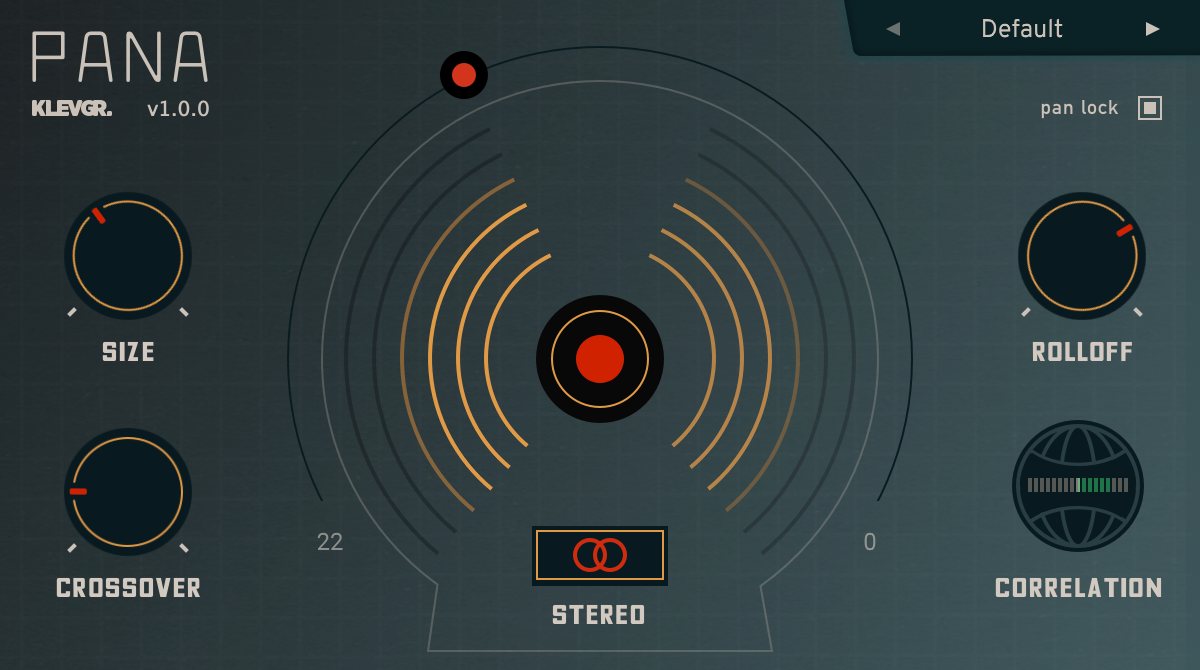
Pana is a panning plugin from Swedish developer Klevgrand, designed for placing sounds in the stereo field more naturally. The product page calls it “a pan knob for the human ear.” A normal pan control changes the level on one side, while Pana combines other methods.
The product page explains that panning can be done by changing the level of one channel, by adding a short delay to one channel (the Haas method), or by applying a low-pass filter to one channel. Pana combines the delay and filter methods to aim for a more natural position.
The pan knob works as a macro controller that moves several parameters at once, linking micro-delay and filtering. A head-size knob adjusts how large the time difference between the ears is assumed to be.
A bass crossover filter can keep low frequencies in the center, which the page says is meant to stop the mix from tipping to one side. Besides the macOS and Windows plugin (AU / VST / AAX), the page also lists an iPad version as AUv3 and standalone.
Key features
Delay and filter based panning
Position is created with a short delay and a high-frequency filter in addition to level difference. The page notes the filter approach works well on transient-rich sounds such as drums.
Adjustable head size
The micro-delay is tuned to a variable head size. It is based on the idea that the time difference between the ears grows with head size.
Low-pass filter on the opposite side
It reflects how high frequencies are reduced at the ear opposite the source, with a knob to steepen the curve. It may help when you want an element’s position to be clearer.
Bass crossover
Frequencies below a set point can be left centered rather than panned. This may be useful when you do not want bass or kick energy to lean to one side.
Mono compatibility check
One button folds the signal to mono so you can check for phase problems, and a correlation meter is included. It helps when thinking about playback on mono speakers.
Pan lock and presets
A pan lock keeps the pan knob in place while you browse presets, and a set of ready-made presets is included.
Specifications
| Item | Details |
|---|---|
| Type | Natural panner (stereo tool) |
| Main functions | Micro-delay, low-pass filter, bass crossover, mono button, correlation meter, pan lock |
| OS | macOS 10.10 or later (optimized for M1), Windows 7 SP1 or later |
| Formats | macOS / Windows: AU, VST (VST2 / VST3), AAX; iPad: AUv3, standalone |
| Host | 64-bit host |
What is included and system requirements
- Pana plugin
- Preset collection
- macOS 10.10 or later / Windows 7 SP1 or later (64-bit host required)
- AU, VST2, VST3, AAX
How to use it
- Install the purchased plugin with Klevgrand Helper and activate the license.
- Rescan plugins in your DAW.
- Insert Pana on the track you want to position.
- Move the pan knob left and right to hear how the position changes.
- Adjust the head-size knob to change the assumed time difference between the ears.
- If the low end leans to one side, use the crossover to keep low frequencies centered.
- Use the mono button to check that the sound does not thin out.
- Use the pan lock to hold the position while changing presets.
Where it may come in handy
Placing drums and percussion
The product page notes that transient-rich sounds respond clearly to the filter approach. It may be worth trying on hi-hats or shakers when you want a natural position.
Spreading guitars and keyboards
When panning doubled guitars or keys, you can compare the result with plain level panning. Keeping the low end centered may help preserve the balance with the bass.
Checking a mix on headphones
On headphones, plain level panning can sound stuck inside the head. Adding a time difference lets you hear whether the perception changes.
Positioning small elements around the lead vocal
It may suit placing backing vocals or ad-libs where they do not crowd the lead, and the mono button lets you check that they do not thin out.
Who it may suit
- Those who want to try panning methods beyond level difference
- Home producers who mix mostly on headphones
- Users who want simple controls for stereo placement
- Anyone who would also like a version on iPad
Good to know before you buy
- Klevgrand’s Haaze 2 page says its plugins can be downloaded and tried free, with occasional audio dropouts in the demo; confirm that the same applies to Pana before buying.
- The iPad version (AUv3 / standalone) may be sold separately from the desktop version, so confirm on the official page.
- The official page lists macOS 10.10 or later and Windows 7 SP1 or later.
How it differs from similar products
We do not pick a winner; the official figures are placed side by side.
Klevgrand Haaze 2
Pana sets position with a single macro pan knob and is listed at $39.99 on Klevgrand’s site. Haaze 2 sets delay, pan and width per band across 16 frequency bands and is listed at $59.99.
Price
$39.99 (Klevgrand official site, checked 2026-10-27). Prices can vary by region and promotion, so check the official page before buying.
More of the same kind
We have introduced 18 stereo and imaging tools. Here are some of the others.
- NUGEN Audio Stereoizer
- Waves Brauer Motion
- W. A. Production Dynawide
- Austrian Audio StereoCreator
- Waves Waves PS22 Stereo Maker
- Fiedler Audio Spacelab Interstellar
We have introduced 26 other products from Klevgrand.
- Klevgrand Baervaag
- Klevgrand Korvpressor
- Klevgrand DAW Cassette
- Klevgrand Klevgrand LUXE
- Klevgrand Pipa
See the full list in Product database: Effects.
Sources: klevgrand.com pluginboutique.com (checked 2026-10-27)










Comments