
Disclosure: This page may contain affiliate links. Prices were checked on the date shown and may change.
An introduction to Waves Center, based on information from the maker and distributors: what it does, how to use it and who it may suit. It is not scored.
Take Control of the Center and Sides of Already-Mixed Tracks
— Waves official site
What is Center?
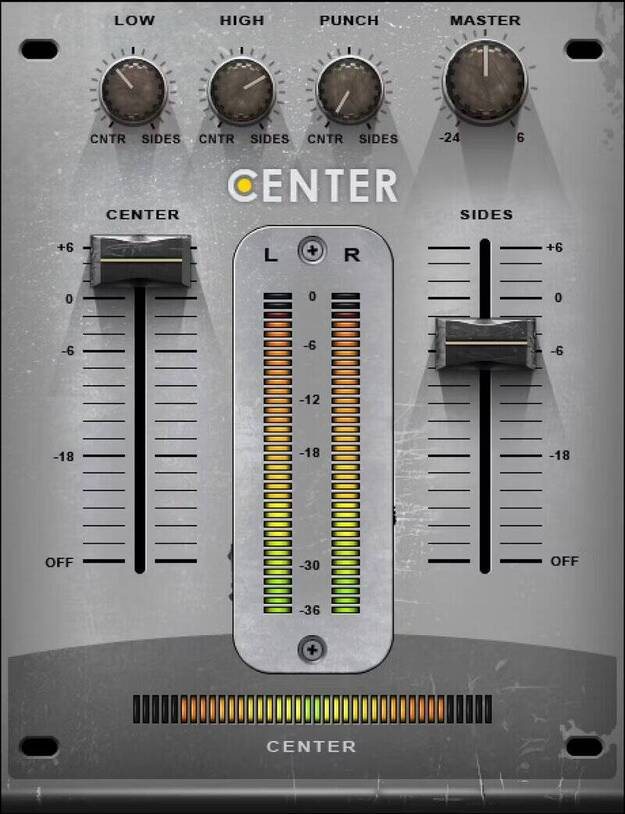
Center is a plug-in from Waves for handling the center and the sides of an already-mixed stereo track separately. The product page describes it as distilling complex mid-side techniques into an easy-to-use tool.
Even without the original multitracks, it can widen or narrow the stereo image and change the balance between center and sides. Raising or lowering a lead vocal and remixing drum loops are among the uses listed.
For mastering, it is described as useful for reducing mud or bringing out bus effects. Opening up space for center-panned sounds in stereo pads is another listed use.
It is a focused tool for adjusting a stereo image. It may be worth considering when you want to change the contents of a finished two-track mix slightly.
Key features
Isolating the center phantom channel
Separates the center-panned component from the sides of a stereo signal, which may help when adjusting a centered element such as a lead vocal separately.
Changing vocal level in a finished mix
Moving the center component is described on the product page as a way to change the vocal level in an already mixed track.
Widening or narrowing the stereo image
Changing the balance between center and sides widens or narrows the image, which may help when adjusting a two-track mix.
Making room under stereo pads
Widening the sides of stereo pads can open up space for sounds mixed to the center, according to the product page.
Remixing material without multitracks
The page lists adjusting old mixes where the original multitracks are not available.
Narrowing low frequencies for vinyl
Narrowing the low-frequency width is listed as a use when mastering for vinyl.
Specifications
| Item | Details |
|---|---|
| Type | Stereo (mid-side) processing tool |
| Plug-in formats | Mac: VST / AU / AAX, Windows: VST / AAX |
| Supported OS | macOS Monterey 12 to Sequoia 15 / Windows 10 or later |
| License | Waves account authorization (Waves Central) |
What is included and system requirements
- Center plug-in (Mac: VST / AU / AAX, Windows: VST / AAX)
How to use it
- After purchase, create a Waves account or log in to an existing one.
- Register the serial number with Register New Products.
- Download and open Waves Central, then log in.
- Choose Center in the Install Products tab and install and activate it.
- Open your DAW and load Center on a stereo bus or master.
- Move the balance between center and sides and listen to the change.
- Switch between processed and original to compare.
- Check how the result sounds in mono before exporting.
Where it may come in handy
Fine-tuning a finished mix
You might adjust the amount of center content slightly.
Before mastering
It could be used to adjust low-end width or stereo spread.
Adjusting loop material
You may try changing the center and side balance of a drum loop.
Who it may suit
- People who want to adjust center and sides in a finished stereo mix
- Those working with material that has no multitracks
- Anyone seeking a simple stereo image tool
Good to know before you buy
- A Waves account and activation through Waves Central are required.
- Supported systems are those on the retailer page; check the Waves site for current support before buying.
- Retailers sometimes run sales, so check the current price before buying.
Price
Please check the official page for the price.
See Center on the product page
More of the same kind
Other introduction articles of the same kind.
- United Plugins Electrum Core
- MAAT RSPhaseShifter
- Signum Audio BUTE Loudness Suite 2 Surround
- Harrison Consoles Drum Flow
- United Plugins Bassment
- Acon Digital Remix:Drums
We have introduced 215 other products from Waves.
See the full list in Product database: Effects.
Sources: pluginboutique.com (checked 2026-10-27)










Comments