
Disclosure: This page may contain affiliate links. Prices were checked on the date shown and may change.
An introduction to United Plugins FireSpacer, based on information from the maker and distributors: what it does, how to use it and who it may suit. It is not scored.
FireSpacer simplifies the complex task of creating space in your mix, ensuring that each element has its own presence without overwhelming others.
— United Plugins official site
What is FireSpacer?
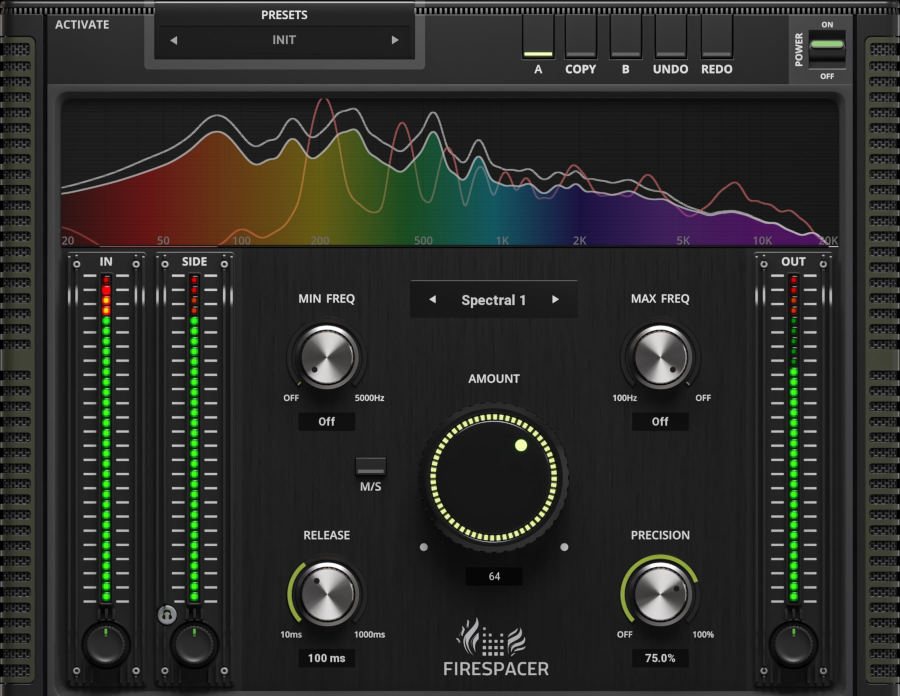
FireSpacer is a mixing plugin from United Plugins (under the FireSonic name) that works on frequency masking between tracks. You send one track to the side-chain input of the plugin, and it removes the frequencies that track occupies from the track the plugin sits on.
It analyzes the frequency content of the prioritized channel in real time and applies an adaptive filter to the other track. Instead of cutting bands by hand with an EQ, the cut follows the other signal, which suggests uses such as kick and bass or vocal and backing instruments.
The workflow described by the maker is short: insert the plugin on the track you want to treat, connect the track you want to prioritize through the side-chain, and raise Amount. There are four processing modes. The spectral algorithms are described as more accurate but add latency and may need more CPU, while the no-latency algorithms use minimum-phase filters, have a broader effect and may remove more than needed.
Processing is 64-bit internally and works at any sample rate, including 192 kHz and above. A free 15-day trial is offered, and updates are described as free. The maker states that hosts without side-chain routing, such as GarageBand, do not work well with it, so it is worth checking your DAW first.
Key features
Side-chain based masking control
The prioritized track is analyzed through the side-chain, and the same frequencies are reduced on the processed track. This may reduce the manual EQ work when two tracks overlap.
Four processing modes
There are spectral and no-latency (minimum-phase) algorithms. You can choose accuracy or zero latency depending on whether you are mixing or tracking.
Release and Precision
Release sets how quickly attenuated frequencies come back once they stop colliding. Precision, used in spectral modes, sets how finely the colliding frequencies are targeted; at maximum only nearly identical frequencies are removed.
Resizable GUI
The interface is styled after hardware and can be resized by dragging the arrow at the bottom right, smaller to save screen space or larger for easier control.
Smart bypass
Bypass is designed to avoid clicks when automated and to compensate for latency, so bypass states stay in sync, according to the maker.
Sleep on silence
When processing would have no effect, the plugin goes to sleep and uses almost no CPU, which may help in projects with many tracks.
64-bit processing
Internal processing is 64-bit and handles sample rates of 192 kHz and above.
Specifications
| Item | Details |
|---|---|
| Maker | United Plugins (FireSonic) |
| Type | Side-chain masking effect |
| Modes | 4 (spectral / no-latency) |
| Internal processing | 64-bit |
| Sample rates | Any, including 192 kHz and above |
| Trial | 15 days, unlimited |
| Formats (Mac) | VST, VST3, AU, AAX |
| Formats (Windows) | VST, VST3, AAX |
What is included and system requirements
- Mac: macOS 10.10 or later (Intel / Apple silicon), SSE2 processor, VST, VST3, AU, AAX
- Windows: Windows 8 or later (Windows 11 supported), SSE2 processor, VST, VST3, AAX
- A host with side-chain routing is required
How to use it
- Insert FireSpacer on the track you want to treat, for example the bass.
- Route the track you want to prioritize, for example the kick, to the plugin's side-chain input in your DAW.
- Confirm that the track is selected as the plugin's side-chain source.
- Raise Amount gradually and listen as the colliding frequencies are reduced.
- Switch modes to choose between accuracy and zero latency.
- Set Release to match the tempo and feel of the song.
- In spectral modes, adjust Precision to set how finely the colliding bands are targeted.
- Toggle bypass to compare and check that nothing is cut too much.
Where it may come in handy
Kick and bass
It may be used to sort out two sounds that clash in the low end, with the one to be prioritized connected to the side-chain.
Vocals and backing
Setting the vocal as the prioritized track and inserting the plugin on guitars or keys that share the midrange is one way it could be used.
Layered guitars at home
When guitars with similar ranges are layered, it may help to prioritize one of them.
Who it may suit
- Those who want to reduce manual EQ cuts
- Those bothered by clashes such as kick and bass
- Those whose DAW supports side-chain routing
- Those who want to try a 15-day trial first
Good to know before you buy
- A host with side-chain support is required; the maker says hosts such as GarageBand do not work well with it.
- Spectral modes add latency and may use more CPU, according to the maker.
- Updates are described as free.
Price
Please check the official page for the price.
See FireSpacer on the product page
More of the same kind
Other introduction articles of the same kind.
- PSP Audioware PSP HertzRider2
- Waves TRACT SPL Meter
- Rob Papen MasterMagic
- Waves MaxxVolume
- W. A. Production Obsidian
- Cockos ReaFIR ReaPlugs
We have introduced 34 other products from United Plugins.
- United Plugins BassRift
- United Plugins FirePreamp
- United Plugins DIFIX
- United Plugins Voxessor
- United Plugins FireCobra
See the full list in Product database: Effects.
Sources: unitedplugins.com pluginboutique.com (checked 2026-10-27)










Comments