
Disclosure: This page may contain affiliate links. Prices were checked on the date shown and may change.
An introduction to MAAT DRMeter MkII, based on information from the maker and distributors: what it does, how to use it and who it may suit. It is not scored.
DRMeter MkII combines mandated R128 and A/85 loudness measurements with an improved version of our DR dynamic range metering standard.
— MAAT official site
What is DRMeter MkII?
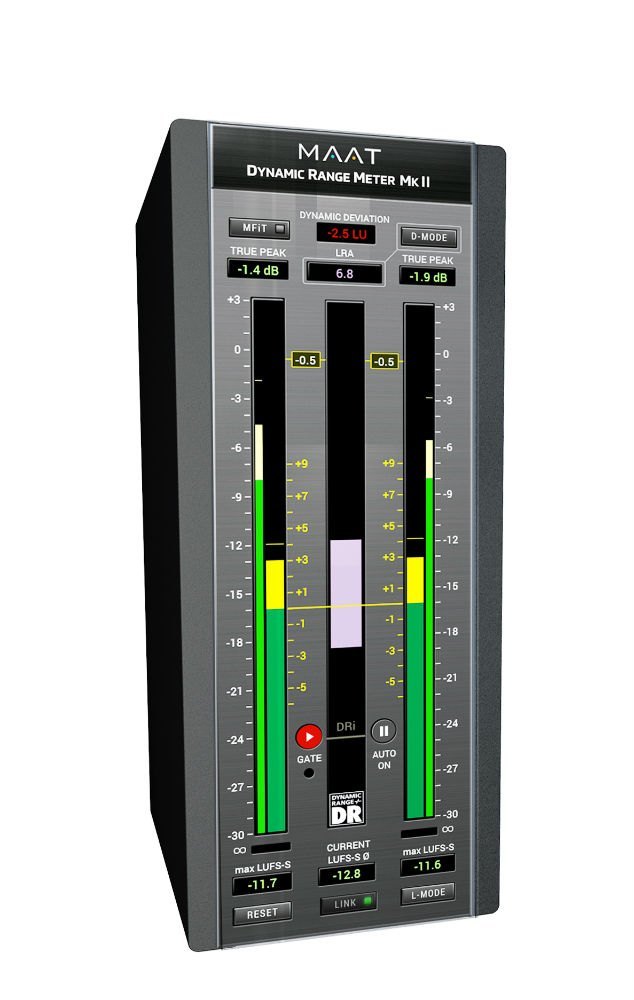
DRMeter MkII is a loudness and dynamic-range metering plug-in from MAAT, a company with roots in Germany. Besides loudness measurement following EBU R128 and ATSC A/85, it places DR (dynamic range) measurement in the same window to show the dynamic density of music.
According to the official description, it reworks broadcast-oriented standards into a meter that is also practical for music production. It includes classic L/R meters for each channel and lets users switch between metrics such as DR, PSR (peak to short-term loudness ratio) and LRA (loudness range).
After setting a target loudness and a True Peak threshold, the plug-in displays Dynamic Deviation, showing how much more dynamic or how much more compressed the material is than the target. A DualVu display shows Relative and Absolute scales at the same time.
It supports AU, VST and AAX on Windows and macOS and includes a standalone version that runs outside a DAW. It may be useful when checking levels before delivery to streaming services such as Spotify, YouTube, iTunes and TIDAL.
Key features
Standards-based loudness
Momentary, short-term and integrated loudness are shown following R128 and A/85. It may help when checking levels against a delivery specification.
DR, PSR and LRA modes
D-MODE switches between DR, PSR and LRA. All measurements keep running in the background, so switching metrics does not interrupt a pass.
Dynamic Deviation
The difference between target loudness and the True Peak threshold forms a dynamic margin, and the display shows how much more or less dynamic the signal is. It may help review the amount of compression in a master.
Per-channel L/R and DualVu
In addition to the mono-summed measurement, left and right can be viewed separately, and Relative and Absolute scales appear together.
MFiT mode
This mode meters the signal after a round-trip AAC conversion for iTunes-style delivery, according to the official page up to 96 kHz.
Detailed settings and 5 UI sizes
Thresholds and colors, the gate on/off, a True Peak disable option (SPPM) and user presets are provided. The interface comes in five sizes.
Specifications
| Item | Details |
|---|---|
| Type | Loudness and dynamic-range meter |
| Formats | AU, VST, AAX (Mac/Win) |
| Sample rates | 44.1 to 384 kHz |
| Measurement modes | D-MODE (DR, PSR, LRA), L-MODE (RMS, momentary, short-term), integrated (DRi, LUi) |
| UI sizes | 5 |
| License | Perpetual license |
What is included and system requirements
- Plug-ins (AU, VST, AAX) and a standalone version
- Factory and user presets
- Using the standalone version outside a DAW usually requires a virtual audio device; the official page recommends free tools such as VB-CABLE on Windows and BlackHole on macOS
How to use it
- Download and run the installer, then rescan plug-ins in the DAW.
- Insert DRMeter MkII in the last slot of the master bus.
- Set the target loudness and the True Peak threshold to match the delivery specification.
- Play the song and let the integrated value settle.
- Switch between D-MODE and L-MODE to compare DR, PSR, LRA and short-term values.
- Check whether Dynamic Deviation is positive or negative against the target.
- Switch to MFiT mode when a check for streaming-style conversion is needed.
- Save frequently used settings as user presets.
Where it may come in handy
Mastering for streaming
It may help when comparing a service's loudness expectations with how compressed a song is, using DR and short-term values together.
Checking narration and video loudness
For deliveries that require R128 or A/85 loudness, the integrated reading may be useful, with the gate and True Peak options available.
Checking a mix in progress
Left on the master bus during mixing, it may show how dynamics change as the mix develops, since all metrics run continuously.
Comparing before and after a remaster
It may suit comparing DR values between an older and a newer master of the same song.
Who it may suit
- Home-studio and music production creators who prepare loudness for streaming
- People who want to check how compressed a mix is with DR numbers
- People who need R128 or A/85 measurement for broadcast or video delivery
- Anyone who wants to check left/right imbalance on a meter
Good to know before you buy
- It is a meter and does not change the sound; the interpretation is left to the user.
- Measuring a DAW's output in the standalone version requires setting up a virtual audio device.
How it differs from similar products
We do not pick a winner; the official figures are placed side by side.
MAAT 2BC multiCORR
DRMeter MkII measures loudness and DR (dynamic range). 2BC multiCORR is a 31-band correlation meter for left/right phase relationships, so the roles differ.
Price
Please check the official page for the price.
See DRMeter MkII on the product page
More of the same kind
We have introduced 14 meters and analyzers. Here are some of the others.
- Waves Dorrough Stereo
- iZotope Tonal Balance Control 3
- Antelope Audio The Judge
- Blue Cat Audio Blue Cat Audio FreqAnalyst Multi
- Voxengo SPAN
- Blue Cat Audio Blue Cat's FreqAnalyst Pro
We have introduced 9 other products from MAAT.
For a side-by-side comparison scored on the same criteria, see our comparison of meters and analyzers.
See the full list in Product database: Effects.
Sources: maat.digital pluginboutique.com (checked 2026-10-27)










Comments