
Disclosure: This page may contain affiliate links. Prices were checked on the date shown and may change.
An introduction to Waves Dorrough Stereo, based on information from the maker and distributors: what it does, how to use it and who it may suit. It is not scored.
Delivers super-fast peak metering, with the behavior of analog meters
— Waves official site
What is Dorrough Stereo?
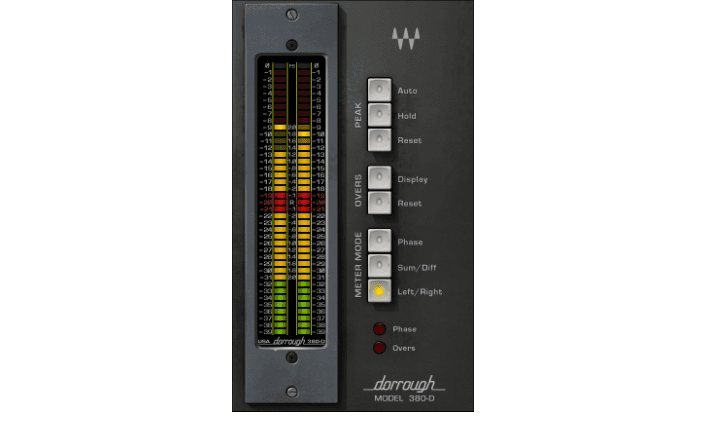
Dorrough Stereo is a metering plugin developed by Waves in association with Dorrough Electronics. It models the behaviour of Dorrough hardware meters and shows peak and average levels on one display.
It is intended for recording, broadcast and film work, covering both peak checks to avoid distortion and average-level checks that relate to how listeners perceive the sound.
According to the Waves product information, it models three of Dorrough's loudness meters, and both mono and stereo meters are provided.
There are three sizes and three styles, and the Sum/Difference mode lets you check for energy drops when the signal is summed to mono.
Key features
Modelling of Dorrough meters
It reproduces the behaviour of Dorrough Electronics hardware meters such as the 280D/240D, 380D/340D and 40AES/EBU. It may help when you want analog-style meter behaviour inside a DAW.
Fast peak display
It reacts quickly to peaks while moving like an analog meter. It can be used to check when you do not want to miss short excursions.
Overs indicator
The Overs LED lights when more than three samples exceed 0 dBFS, so you can see whether clipping occurred.
Three meter modes
Left/Right, Sum/Difference and Phase modes are provided. Sum/Difference shows energy drops when summed to mono, and Phase shows the left-right phase relationship.
Three peak modes
You can choose to hold peaks for three seconds, hold them indefinitely, or reset them. This is useful for keeping a record of peaks during a mix.
Reference level selection
A reference level can be chosen for work that involves analog devices.
Specifications
| Item | Details |
|---|---|
| Maker | Waves (developed with Dorrough Electronics) |
| Type | Meter |
| Meter sizes | 3 |
| Meter styles | 3 |
| Configuration | Mono / stereo |
| Meter modes | Left/Right, Sum/Difference, Phase |
| Peak modes | 3-second hold, infinite hold, reset |
| Supported OS | Mac: macOS 13 Ventura, 14 Sonoma, 15 Sequoia, 26 Tahoe; Windows 10 and 11 (64-bit) |
What is included and system requirements
- Dorrough Stereo (mono and stereo)
- Formats: SoundGrid, AAX Native, AudioSuite, Audio Units, VST3 (as listed on the distributor page)
- Also included in bundles such as 360° Surround Tools, Broadcast and Surround Suite and Grand Masters Collection
How to use it
- Create a Waves account and register the purchased product.
- Install and activate it with Waves Central.
- Insert the plugin on the track whose level you want to watch, such as the master.
- Choose a meter size and style you like.
- Set the meter mode to Left/Right to check the left and right levels.
- Switch to Sum/Difference to check for energy drops when summed to mono.
- Choose a peak mode and check that the Overs LED stays off.
- Set the reference level if you work with analog gear.
Where it may come in handy
Final mix check
It may be useful on the master when you want to watch peak and average levels with analog-like movement.
Mono compatibility check
The Sum/Difference mode could be used to see drops when summed and confirm the mix holds up in mono playback.
Audio for video and streaming
It could be used to check peaks and Overs when managing levels for broadcast or video.
Who it may suit
- Users who want to check levels with the look and motion of analog meters
- Those who want to see mono compatibility and phase
- People who manage levels for broadcast or video
- Those who need LUFS-style loudness standard readings may find another meter fits better
Good to know before you buy
- The distributor page also presents it as the Waves Dorrough Meter Collection.
- System requirements are common to Waves V17 products, with 16 GB RAM or more and 30 GB free space or more.
- A 7-day demo is mentioned on the distributor page.
How it differs from similar products
We do not pick a winner; the official figures are placed side by side.
Waves PAZ Analyzer
Dorrough Stereo is a meter with three meter modes and three peak modes. PAZ Analyzer offers 52- or 68-band spectrum analysis, a stereo position display and peak/RMS meters.
Price
Please check the official page for the price.
See Dorrough Stereo on the product page
More of the same kind
We have introduced 14 meters and analyzers. Here are some of the others.
- Blue Cat Audio Blue Cat's Oscilloscope Multi
- Awesonix Simple Meter
- iZotope Tonal Balance Control 3
- NUGEN Audio DialogCheck
- Blue Cat Audio Blue Cat Audio FreqAnalyst Multi
- MAAT DRMeter MkII
We have introduced 215 other products from Waves.
- Waves VU Meter
- Waves eMo Generator
- Waves X-Crackle
- Waves Scheps Omni Channel 2
- Waves C4 Multiband Compressor
For a side-by-side comparison scored on the same criteria, see our comparison of meters and analyzers.
See the full list in Product database: Effects.
Sources: minet.jp pluginboutique.com (checked 2026-10-27)










Comments