
Disclosure: This page may contain affiliate links. Prices were checked on the date shown and may change.
An introduction to Antelope Audio The Judge, based on information from the maker and distributors: what it does, how to use it and who it may suit. It is not scored.
The Judge is Antelope Audio's advanced metering and analysis plugin
— Antelope Audio official site
What is The Judge?
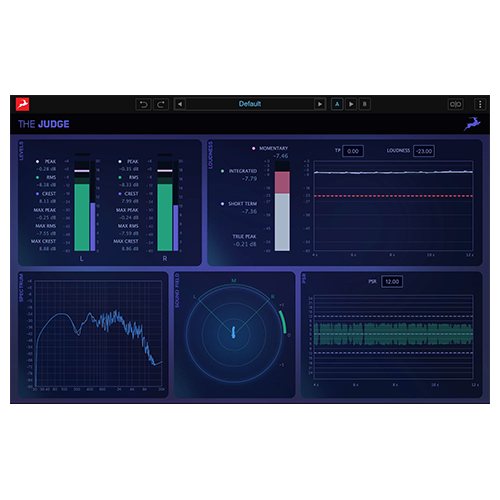
The Judge is a metering and analysis plugin from Antelope Audio. It brings loudness, levels, spectrum, stereo field and dynamics into a single window.
According to the maker, Peak, RMS, Crest Factor, LUFS, True Peak, Spectrum, Stereo Field and PSR (peak to short-term loudness ratio) readouts share one interface, so you can check numbers and shapes without opening several separate meters.
Loudness is described as compliant with EBU R128 and ITU-R BS.1770, with Momentary, Short-Term, Integrated and True Peak values shown over time. Target indicators mark delivery levels for streaming and broadcast.
It runs natively inside the DAW and is part of the Antelope Cosmos plugin collection, which offers more than 75 native plugins. The maker also points to a 14-day Cosmos trial.
Key features
Five modules in one window
Loudness, levels, spectrum, stereo field and dynamics sit in the same window. That can help when you would rather not switch between several meter plugins.
Loudness for broadcast and streaming
Compliant with EBU R128 and ITU-R BS.1770, it shows Momentary, Short-Term, Integrated and True Peak with history graphs. It suits a final check against a delivery target.
Spectrum and crest factor
A fast spectrum display is paired with crest factor and PSR readouts. It may help when you want to spot buildup in a frequency range or compare dynamics before and after a limiter.
Stereo field display
A goniometer and L/R/M/S indicators show width, balance and phase coherence. It could be useful when you care about how a mix folds down to mono.
Light on CPU, flexible placement
The maker highlights low CPU impact and suggests inserting it before or after compression, comparing limiter stages, or monitoring a whole chain. It can sit on sub-mixes as well as the master bus.
Part of Antelope Cosmos
The Judge is included in the Cosmos collection. If you also want other Antelope native plugins, you can weigh a single purchase against joining the service.
Specifications
| Item | Details |
|---|---|
| Type | Metering and analysis plugin |
| Format | Native (macOS / Windows; see the maker's system requirements page for formats) |
| Main readouts | Peak / RMS / Crest Factor / LUFS / True Peak / Spectrum / Stereo Field / PSR |
| Standards | EBU R128 / ITU-R BS.1770 |
| Target indicators | -23 LUFS, -5.0 dBTP (per Plugin Boutique) |
What is included and system requirements
- Native plugin that runs on Mac or Windows without extra hardware
- Part of the Antelope Cosmos plugin collection
- See the maker's system requirements page for supported OS and plugin formats
How to use it
- Buy from Plugin Boutique or Antelope Audio, then download and install it.
- Restart your DAW and check that The Judge appears in the plugin list.
- Insert it at the end of your mix bus or master bus.
- Play the track and read the loudness, spectrum and stereo modules.
- Use the target indicators and history graphs while adjusting your limiter or gain to match a delivery target.
- Move it before and after a compressor or limiter to compare how dynamics change.
- Before exporting, check that True Peak stays within your target.
Where it may come in handy
Check before exporting a vocal cover
It may help you confirm that a track sits within a streaming loudness target. LUFS and True Peak with history make it easier to follow the whole song.
Checking frequency balance in a mix
The spectrum view could show buildup in the low or mid range, as a visual aid alongside your ears.
Checking stereo width and mono compatibility
With the goniometer you might check width and phase, and see whether layered parts hold up when summed to mono.
Comparing before and after a limiter
Placing it before and after a limiter lets you watch crest factor and PSR change, which could be a guide to how hard the limiter is working.
Who it may suit
- People who want to check loudness and True Peak targets before exporting
- Those who prefer one plugin instead of several meters
- Those who also want to check stereo width and phase
- Anyone interested in other Antelope native plugins
Good to know before you buy
- This is a metering and analysis tool, not an effect that changes the sound.
- The maker's site lists the price in euros and Plugin Boutique in US dollars, so check the current amount before buying.
- Joining Antelope Cosmos gives access to other Antelope native plugins; see the maker's page for details.
Price
$149 (Plugin Boutique, checked 2026-10-27). Prices can vary by region and promotion, so check the official page before buying.
See The Judge on the product page
More of the same kind
We have introduced 14 meters and analyzers. Here are some of the others.
- TBProAudio dpMeter5
- Waves Dorrough Stereo
- iZotope Tonal Balance Control 3
- Blue Cat Audio Blue Cat's FreqAnalyst Pro
- Awesonix Simple Meter
- MAAT 2BC multiCORR
We have introduced 54 other products from Antelope Audio.
- Antelope Audio Edge Go
- Antelope Audio UK-69
- Antelope Audio SMT-100A
- Antelope Audio MG4+
- Antelope Audio VEQ-4K BLACK
For a side-by-side comparison scored on the same criteria, see our comparison of meters and analyzers.
See the full list in Product database: Effects.
Sources: antelopeaudio.com pluginboutique.com (checked 2026-10-27)










Comments