
Disclosure: This page may contain affiliate links. Prices were checked on the date shown and may change.
An introduction to Acon Digital DeVerberate 3, based on information from the maker and distributors: what it does, how to use it and who it may suit. It is not scored.
DeVerberate is a reverb reduction plug-in that can attenuate or boost the reverberation that is already present in recorded material.
— Acon Digital official site
What is DeVerberate 3?
DeVerberate 3 is a plug-in from Acon Digital, based in Oslo, that reduces or boosts the reverberation already present in recorded audio. Version 3 adds a new deep-learning algorithm for dialogue.
The dialogue mode is fully automatic and needs no manual settings, according to the page. A neural network trained on thousands of voice recordings in a wide range of acoustic spaces separates dialogue from reverb. It looks suited to tidying roomy narration or interviews.
For music and other sources, the version 2 algorithm is included. It splits incoming audio into direct and reverberated parts that can be recombined freely, with manual control of the original reverb's level and decay time.
An Early Reflections Filter, which estimates and cancels early reflections, can be used alongside either mode. The pricing is described as one-time, not a subscription.
Key features
Automatic dialogue de-reverb
A fully automatic, deep-learning-based reverb reduction for dialogue. It is meant to work once placed on a track, so it may be worth trying when there is little time for detailed setup.
Manual mode for music
This mode adjusts the original reverb's level and decay time and is used for material other than dialogue. Because direct and reverberated levels are separate, it can add reverb as well as reduce it.
Early Reflections Filter
It estimates the impulse response of early reflections using statistical methods and cancels their effect. It may help when close-wall reflections remain after the tail has been reduced.
Spectrum display
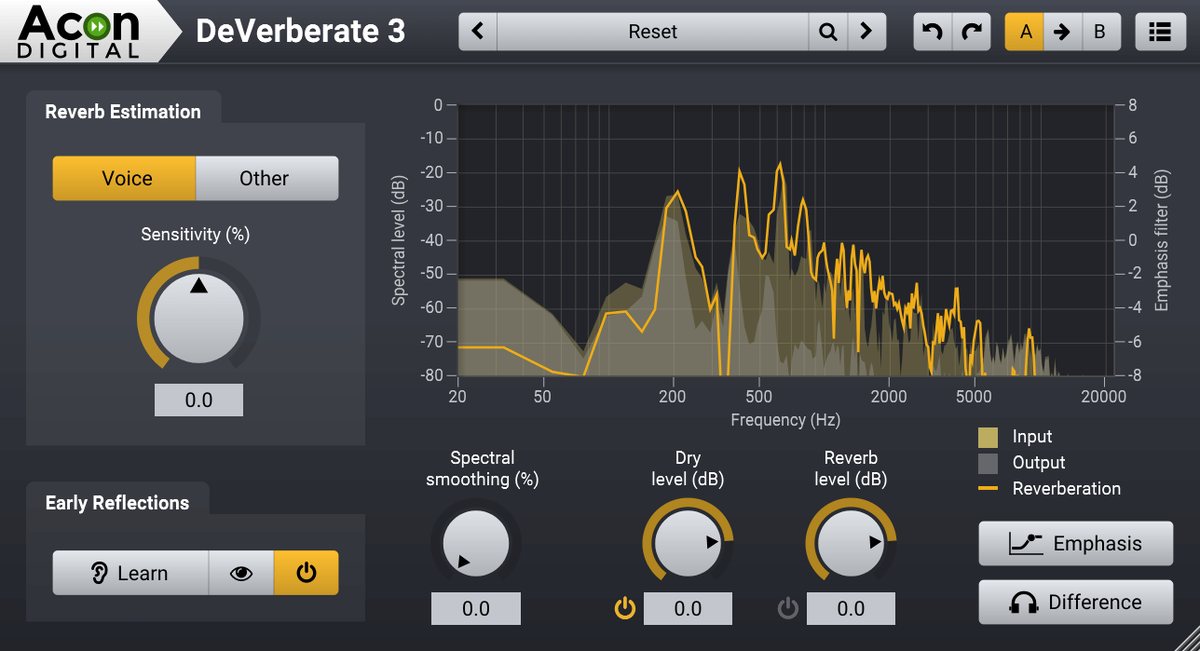
The frequency spectrum of the input signal, output signal and estimated reverberation can be displayed, so you can see what is being removed as you adjust.
Frequency emphasis filter
High and low shelving filters (-3 to -96 dB/octave) and peak filters with 0.1 to 3.0 octave bandwidth let you weight the amount of reduction by frequency. Handles on the curve can also be used.
Controller support
EUCON and Pro Tools hardware controllers are supported. It may be helpful in post-production setups where you want to operate it from faders.
Specifications
| Item | Details |
|---|---|
| Maker | Acon Digital |
| Type | Reverb reduction plug-in |
| Formats (Windows) | VST, VST3, AAX |
| Formats (Mac) | VST, VST3, AAX, AU |
| OS (Windows) | Windows 10 / 11 |
| OS (Mac) | macOS 10.13 or later (native on ARM64 and Intel) |
| Sample rate | Up to 96 kHz |
| RAM | 1 GB (4 GB or more recommended) |
| Disk | 1 GB free |
| Display | 1366 x 768 (1920 x 1080 or higher recommended) |
What is included and system requirements
- The DeVerberate 3 plug-in
- Both the new dialogue algorithm and the version 2 algorithm for music
- A demo version is offered on the official site
How to use it
- Install it from the demo or the download you get after purchase.
- In your DAW or editor, insert DeVerberate 3 on the target track.
- For dialogue, start playback with the automatic mode.
- For music, switch to the manual mode.
- Move the level and decay time of the original reverb and listen to the change.
- If early reflections remain, try the Early Reflections Filter.
- Use the spectrum display to see what is being removed as you finish.
Where it may come in handy
Cleaning narration and interviews
It may be tried in automatic mode to tidy roomy voice recordings.
Video editing
It may be used from editing software such as DaVinci Resolve or Premiere to reduce reverberation in location dialogue.
Adjusting reverb on music material
It may be used to reduce reverb in recorded audio or to rebalance direct and reverberated sound.
Who it may suit
- Narrators and streamers who want to tidy roomy voice recordings
- People who handle dialogue in video and post-production
- Those who want to adjust reverb on already-recorded material
Good to know before you buy
- The automatic mode is for dialogue; use the manual mode for music.
- Formats differ by OS (AU is Mac only).
- Sample rates up to 96 kHz are supported.
How it differs from similar products
We do not pick a winner; the official figures are placed side by side.
Waves Clarity Vx DeReverb
DeVerberate 3 pairs an automatic dialogue mode with a manual mode for music, adjusting reverb level and decay time, and an early reflections filter. Clarity Vx DeReverb is a one-knob design with separate neural networks for dialogue and sung vocals.
Price
$99 (Acon Digital official site, checked 2026-10-27). Prices can vary by region and promotion, so check the official page before buying.
See DeVerberate 3 on the product page
More of the same kind
We have introduced 112 reverbs. Here are some of the others.
- Wave Alchemy Radiance
- Accentize DeRoom Pro
- IK Multimedia CSR Hall Reverb
- Waves IR-L Convolution Reverb
- Nomad Factory BlueVerb DRV-2080
- Inspired Acoustics INSPIRATA
We have introduced 8 other products from Acon Digital.
- Acon Digital Verberate 2
- Acon Digital Verberate Immersive 2
- Acon Digital Remix
- Acon Digital Extract:Dialogue 2
- Acon Digital Multiply 2
For a side-by-side comparison scored on the same criteria, see our comparison of reverbs.
See the full list in Product database: Effects.
Sources: acondigital.com pluginboutique.com (checked 2026-10-27)










Comments