
Disclosure: This page may contain affiliate links. Prices were checked on the date shown and may change.
An introduction to Waves IR-L Convolution Reverb, based on information from the maker and distributors: what it does, how to use it and who it may suit. It is not scored.
IR-L cuts through the complexity. Featuring the acclaimed sound quality of Waves’ IR1 audio engine, you can bring over 2,000+ acoustic spaces into your studio—from stairwells to cathedrals.
— Waves official site
What is IR-L Convolution Reverb?
IR-L Convolution Reverb is a compact version of Waves' IR convolution reverb series, built with ease of use in mind. A convolution reverb applies recordings of real spaces (impulse responses) to your audio, so the sound appears to be in that space.
It uses the engine of IR-1 from the same series and is described as handling more than 2,000 acoustic spaces, from stairwells to cathedrals. The Japanese distributor page says famous venues such as the Sydney Opera House, The Bottom Line in New York and Kirishima Hall in Japan are included.
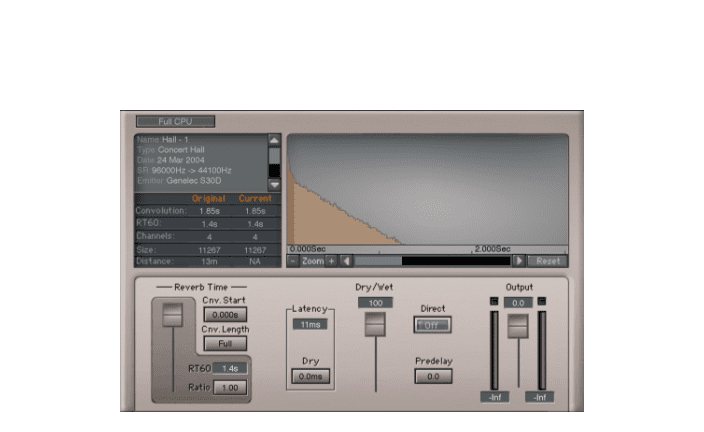
Convolution reverbs can have many confusing options, but IR-L is edited with standard reverb parameters. Instead of filtering the sampled result, it is explained that the convolution data itself is rewritten so that reverb time and size can be changed.
A library of about 4.8 GB is included, and WAV or third-party impulse files can be imported. Pre-delay is variable from 0 to 500 ms, and modes include mono, mono-to-stereo, full stereo and an efficient stereo mode.
Key features
2,000+ acoustic spaces
From small spaces like stairwells to large ones like cathedrals, you can choose recorded responses. You can browse the library for a space that fits the mood of your piece.
Standard reverb parameters
You edit with the same controls as an ordinary reverb, so convolution does not become hard to set up. Newcomers can go from a preset to adjustment.
Start and length trimming
The beginning and end of the impulse can be trimmed, acting as a pre-delay or shortening the tail. It helps cut unneeded portions to suit a busy mix.
Reverb time control with ERT60
The distributor page says reverb time can be extended up to four times while keeping natural envelope and frequency content. It is worth trying when you need a tail longer than the source impulse.
Import of external impulses
WAV and third-party impulse files can be imported, so an existing IR collection can be used from the same interface.
Choice of CPU load
Two levels of CPU usage are available, plus an efficient stereo mode. This helps in projects with many tracks.
Specifications
| Item | Details |
|---|---|
| Type | Convolution reverb |
| Library | About 4.8 GB / 2,000+ acoustic spaces |
| Pre-delay | 0 to 500 ms |
| Channel modes | Mono / Mono-to-Stereo / Stereo / Efficient Stereo |
| Plug-in formats (distributor page) | AAX Native, AudioSuite, Audio Units, VST3 |
| Supported OS (distributor page) | macOS Ventura 13 to Tahoe 26 / Windows 10 and 11 (64-bit) |
What is included and system requirements
- IR-L Convolution Reverb plug-in
- About 4.8 GB impulse response library
- Installation and activation through Waves Central (Waves account required)
- Disk space for the library is needed during installation
How to use it
- Register the serial number in your Waves account.
- Install and activate IR-L and its library with Waves Central.
- Insert IR-L on an aux track in your DAW.
- Choose a space from the library and first set the balance with the dry signal.
- Adjust pre-delay so the start of vocals or instruments stays audible.
- Change reverb time and size to suit the tempo and density of the song.
- Trim the start and end of the impulse to remove unneeded parts.
- If the load is heavy, switch to an efficient CPU mode.
Where it may come in handy
Acoustic instruments and songs
Since recordings of real spaces are used, it may suit adding realistic room sound to piano, guitar or strings.
Matching space for video and narration
Choosing a small room or theater-like space could create ambience that fits narration.
Shared reverb in a mix
Placed on an aux and shared by several tracks, it may help the parts feel as if they are in the same space.
Who it may suit
- People who want a reverb based on real space recordings
- Those new to convolution settings
- People who want to manage their own impulse files in one plug-in
- Anyone who wants to switch CPU load levels
Good to know before you buy
- The library is about 4.8 GB, so free disk space is required for installation.
- Supported OS ranges differ between Plugin Boutique and the Japanese distributor. Check the latest requirements before buying.
- A Waves account is required for activation.
- The Japanese distributor page mentions a 7-day demo.
How it differs from similar products
We do not pick a winner; the official figures are placed side by side.
Waves H-Reverb Hybrid Reverb
IR-L is a convolution type using impulses of real spaces, with 2,000+ spaces in a roughly 4.8 GB library. H-Reverb is a hybrid of algorithmic and convolution reverb with 240+ presets.
Price
$129 (Plugin Boutique, checked 2026-10-27). Prices can vary by region and promotion, so check the official page before buying.
See IR-L Convolution Reverb on the product page
More of the same kind
We have introduced 112 reverbs. Here are some of the others.
- Klevgrand Kleverb
- Eventide Temperance Lite
- Wave Alchemy Radiance
- MeldaProduction MReverbMB
- Wave Arts MasterVerb 7
- Antinode CLEAR
We have introduced 215 other products from Waves.
- Waves Renaissance Reverb
- Waves Abbey Road Reverb Plates
- Waves Manny Marroquin Reverb
- Waves Abbey Road Chambers
- Waves IR1 Convolution Reverb
For a side-by-side comparison scored on the same criteria, see our comparison of reverbs.
See the full list in Product database: Effects.
Sources: pluginboutique.com wavesjapan.jp (checked 2026-10-27)










Comments