
Disclosure: This page may contain affiliate links. Prices were checked on the date shown and may change.
An introduction to UVI Orbit, based on information from the maker and distributors: what it does, how to use it and who it may suit. It is not scored.
Orbit is an advanced cinematic sound design instrument built for creators who want more than instant hits.
— UVI official site
What is Orbit?
Orbit is a cinematic sound design instrument from UVI, aimed at film, trailer and transition work. It combines rises, impacts and textures to build tension and atmosphere in a scene.
At its core is a timeline that lines up seven layers. Each layer has envelopes, modulation, filters, distortion, pitch and dynamics controls, so you can build a sound while watching the order and timing of events.
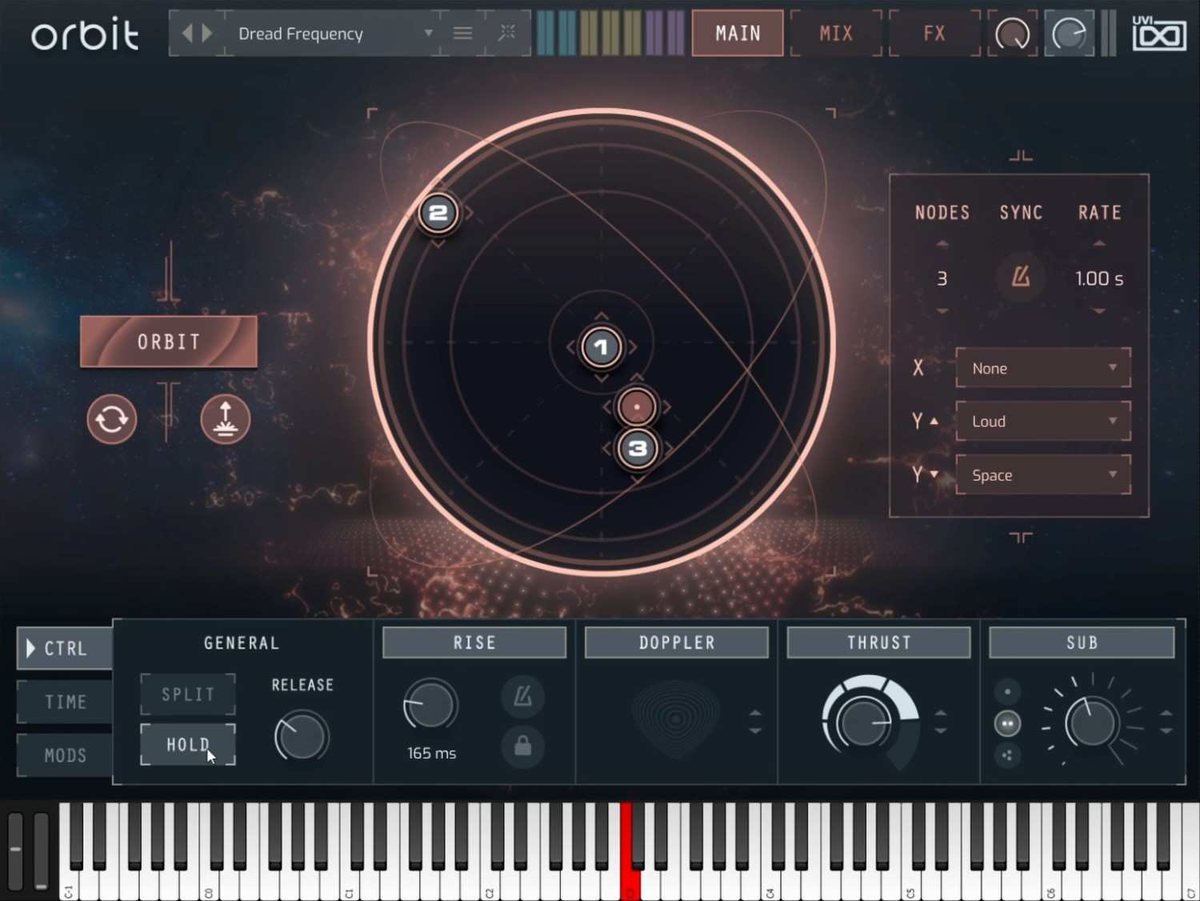
Another feature is the XY pad. Tremolo, distortion, loudness, tape character, space and more can be assigned to its two axes, and Orbit mode lets it be played or automated.
It runs inside UVI Workstation (a free player) or Falcon and is authorized through an iLok account. The library size is listed as about 15.7 GB, FLAC-encoded.
Key features
Seven-layer timeline
Rises, impacts and textures are placed on seven layers and lined up in time. You can see where the peak of the sound falls against a scene change or hit point as you build it.
Per-layer controls
Each layer has envelopes, modulation, filters, distortion, pitch shaping and dynamics. You may be able to start from a preset and rework only some of the layers.
XY pad and Orbit mode
Tremolo, distortion, loudness, tape character, space and other parameters can be moved on a two-axis pad. Orbit mode lets that movement be played or automated.
47 categories, 1,895 layers
The official page lists 1,895 layers across 47 sound categories. Listed categories include braams, gongs, Shepard tones, room tones, voices and metal.
Use your own samples
The official page says your own samples can be dragged and dropped in. Everyday sounds or experimental clicks may be added as layer material.
Macros and effects
Macros such as Doppler and Thrust, effects including compression and distortion, a Sub layer for low-end weight and a master processing chain are provided. They may help scale intensity to the scene.
Specifications
| Item | Details |
|---|---|
| Maker | UVI |
| Type | Sound design instrument |
| Layers | 7 (timeline) |
| Content | 1,895 layers / 47 categories |
| Size | 15.7 GB (FLAC) |
| Samples | 11,704 samples (recorded at 88.2 kHz, delivered at 44.1 kHz) |
| Host | UVI Workstation 4.0.4+ or Falcon 26.0.3+ |
| OS | macOS 10.14 or later / Windows 10 and 11 (64-bit) |
| Formats | AU, AAX, VST, VST3, standalone |
| Memory/disk | 4 GB RAM, 16 GB disk space, 7,200 rpm HDD or SSD |
| Authorization | iLok account (dongle not required), internet for activation |
| License | 3 activations per license |
What is included and system requirements
- The Orbit instrument and sound library
- Runs in UVI Workstation (free player) or Falcon
- Formats: AU, AAX, VST, VST3, standalone
How to use it
- Prepare an iLok account (free; a dongle is not required).
- After purchase, download the library from your UVI account.
- Install it into UVI Workstation (or Falcon) following the installation guide.
- Authorize the license through iLok while connected to the internet.
- Open UVI Workstation in your DAW and load Orbit.
- Choose a preset first and check which role each of the seven layers plays.
- Adjust timing on the timeline and add movement with the XY pad.
Where it may come in handy
Trailer and picture sound design
Rises and impacts that match scene changes may be built while watching timing on the timeline.
Transitions in songs
Build-ups and drops before choruses or breaks may be shaped with XY pad movement.
Game and podcast sound effects
Layering heavy lows and ambient textures may help create tension in a scene.
Who it may suit
- People who want to build rises and impacts for picture or trailers
- Producers who want to craft transitions in their own tracks
- Those who want to mix their own samples into sound design
Good to know before you buy
- It requires UVI Workstation (free) or Falcon.
- Authorization needs an iLok account and an internet connection (no dongle).
- The library is about 15.7 GB and 16 GB of free disk space is listed.
- The official page gives different preset counts in different places (770 and 1,700+); check the latest wording before purchase.
Price
$149 (UVI official site, checked 2026-10-27). Prices can vary by region and promotion, so check the official page before buying.
More of the same kind
Other introduction articles of the same kind.
- Pitch Innovations Groove Shaper
- BEATSURFING 7DeadlySnares
- UJAM UJAM Virtual Drummer HEAVY 2
- Arturia Analog Lab Pro
- Applied Acoustics Systems Strum GS-2
- Samplemodeling The Trumpet v3
We have introduced 9 other products from UVI.
See the full list in Product database: Instruments.
Sources: uvi.net pluginboutique.com (checked 2026-10-27)










Comments