
Disclosure: This page may contain affiliate links. Prices were checked on the date shown and may change.
An introduction to Universal Audio Studer A800 Multichannel Tape Recorder, based on information from the maker and distributors: what it does, how to use it and who it may suit. It is not scored.
Track and mix with the complete Studer A800 electronic signal paths, including Input, Sync and Repro paths
— Universal Audio official site
What is Studer A800 Multichannel Tape Recorder?
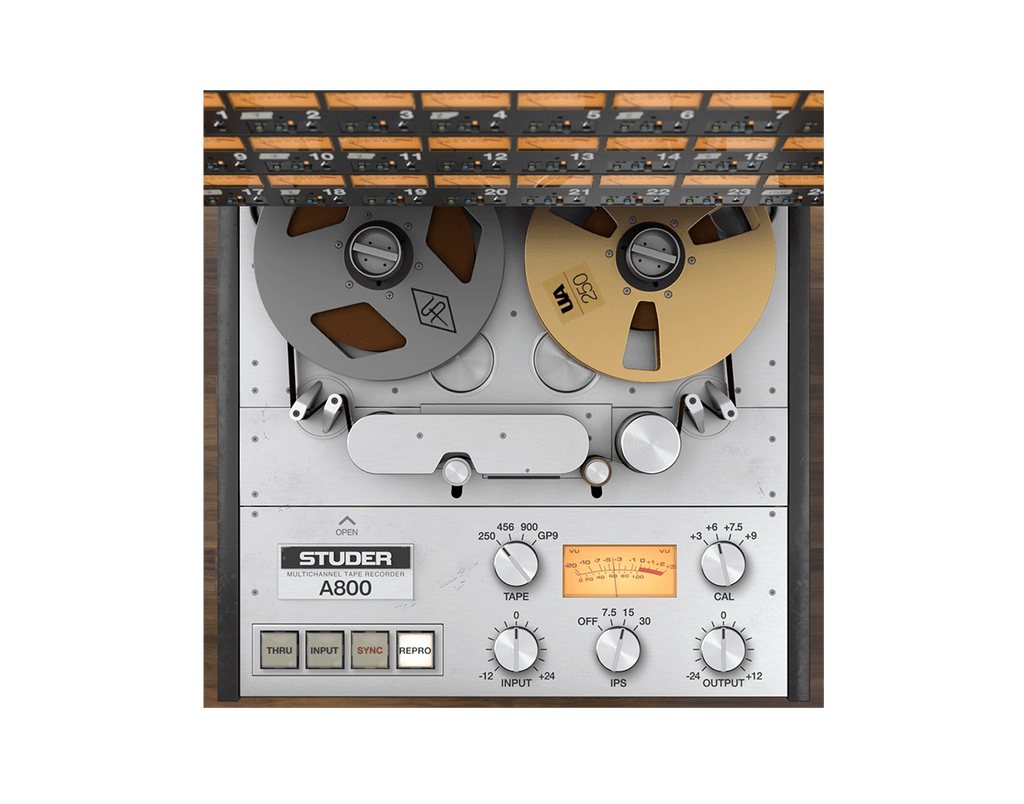
Studer A800 Multichannel Tape Recorder is a tape-machine emulation plug-in from Universal Audio (UA). It models the multichannel analogue Studer A800 including its circuit paths.
According to the official description, it is based on the unit at Ocean Way Studios in Los Angeles, was authenticated by Studer and was developed with magnetic-recording specialist Jay McKnight. The A800 is introduced as a microprocessor-controlled tape machine from 1978.
The main controls are Input and Output, an IPS control that steps through 7.5, 15 and 30 inches per second, and a Type control with four tape formulas. Secondary controls such as Noise, EQ and Bias are also provided, covering settings from nearly clean to harmonic saturation.
UAD Native and Apollo/UAD-2 versions are included, so it runs on a computer without UA hardware. A Studer A800 LUNA Extension is also provided, and the plug-in is described as part of the UAD Spark Studio subscription.
Key features
Signal paths
UA says the Input, Sync and Repro electronic paths are all modeled, so both record and playback behaviour can be applied when adding tape character to a track.
IPS tape speed
Three speeds of 7.5, 15 and 30 IPS are provided, each with its own frequency shift and distortion tendency according to the maker, so they can be auditioned per source.
Four tape types
The Type control chooses among four common magnetic tape formulas, each with subtle differences according to the official page.
Secondary controls
Noise, EQ and Bias controls allow finer changes to the tape texture.
Native and Apollo versions
The UAD Native version needs no UA hardware, and an Apollo realtime / UAD-2 version is included as well.
LUNA Extension
The Studer A800 LUNA Extension integrates the tape machine into the mixer of UA's LUNA DAW so it can be applied per channel.
Specifications
| Item | Details |
|---|---|
| Type | Tape machine emulation |
| Modeled on | Studer A800 (unit at Ocean Way Studios) |
| Tape speeds | 7.5, 15, 30 IPS |
| Tape formulas | 4 |
| Formats | VST3, AU, AAX |
| Versions | UAD Native, Apollo Realtime / UAD-2 |
| macOS | macOS 11 Big Sur to 26 Tahoe |
| Windows | Windows 10 and 11 (64-bit) |
| Authorisation | Free iLok account; iLok USB not required |
What is included and system requirements
- UAD Native version
- Apollo Realtime / UAD-2 version
- Studer A800 LUNA Extension
- Requirements: internet connection, free iLok account, free UA Connect app, a DAW supporting VST3, AU or AAX
How to use it
- Install UA Connect and authorise with a free iLok account.
- Load the plug-in as an insert on a track or bus.
- Choose a tape speed with IPS.
- Pick one of the four tape formulas with Type.
- Adjust Input and Output and listen from clean through to harmonic saturation.
- Tweak Noise, EQ and Bias if needed.
- When using it on a full mix, leave headroom while experimenting.
- If you use LUNA, apply the LUNA Extension per track.
Where it may come in handy
Adding texture to drums or bass
It may be inserted on individual tracks to add tape-style harmonics and weight, with the speed changed to compare results.
Home-recorded vocals
Passing a recorded vocal through lightly may show whether it softens a harder digital edge.
Cohesion on a bus
It may be tried on a bus or the full mix to tie parts together.
Working in LUNA
LUNA users can add tape character per track from the mixer.
Who it may suit
- Producers who want tape character from a plug-in
- Those who want to compare tape speeds and formulas
- Users of UA Apollo interfaces or LUNA
- People considering the UAD Spark Studio subscription
Good to know before you buy
- A free iLok account and the UA Connect app are required; an iLok USB key is optional.
- The official page says it is included in the UAD Spark Studio subscription.
- It runs as a VST3, AU or AAX plug-in inside a DAW.
- Check the official page for current OS support before buying.
How it differs from similar products
We do not pick a winner; the official figures are placed side by side.
Black Rooster Audio Magnetite
Studer A800 offers 7.5, 15 and 30 IPS with four tape formulas, while Magnetite offers 7.5 and 15 IPS with three tape types (Black, Blue, Red). These are figures from each official page, without ranking.
Price
Please check the official page for the price.
The official page says it is also included in the UAD Spark Studio subscription.
See Studer A800 Multichannel Tape Recorder on the product page
More of the same kind
We have introduced 82 saturation and distortion effects. Here are some of the others.
- W. A. Production Satyrus
- Stagecraft Software Picante
- BLEASS Fusion
- Waves OneKnob Driver
- AudioThing Things – Fold
- Klevgrand SquashIt
We have introduced 46 other products from Universal Audio.
- Universal Audio Ampex ATR-102 Mastering Tape Recorder
- Universal Audio Oxide Tape Recorder
- Universal Audio Studio D Chorus
- Universal Audio Capitol Chambers
- Universal Audio Capitol Mastering Compressor
For a side-by-side comparison scored on the same criteria, see our comparison of saturation and distortion effects.
See the full list in Product database: Effects.
Sources: uaudio.com pluginboutique.com (checked 2026-10-27)










Comments