
Disclosure: This page may contain affiliate links. Prices were checked on the date shown and may change.
An introduction to Waves Clarix LB, based on information from the maker and distributors: what it does, how to use it and who it may suit. It is not scored.
Clarix LB is an AI-powered noise reduction plugin for voice and dialogue in live broadcast and live streaming scenarios.
— Waves official site
What is Clarix LB?
Clarix LB is a Waves plug-in that removes background noise from voices in live broadcast and live streaming. It targets real-time voice capture such as on-location anchors, reporters and live-streamed worship services.
The noise reduction runs on Waves' neural network (AI) engine. The product page says the same technology powers newer Waves noise-removal products for studio and live use, such as Clarity Vx.
It is compatible with Waves SoundGrid and can run on major mixing consoles through SuperRack SoundGrid or SuperRack LiveBox, and on eMotion LV1. Running it on SuperRack SoundGrid or LV1 requires an external Titan SoundGrid server.
Latency is 47 ms. It suits live broadcast and streaming but is not intended for in-venue concert sound. Because of the neural networks, high processing power is required.
Key features
AI noise reduction
Waves' neural networks separate voice from background noise. It may be worth trying on reports or streams that pick up ambient sound.
One-knob voice/noise balance
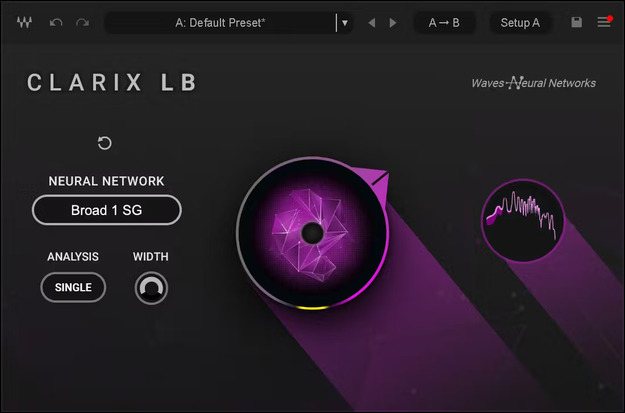
A single knob sets the balance between voice and noise. The large interface is meant for quick control in broadcast.
SoundGrid and SuperRack support
It runs in SuperRack SoundGrid, SuperRack LiveBox and eMotion LV1, so it can be combined with major mixing consoles.
Up to 96 kHz, 47 ms latency
Sample rates up to 96 kHz are supported and latency is 47 ms. The maker positions it for broadcast and streaming rather than in-venue sound.
Stereo analysis and width
Double analysis and a width control are provided for stereo sources. It may help with location sound recorded in stereo.
Specifications
| Item | Details |
|---|---|
| Type | AI noise reduction for live broadcast |
| Sample rate | Up to 96 kHz |
| Latency | 47 ms |
| Mac | macOS Ventura 13, Sonoma 14, Sequoia 15; Apple silicon M2 or higher; AU / AAX / VST; 16 GB RAM; 30 GB free disk space |
| Windows | Windows 10 or later; Intel 14th Gen or AMD Ryzen 9 5900HX (minimum); VST / AAX; 16 GB RAM; 30 GB free disk space |
What is included and system requirements
- Clarix LB plug-in
- Formats: AU / AAX / VST on Mac, VST / AAX on Windows
- Titan SoundGrid server (separate) needed to run in SuperRack SoundGrid or eMotion LV1
How to use it
- Check the system requirements, including 16 GB RAM and 30 GB free disk space.
- Create a Waves account and activate the license.
- Insert Clarix LB on the voice track in your DAW or SuperRack.
- For SoundGrid use, connect a Titan SoundGrid server.
- Move the voice/noise balance knob and listen.
- For stereo sources, adjust the width control.
Where it may come in handy
Reports from the field
It may be worth trying to tidy voices picked up with outdoor or venue noise in real time.
Live-streamed services and talks
It may help make speech easier to follow when air conditioning and other noise intrude.
Live broadcast mixing
It may fit into broadcast mixes built around SuperRack or eMotion LV1.
Who it may suit
- People who want to reduce background noise on live broadcast or streaming voices
- Users of Waves SuperRack or eMotion LV1
- Those who can provide a Titan SoundGrid server
Good to know before you buy
- Latency is 47 ms; it is not intended for in-venue live concert sound.
- High processing power is needed. Mac requires Apple silicon M2 or higher.
- Running in SuperRack SoundGrid or LV1 needs a separate Titan SoundGrid server.
Price
Please check the official page for the price.
See Clarix LB on the product page
More of the same kind
We have introduced 11 noise reduction and repair tools. Here are some of the others.
- iZotope RX Voice De-noise
- McDSP NR800 Noise Reduction Processor Native v7
- Descript Studio Sound
- ElevenLabs Voice Isolator
- Accentize dxRevive Pro
- McDSP NR800 Noise Reduction
We have introduced 215 other products from Waves.
- Waves X-Noise
- Waves W43 Noise Reduction
- Waves Greg Wells ToneCentric
- Waves AudioTrack
- Waves Morphoder
For a side-by-side comparison scored on the same criteria, see our comparison of noise reduction and repair tools.
See the full list in Product database: Effects.
Sources: pluginboutique.com (checked 2026-10-27)










Comments