
Disclosure: This page may contain affiliate links. Prices were checked on the date shown and may change.
An introduction to Waves Greg Wells ToneCentric, based on information from the maker and distributors: what it does, how to use it and who it may suit. It is not scored.
ToneCentric is all about the sweet, singing overtones of tube-based analog gear.
— Waves official site
What is Greg Wells ToneCentric?
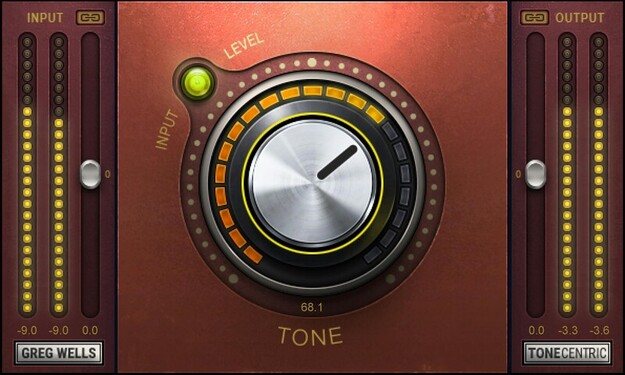
Greg Wells ToneCentric is a one-knob plug-in from Waves, made with Grammy-winning producer and mixer Greg Wells. It is designed around the overtones of tube-based analog gear.
It aims to capture, with a single knob, the footprint of gear in Greg Wells' studio, such as a 1950s mono tube compressor, a tape machine and a custom vacuum tube console.
According to the description, different dial positions home in on variations of the basic process, so multiple sweet spots appear as the knob turns. It can be used lightly on a mix bus or in small amounts on every track.
Input/output linking and makeup gain make gain staging easy. It supports VST, AU and AAX on macOS Monterey 12 to Sequoia 15 and VST and AAX on Windows 10 or later.
Key features
One-knob operation
One knob changes the processing by position. Several sweet spots are described, so users find them by listening.
Tube-style overtones
The design focuses on the singing overtones of tube-based analog gear, an option when warmth and fullness are wanted on digital tracks.
Preserving the high end
The feature list says warmth and fullness are added while a bright high end is preserved.
On a mix bus or on every track
Both use on a mix bus and in small amounts on every track, for a cumulative effect, are described.
I/O link and makeup gain
Input/output linking and makeup gain simplify gain staging.
Designed with Greg Wells
It is based on the studio gear of Greg Wells, who has worked with Adele, Dua Lipa and John Legend.
Specifications
| Item | Details |
|---|---|
| Type | One-knob analog-style saturation |
| Mac | macOS Monterey 12 / Ventura 13 / Sonoma 14 / Sequoia 15 (VST, AU, AAX) |
| Windows | Windows 10 or later (VST, AAX) |
What is included and system requirements
- Plug-in (VST, AU, AAX)
- Input/output link and makeup gain
How to use it
- Insert the plug-in on a track or mix bus in the DAW.
- Turn the knob gradually and listen.
- Compare positions, since several sweet spots are described.
- Match levels with input/output link and makeup gain.
- When used on every track, keep each setting small.
Where it may come in handy
Finishing a mix bus
A light setting on the bus may add warmth.
Small amounts on each track
Adding a little on every track may build fullness across a mix.
Fullness on vocals or keys
Used on a single track, it may add overtones.
Who it may suit
- Users who want analog-style overtones with few controls
- Those who want light coloring on a mix bus
- Fans of Greg Wells' work
Good to know before you buy
- Descriptions follow the retailer text; they are not listening impressions.
- Waves prices change often with promotions.
- OS support is as listed on the product page; check it before buying.
How it differs from similar products
We do not pick a winner; the official figures are placed side by side.
Waves OneKnob Driver
ToneCentric is designed around tube-style overtones, while OneKnob Driver is described as moving from 2nd and 3rd harmonics to heavy 3rd harmonics as an overdrive. Both have one knob.
Price
Please check the official page for the price.
See Greg Wells ToneCentric on the product page
More of the same kind
Other introduction articles of the same kind.
- AudioThing Arguments
- Black Rooster Audio BlueAsh SC-5
- United Plugins QuickMuse
- MeldaProduction MStereoGenerator
- MAAT LINone
- Toolroom Records Infinite
We have introduced 215 other products from Waves.
- Waves Clarity Vx DeReverb
- Waves TRACT SPL Meter
- Waves Bass Rider
- Waves Waves CLA Nx
- Waves Curves Resolve
See the full list in Product database: Effects.
Sources: pluginboutique.com (checked 2026-10-27)










Comments