
Disclosure: This page may contain affiliate links. Prices were checked on the date shown and may change.
An introduction to Safari Audio Rabbit Tape V2, based on information from the maker and distributors: what it does, how to use it and who it may suit. It is not scored.
Rabbit Tape V2 brings the warmth, character, and beautiful imperfections of vintage tape machines straight into your DAW.
— Safari Audio official site
What is Rabbit Tape V2?
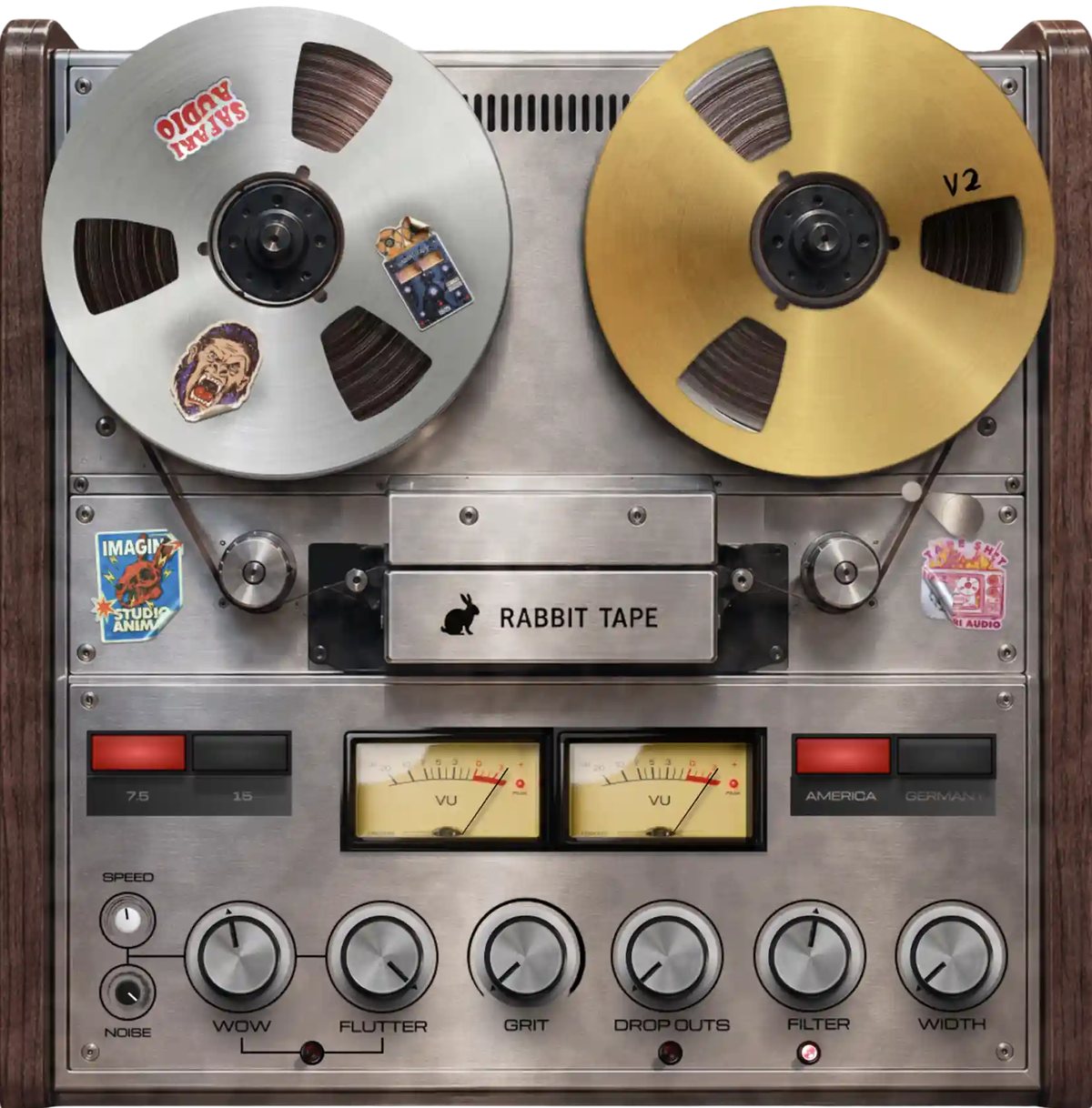
Rabbit Tape V2 is a tape-machine style effect plug-in from Safari Audio. It aims to add the warmth, light compression and imperfections of a tape recorder, such as wobble and drop-outs, to digitally recorded audio. It is the second generation of the original Rabbit Tape.
V2 lets a user choose between two tape machine models. According to the official description, America leans toward rich, warm coloration and Germany toward tighter, more precise coloration. Tape speed can be set to 7.5 or 15 IPS, which changes tonal and saturation behavior.
To create tape-like movement, the plug-in offers Wow, Flutter, Grit, Drop Outs and Noise controls. Filter and Width shape tone and stereo spread, and vintage-style VU meters show the signal while a user adjusts.
It supports VST3, AU, AAX and standalone on macOS, and VST3, AAX and standalone on 64-bit Windows. The descriptions mention full mixes, drums, vocals and bass as typical sources for adding analog-style glue.
Key features
America and Germany models
Two tape machines can be switched. Comparing them on the same source helps choose between a warmer or a tighter coloration.
7.5 and 15 IPS
Tape speed has two settings. The official page says tonal and saturation behavior changes with speed, so it is a switch worth trying to suit the style of a song.
Wow and Flutter
These recreate the pitch movement of tape. They may be useful for lo-fi wobble or for giving a synth a living motion.
Grit and Drop Outs
These add worn-tape roughness and momentary dips in level. Small amounts give slight imperfection, larger amounts give a battered texture.
Filter, Width and Noise
Filter shapes tone from dark and vintage to bright, Width adjusts the stereo spread, and Noise sets the amount of tape noise.
Smart Gain, A/B and LUFS
These shared V2 features let a user compare settings at matched levels, with a short-term LUFS readout in the window.
Vintage VU meters
Needle-style meters show input and output while adjusting, which suits users who prefer to read movement rather than numbers.
Specifications
| Item | Details |
|---|---|
| Maker | Safari Audio |
| Type | Tape emulation |
| Version | V2 |
| Tape machines | America, Germany |
| Tape speeds | 7.5 IPS, 15 IPS |
| Formats (macOS) | VST3, AU, AAX, standalone |
| Formats (Windows) | 64-bit VST3, AAX, standalone |
| Processor | 2 GHz Intel dual core or AMD equivalent |
| RAM | 8 GB minimum (16 GB recommended) |
| OS | macOS 10.13 or later (11 or later recommended), Windows 8 or later |
| License | Perpetual (up to 4 machines) |
What is included and system requirements
- Rabbit Tape V2 itself (plug-in formats and standalone)
- Factory presets
- A 14-day free trial is offered on the official site
- When bought at Plugin Boutique, the serial number appears in the account
How to use it
- Buy at the official site or Plugin Boutique and download the version for your OS.
- Install with the installer (Mac) or by placing format files (Windows), then restart the DAW.
- Load Rabbit Tape V2 as an insert on the master bus or on individual tracks.
- Enter the serial number and press Activate.
- Choose America or Germany, then 7.5 or 15 IPS.
- Raise the input and set the amount of saturation while watching the VU meters.
- Increase Wow, Flutter, Grit and Drop Outs gradually to adjust the amount of movement.
- Fine-tune Filter, Width and Noise and check the balance with A/B comparison.
Where it may come in handy
Adding glue to a full mix
A light touch on the master bus may offer a sense of cohesion as if passed through analog gear. Matching level with Smart Gain makes the change easier to judge.
Warming up vocals
Using America lightly on a vocal track is one way to add warmth, and keeping the wobble controls small may be the safer approach.
Creating lo-fi texture
Raising Wow, Flutter and Drop Outs may recreate the movement of an old cassette.
Thickening drums and bass
Light use at 15 IPS on a drum bus or bass may bring out thickness through saturation.
Who it may suit
- People who want tape-style warmth and wobble from a perpetual-license plug-in
- Users who like switching machine and speed to choose a tape character
- Those looking for an effect to build lo-fi textures
- Anyone who prefers adjusting while watching needle meters
Good to know before you buy
- The official site has an upgrade offer for V1 owners, shown after logging in.
- Plugin Boutique lists VST3, AU and AAX for macOS and VST3 and AAX for Windows, while the official page also lists standalone.
- The stated requirements are a 2 GHz dual core CPU and 8 GB of RAM (16 GB recommended).
- Large wobble settings make the pitch unstable, so check how it sits against other parts.
How it differs from similar products
We do not pick a winner; the official figures are placed side by side.
Safari Audio Gorilla Drive V2
Rabbit Tape V2 is a tape emulation with two machines, two tape speeds and Wow, Flutter and Drop Outs controls. Gorilla Drive V2 is a germanium-style overdrive with a Transient Shaper and independent low and high drive stages.
Price
Please check the official page for the price.
See Rabbit Tape V2 on the product page
More of the same kind
We have introduced 82 saturation and distortion effects. Here are some of the others.
- Eventide CrushStation
- Klevgrand SquashIt
- Kuassa Efektor Blues River
- W. A. Production Punchy Worm
- Three-Body Technology Sapphire Drive
- MeldaProduction MDistortionMB
We have introduced 9 other products from Safari Audio.
- Safari Audio Gorilla Drive V2
- Safari Audio Cobra Fuzz V2
- Safari Audio Mastering Console V2
- Safari Audio Flamingo Verb V2
- Safari Audio Safari Audio The Herd V2
For a side-by-side comparison scored on the same criteria, see our comparison of saturation and distortion effects.
See the full list in Product database: Effects.
Sources: safariaudio.com pluginboutique.com (checked 2026-10-27)










Comments