
Disclosure: This page may contain affiliate links. Prices were checked on the date shown and may change.
An introduction to MeldaProduction MDistortionMB, based on information from the maker and distributors: what it does, how to use it and who it may suit. It is not scored.
MDistortionMB is a unique distortion plugin combining a generalized amp simulator with a digital distortion processor.
— MeldaProduction official site
What is MDistortionMB?
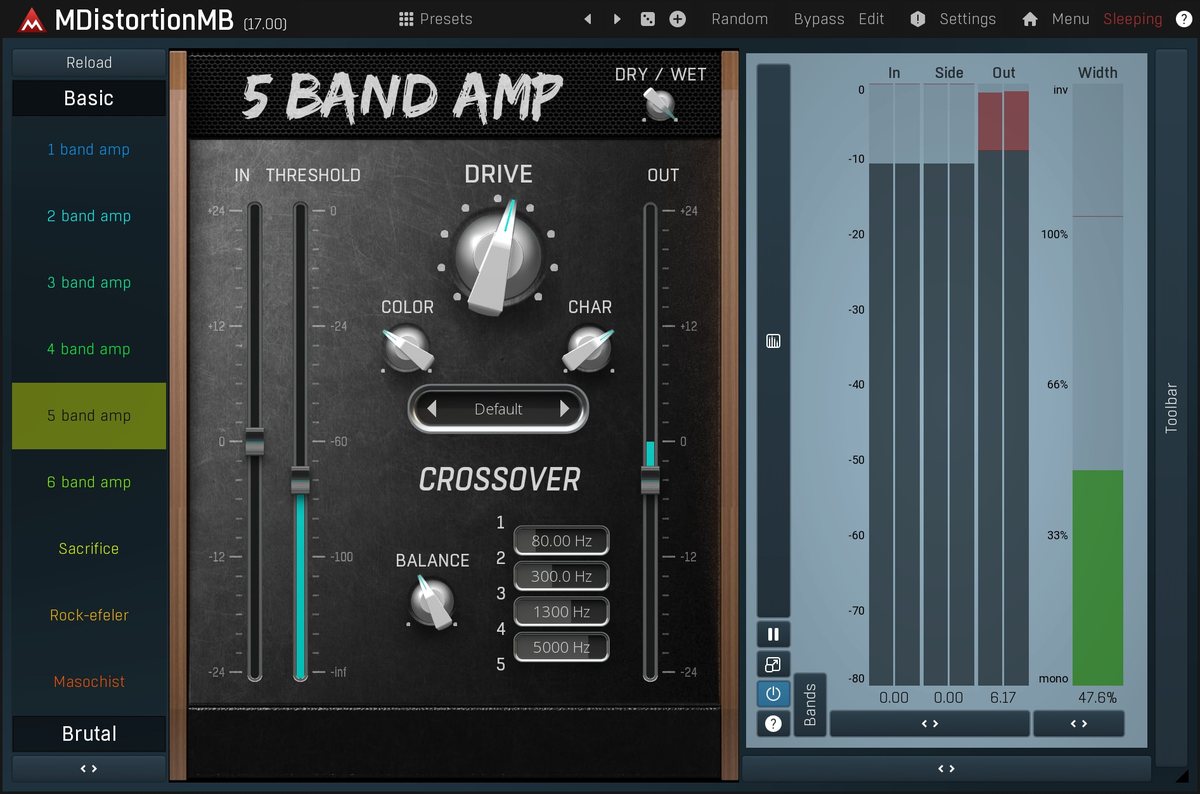
MDistortionMB is a multiband distortion plug-in from MeldaProduction. Rather than modelling one specific amp, it joins a generalized amp simulation with a purely digital distortion processor, and the maker presents it for guitars, keyboards, drums and synth bass.
The amp section holds 12 predefined sounds organized by style, such as metal and rock. Each comes with an equalizer and detailed controls, so a user can pick a nearby starting point and then tune it. The maker notes it may not sound like a particular favorite amp.
Several purely digital distortion algorithms are provided and can be combined with the amp simulation. Up to four modulators can be applied to any parameter, working as an LFO, level follower, envelope, randomizer or pitch detector, so drive and texture can move over time.
The interface comes in two forms: a simple view with a few controls and an advanced view with every function. Processing can be split into 1 to 6 independent bands with analog, linear-phase or hybrid crossovers. It runs on Windows and macOS (native Apple Silicon) in VST, VST3, AU and AAX formats.
Key features
Generalized amp simulation
Instead of copying one amp, it models amps in general. Twelve predefined sounds are grouped by style such as metal and rock, and each can be finished with the equalizer and other controls.
Purely digital distortion
Several algorithms offer distortion that is native to digital processing, and they can be layered with the amp simulation. It may be worth trying when a synth bass needs heavy transformation.
1 to 6 independent bands
Each band can receive its own distortion, with analog, linear-phase and hybrid crossover options. A lighter low end and a stronger top end is one possible split.
Four modulators
They act as LFOs, followers, MIDI or audio triggered envelopes or pitch detectors and can control any parameter, including other modulators. They may help when a distortion feels static.
Two interfaces
A simple view with a few controls is available for quick starts, and an advanced view exposes every feature. The resizable interface is also mentioned by the maker.
Randomization and up-sampling
One button generates new settings, and holding Ctrl modifies the current ones slightly. Adjustable 1x to 16x up-sampling reduces aliasing.
M/S and surround
Besides mono and stereo, up to eight channels of surround are handled, and the maker positions it for film and game audio too.
Specifications
| Item | Details |
|---|---|
| Type | Distortion and saturation (multiband) |
| Bands | 1 to 6 |
| Predefined amp sounds | 12 |
| Modulators | 4 |
| Up-sampling | 1x to 16x |
| Formats | VST, VST3, AU, AAX |
| OS | Windows 8/10/11 (64-bit), macOS 10.14 or later (64-bit, Apple Silicon supported) |
What is included and system requirements
- MDistortionMB plug-in
- 12 amp sounds and style presets
- Formats: VST, VST3, AU, AAX
- Requirements: Windows 8/10/11 (64-bit), macOS 10.14 or later
- Free trial available
- No dongle is needed for activation, and updates are listed as free
How to use it
- Try the free trial on the official site, or download the installer after purchase.
- After installing, rescan plug-ins in your DAW.
- Insert MDistortionMB on a guitar or synth track.
- Start in the simple view, choose a style and set the sound with a few knobs.
- Switch to the advanced view and balance the amp and digital distortion sections.
- If needed, add bands and set a different amount of distortion for each.
- Assign one modulator and listen to how the distortion moves.
- Save settings you like as a preset.
Where it may come in handy
Shaping guitar distortion
Starting from a style sound, it may suit building a guitar distortion.
Breaking up a synth bass
Using digital distortion and multiband processing, a synth bass could receive different distortion in the low and high bands.
Adding texture to a drum bus
A light amount on a drum bus with a modulator for movement is one thing to try.
Sound design
Combined with randomization, it may suit heavily transforming material for sound effects.
Who it may suit
- People who want amp-style and purely digital distortion in one plug-in
- Those who want a different amount of distortion per band
- Anyone who wants to add movement to distortion with LFOs and similar sources
- People who prefer to try the free trial before buying
Good to know before you buy
- The maker states it does not reproduce a specific amp.
- Because of the many functions, starting in the simple view may suit new users.
- MeldaProduction products are sold on its own site and through resellers such as Plugin Boutique, and prices can change over time.
How it differs from similar products
We do not pick a winner; the official figures are placed side by side.
MBitFunMB
MDistortionMB combines 12 predefined amp sounds with several digital distortion algorithms, while MBitFunMB reduces audio to 1 to 16 bits and manipulates individual bits. Both offer up to 6 bands and 4 modulators.
Price
Please check the official page for the price.
See MDistortionMB on the product page
More of the same kind
We have introduced 82 saturation and distortion effects. Here are some of the others.
- D16 Group Redoptor 2
- Rob Papen RP-Distort 2
- United Plugins WideFire
- Waves J37 Tape
- W. A. Production Combustor
- Universal Audio Ampex ATR-102 Mastering Tape Recorder
We have introduced 32 other products from MeldaProduction.
- MeldaProduction MBitFunMB
- MeldaProduction MSaturatorMB
- MeldaProduction MWaveFolderMB
- MeldaProduction MPolySaturator
- MeldaProduction MMatcher
For a side-by-side comparison scored on the same criteria, see our comparison of saturation and distortion effects.
See the full list in Product database: Effects.
Sources: meldaproduction.com pluginboutique.com (checked 2026-10-27)










Comments