
Disclosure: This page may contain affiliate links. Prices were checked on the date shown and may change.
An introduction to Antelope Audio InTune Chorus, based on information from the maker and distributors: what it does, how to use it and who it may suit. It is not scored.
Generate rich, realistic backing vocals from a single lead.
— Antelope Audio official site
What is InTune Chorus?
InTune Chorus is a vocal plug-in from Antelope Audio that builds a five-part vocal ensemble from a single voice. The official page lists pop, R&B, gospel, EDM and cinematic backing layers as typical fits.
It is based on the InTune pitch-processing engine that Antelope Audio first developed for its hardware, and it now runs as a native plug-in. Plugin Boutique describes it as usable on Mac or Windows in any DAW without extra hardware.
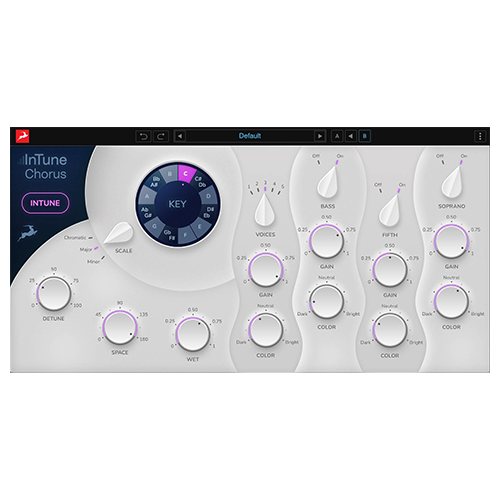
Each generated voice can be given detune and delay settings, which is meant to produce the slight variation of real singers. There are controls for adding bass, fifth and soprano voices, and a Color control to adjust the tone of each generated voice.
The Space knob sets the stereo spread, and the InTune button turns on pitch correction of the lead vocal. The official site also presents it as part of Antelope Cosmos, a collection of more than 75 native plug-ins. No Japanese distributor page was confirmed.
Key features
Five-voice ensemble generation
It creates five voices from one vocal input. The official page says depth and width can be added without extra takes or outside singers, which may help when sketching backing parts quickly.
Detune and delay
Pitch and timing offsets between the voices can be set. The official page gives the maximum detune as plus or minus 50 cents, spread across plus or minus 100. Small offsets give subtle thickness, larger ones a more obvious effect.
Bass, fifth and soprano voices
Controls add bass, fifth and soprano voices to shape the ensemble. They look useful when deciding whether the stack should lean toward the low or the high end.
Color control
A Color control adjusts the tone of each generated voice. Plugin Boutique's description says this lets each voice take on its own character.
Space (stereo spread)
At 0 the signal stays mono, and at 180 the ensemble is spread fully left to right. You can move from a narrow to a wide placement to match each section of a song.
InTune pitch correction
Turning on the InTune button applies real-time pitch correction to the lead vocal. The official page says this keeps the generated voices harmonically aligned.
Per-group gain
According to Plugin Boutique, each voice group has its own gain control, which helps with balancing the stack.
Specifications
| Item | Details |
|---|---|
| Type | Vocal ensemble generator plug-in |
| Voices | Up to five (plus bass, fifth and soprano additions) |
| Maximum detune | Plus or minus 50 cents (spread across plus or minus 100) |
| Space | 0 (mono) to 180 (full left-right spread) |
| Format | Native plug-in (macOS / Windows) |
| Availability (official) | Presented as part of Antelope Cosmos |
What is included and system requirements
- Native plug-in (Plugin Boutique states it runs on Mac or PC without additional hardware)
- The official site has a system requirements page
How to use it
- Insert InTune Chorus on the vocal track in your DAW.
- Check the input with a steady lead vocal level and key.
- Set Space to a middle position first to judge the spread.
- Raise detune and delay little by little to adjust the offsets between voices.
- Add bass, fifth and soprano voices to decide which way the stack leans.
- Use Color to shape the tone of the individual voices.
- Turn on the InTune button if the lead needs pitch correction.
- Finally balance the stack against the lead with the voice gain controls.
Where it may come in handy
Backing vocals for songs
It may be worth trying when you want a fuller chorus behind a hook, for example to sketch an arrangement with less recording work.
EDM and pop vocal layers
It could suit turning a lead into several voices to build a wide vocal texture.
Doubling-style thickening at home
It may help add the slight variation of several singers to a vocal recorded alone.
Choir-like layers for scoring
It could serve as one ingredient when building a choir-like layer for cinematic-style music.
Who it may suit
- Singers who record alone and want an easy way to add backing vocals
- Producers building vocal thickness in pop or EDM
- Users who also work with other Antelope Cosmos plug-ins
- Those who want pitch correction and voice stacking in one plug-in
Good to know before you buy
- The official site points to joining Antelope Cosmos. Check the official page and the Plugin Boutique product page for purchase and usage terms.
- The generated voices are built from your input, so the quality of the recorded lead is likely to matter.
- No Japanese distributor page was confirmed.
How it differs from similar products
We do not pick a winner; the official figures are placed side by side.
InTune Harmony
According to the official pages, InTune Chorus builds a five-voice ensemble with detune and delay settings, while InTune Harmony adds two, three or four harmony voices with key and scale selection. Both offer InTune pitch correction, Space and Color.
Price
Please check the official page for the price.
See InTune Chorus on the product page
More of the same kind
We have introduced 35 vocal processors. Here are some of the others.
- Sonnox Voca
- W. A. Production Vocal Cleaner
- Waves Greg Wells VoiceCentric
- iZotope Vocal Doubler
- LANDR LANDR VoxChain / VoxTune / VoxVerb / VoxDeEss
- Techivation T-De-Breather
We have introduced 54 other products from Antelope Audio.
- Antelope Audio InTune Harmony
- Antelope Audio VMEQ-5
- Antelope Audio VEQ-HLF
- Antelope Audio SMT-100A
- Antelope Audio VEQ-432C
For a side-by-side comparison scored on the same criteria, see our comparison of vocal processors.
See the full list in Product database: Effects.
Sources: antelopeaudio.com pluginboutique.com (checked 2026-10-27)










Comments