
Disclosure: This page may contain affiliate links. Prices were checked on the date shown and may change.
An introduction to Antelope Audio InTune Harmony, based on information from the maker and distributors: what it does, how to use it and who it may suit. It is not scored.
Effortless multi-voice harmonies with pitch correction and tonal shaping.
— Antelope Audio official site
What is InTune Harmony?
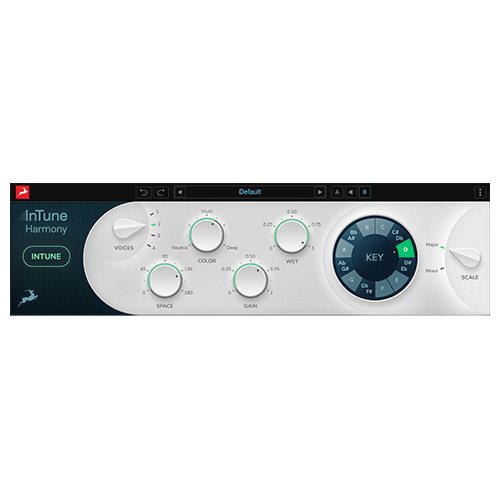
InTune Harmony is a real-time vocal harmony generator plug-in from Antelope Audio. It adds two, three or four harmony voices to a lead vocal, and the official page presents it as suitable from subtle support to heavily layered pop vocals.
You choose a key and scale, and the harmony pitches follow that scale. Plugin Boutique's description says the InTune button uses the same correction algorithm as InTune Performer and InTune Chorus, so the lead pitch can be tidied at the same time.
The generated voices can be placed in the stereo field with the Space knob, and the Color control shifts the tonal difference between the lowest and highest voices from Neutral to Deep. The official page also mentions use for thickening and doubling a lead and for building a stand-out chorus section.
It is a native plug-in, stated to run in DAWs on Mac and Windows. The official site also presents it as part of Antelope Cosmos, a collection of more than 75 native plug-ins. No Japanese distributor page was confirmed.
Key features
Two, three or four voices
You choose to add two, three or four harmony voices to the lead. That lets you move from light support to a denser stack as the song section requires.
Key and scale selection
Setting the key and scale of the song makes the harmony pitches follow it. The official page says this avoids complex routing or manual harmony writing.
InTune pitch correction
The InTune button turns on correction with the algorithm said to be the same as in InTune Performer. It is meant to keep the generated voices in key.
Space (stereo placement)
The harmony voices are spread across the stereo field. The official page says it can be used for natural separation, wide chorus-style effects or a focused doubling placement.
Color (timbre)
The tonal difference between the lowest and highest voices is adjusted between Neutral and Deep. It sets how much contrast the voices have.
Vocal thickening and doubling
The official page lists enhancing a lead, creating backing parts and building a chorus section that stands out. It can be tried when you want fewer extra takes or less manual harmony work.
Specifications
| Item | Details |
|---|---|
| Type | Real-time vocal harmonizer |
| Voices | Two, three or four |
| Controls | Key, scale, Space, Color (Neutral to Deep), InTune button |
| Format | Native plug-in (macOS / Windows) |
| Availability (official) | Presented as part of Antelope Cosmos |
What is included and system requirements
- Native plug-in (runs in DAWs on Mac or Windows)
- The official site has a system requirements page
How to use it
- Insert InTune Harmony on the vocal track in your DAW.
- Set the key and scale of the song.
- Choose two, three or four harmony voices.
- Turn on the InTune button if the lead needs pitch correction.
- Set the stereo spread of the harmonies with Space.
- Adjust the tonal difference between low and high voices with Color.
- Balance the overall level against the lead by ear.
- Check that the key and scale still fit in other sections of the song.
Where it may come in handy
Writing harmonies at home
It may be handy for quickly trying harmony parts after recording a lead alone, or for sketching a rough backing arrangement.
Thickening a chorus
You could add voices only in the chorus to set it apart from the verse.
Doubling-style support
With Space narrowed, it can serve as a supporting voice that sits close to the lead.
Demo making
It may help you produce a demo with harmonies already in place to share with other singers.
Who it may suit
- Singer-songwriters who record alone
- People who want to reduce the effort of writing harmonies by hand
- Producers working on pop or chorus-heavy songs
- Users who also work with other Antelope Cosmos plug-ins
Good to know before you buy
- The official site points to joining Antelope Cosmos. Check the official page and the Plugin Boutique product page for purchase and usage terms.
- The harmonies follow the key and scale you set, so the setting needs to match the song.
- No Japanese distributor page was confirmed.
How it differs from similar products
We do not pick a winner; the official figures are placed side by side.
InTune Chorus
According to the official pages, InTune Harmony adds two, three or four harmony voices with key and scale selection, while InTune Chorus builds a five-voice ensemble with detune and delay settings.
Price
Please check the official page for the price.
See InTune Harmony on the product page
More of the same kind
We have introduced 35 vocal processors. Here are some of the others.
- W. A. Production Vocal Splitter
- Klevgrand Altitude
- iZotope iZotope VocalSynth 2
- Leapwing Audio UltraVox 2
- Bogren Digital A-Class Vocal
- Synchro Arts VocAlign 7
We have introduced 54 other products from Antelope Audio.
- Antelope Audio InTune Chorus
- Antelope Audio Liverpool
- Antelope Audio VEQ-55A
- Antelope Audio Blonder Tongue Audio Baton
- Antelope Audio NEU-W495
For a side-by-side comparison scored on the same criteria, see our comparison of vocal processors.
See the full list in Product database: Effects.
Sources: antelopeaudio.com pluginboutique.com (checked 2026-10-27)










Comments