
Disclosure: This page may contain affiliate links. Prices were checked on the date shown and may change.
An introduction to Waves Greg Wells VoiceCentric, based on information from the maker and distributors: what it does, how to use it and who it may suit. It is not scored.
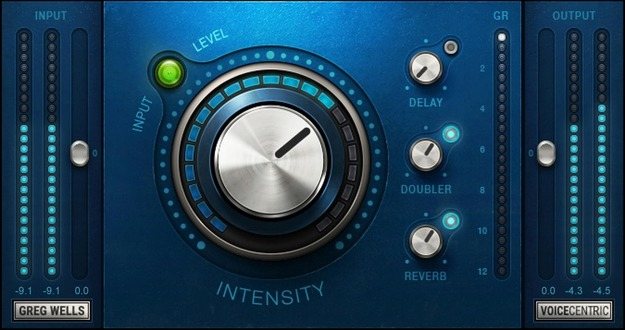
Intensity knob combines complex EQ and compression chains
— Waves official site
What is Greg Wells VoiceCentric?
Greg Wells VoiceCentric is a vocal plugin Waves created with Grammy-winning producer and mixer Greg Wells, who has worked with artists such as Adele, Dua Lipa and Taylor Swift. It is presented as a way to use his approach with a few simple controls.
The center is the Intensity knob. Complex EQ and compression chains sit behind it, and Greg Wells says certain elements only kick in at 60% or even 80%, so different flavors appear as that one knob is moved.
Delay, reverb and doubler effects are added, and simple input and output gain with metering makes gain staging easy to check. The listing says it suits lead and backing vocals in all genres.
Improving the voice quality in videos and podcasts is also listed. The plugin is also part of the four-plugin Greg Wells Signature Series bundle, and VoiceCentric can be chosen on its own.
Key features
Intensity knob
Complex EQ and compression chains are combined in one knob, and different elements engage at different amounts, so simple control gives varied results.
Delay, reverb and doubler
Time-based effects and a doubler are included, which may let you shape the finish without opening other plugins.
Input/output gain and metering
Input and output gain can be adjusted simply and checked on meters.
Lead and backing vocals
It is described as suited to both lead and backing vocals.
Video and podcast voices
Improving voices in videos and podcasts is also listed as a use.
Created with Greg Wells
It is presented as based on Greg Wells's experience.
Specifications
| Item | Details |
|---|---|
| Maker | Waves |
| Type | Vocal chain (EQ, compression, delay, reverb, doubler) |
| Mac | macOS Monterey 12, Ventura 13, Sonoma 14, Sequoia 15; VST / AU / AAX |
| Windows | Windows 10 or later; VST / AAX |
What is included and system requirements
- The VoiceCentric plugin (Mac / Windows)
- Waves license activation is required
How to use it
- Activate the license in your Waves account and install with Waves Central.
- Insert VoiceCentric on a vocal track in your DAW.
- Raise the Intensity knob from a low setting and listen to how elements engage.
- Add delay, reverb or doubler as needed.
- Adjust input and output gain and check headroom on the meters.
- Use bypass to compare with the original voice.
Where it may come in handy
Home-recorded vocals
It may be useful when you want to see a direction quickly.
Backing vocals
The doubler could be used to thicken the voice.
Video and podcast voices
It could also be tried to polish speech.
Who it may suit
- Those who want to set a vocal direction with few controls
- Those who do not want to open many vocal plugins
- Those who also want to treat voices in videos and podcasts
Good to know before you buy
- Waves license activation is required.
- It is also part of the Greg Wells Signature Series bundle.
Price
Please check the official page for the price.
See Greg Wells VoiceCentric on the product page
More of the same kind
We have introduced 35 vocal processors. Here are some of the others.
- W. A. Production VocalShaper
- W. A. Production Vocal Splitter
- Resonant Cavity Voloco Producer
- LANDR LANDR FX Voice
- Tuned Plugins Vocal Chain
- iZotope iZotope VocalSynth 2
We have introduced 215 other products from Waves.
- Waves Sync Vx
- Waves Renaissance Vox
- Waves Butch Vig Vocals
- Waves OVox Vocal ReSynthesis
- Waves JJP Vocals
For a side-by-side comparison scored on the same criteria, see our comparison of vocal processors.
See the full list in Product database: Effects.
Sources: pluginboutique.com (checked 2026-10-27)










Comments