
Disclosure: This page may contain affiliate links. Prices were checked on the date shown and may change.
An introduction to United Plugins QuickVox, based on information from the maker and distributors: what it does, how to use it and who it may suit. It is not scored.
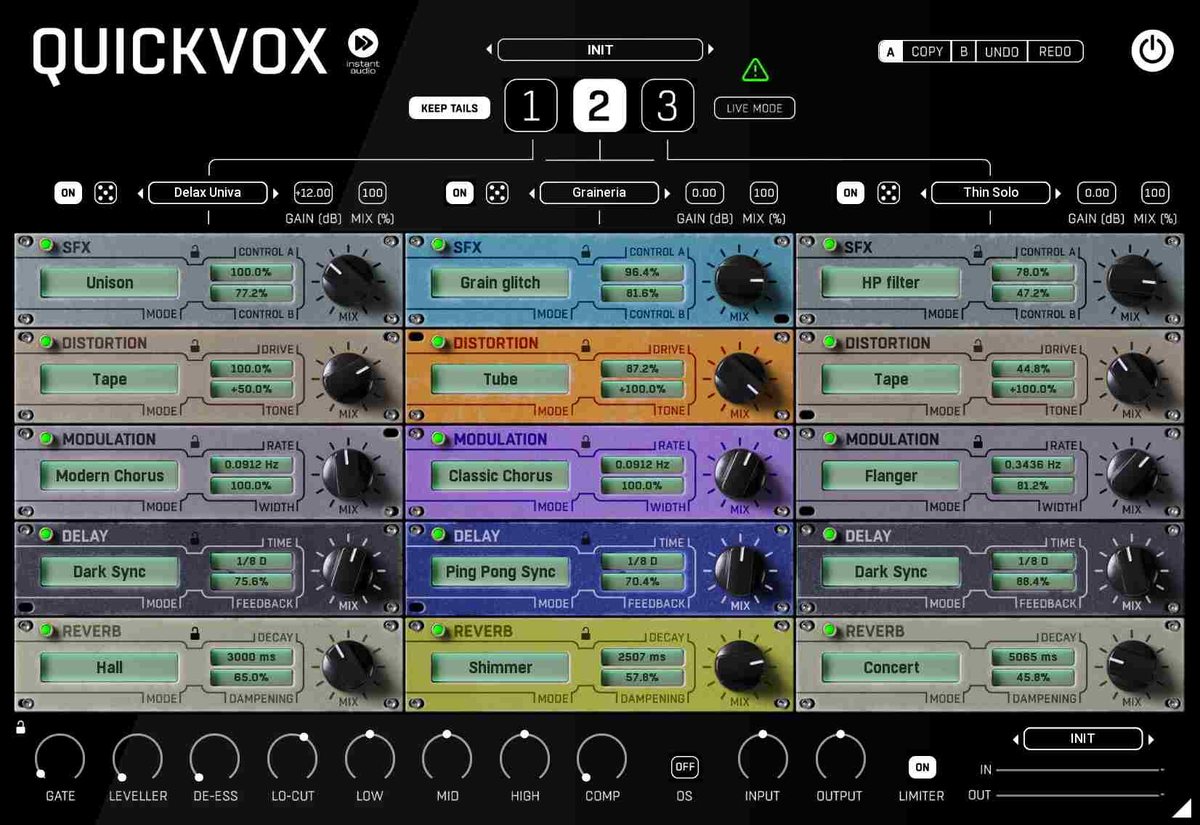
QuickVox features three independent, identical rack units which you can use to craft unique effects chains for verses, choruses, and intros.
— United Plugins official site
What is QuickVox?
QuickVox is a vocal multi-effect plug-in from United Plugins. It has three identical rack units, each hosting five effect modules with three controls apiece, so the layout is kept compact.
Its main feature is Live Mode. This screen turns the three racks into three large buttons so you can switch vocal settings during a performance. The official page says a Keep Tails function lets the delay and reverb tails of the previous setting decay naturally when you switch.
The effects cover SFX (vocoders, autotune, comb filters, ring modulators and more), distortion, modulation, delay and reverb, plus a mixing section with a gate, leveller, de-esser, EQ and compressor.
Racks can also be switched from a MIDI controller or a MIDI track, and presets are sorted by use. It is described as having zero latency and a low CPU load. No Japanese distributor page was confirmed.
Key features
Three racks
Three identical racks each hold a separate effect chain. The idea is to prepare different settings for sections such as verse, chorus and intro.
Live Mode and Keep Tails
A screen with three large buttons for switching racks. Keep Tails lets delay and reverb tails carry over when you switch, a function aimed at live use.
MIDI rack switching
The lowest three notes (C-2, C#-2 and D-2) select racks 1, 2 and 3. This lets you switch from a controller or a MIDI track without the mouse.
A broad set of effects
There are 11 SFX types, 8 distortion types (tube, tape, fold, amp and others) and 12 reverb types (room, chamber, hall, cathedral and others). Delay offers digital, tape, ping-pong and wide types.
Mixing section
A gate, leveller, de-esser, musical EQ and compressor are included, so basic vocal polishing can be done within one plug-in.
Presets by use
Presets are grouped into rapping, singing, aggressive, intros, experimental and creative, and the official page also mentions presets for specific song parts.
Low latency and light load
The official page describes zero latency and a light CPU load. Processing is 64-bit internally and handles any sampling rate, including 192 kHz and above.
Specifications
| Item | Details |
|---|---|
| Type | Vocal multi-effect |
| Racks | Three (five effect modules per rack) |
| SFX | 11 types |
| Distortion | 8 types |
| Reverb | 12 types |
| Formats | VST, VST3, AU (macOS), AAX |
| Mac requirements | macOS 10.10 or later, Intel / Apple Silicon supported |
| Windows requirements | Windows 8 or later (Windows 11 supported) |
| Internal processing | 64-bit, any sampling rate |
What is included and system requirements
- QuickVox plug-in (VST, VST3, AAX, and AU on macOS)
- Preset library sorted by use
- Mac: macOS 10.10 or later (Intel / M1 supported), processor with SSE2
- Windows: Windows 8 or later (Windows 11 supported), processor with SSE2
How to use it
- Insert QuickVox on the vocal track in your DAW.
- Build a basic vocal chain in rack 1.
- Pick a preset close to your use and adjust it with the knobs.
- Create other settings for the chorus or intro in racks 2 and 3.
- Set up the gate, de-esser, EQ and compressor in the mixing section.
- Switch to Live Mode and try changing racks with the three buttons.
- For live use, set up MIDI notes C-2, C#-2 and D-2 to select the racks.
- Drag the arrow at the bottom right to resize the window to a comfortable size.
Where it may come in handy
Vocal processing on stage
Live Mode may help when you want different effects for different parts of a song. Button-based switching could reduce how much you handle during a performance.
Rap and vocal production
It could suit quickly layering distortion, delay and SFX on a rap or sung vocal to try different characters.
Voice sound for streaming
For streaming or live broadcasts, the three racks could be used to switch the voice processing by scene.
Rough processing while sketching
When sketching a song, it may help to try a vocal chain without spreading it over several separate plug-ins.
Who it may suit
- Performers who want to switch vocal effects live
- Producers of rap or vocal tracks who want a whole chain in one plug-in
- People looking for a vocal chain with a light CPU load
- Users who want to try many SFX-style effects
Good to know before you buy
- MIDI control is used for switching racks.
- The listed formats are VST, VST3 and AAX on Windows, and VST, VST3, AU and AAX on Mac.
- No Japanese distributor page was confirmed.
Price
Please check the official page for the price.
See QuickVox on the product page
More of the same kind
We have introduced 35 vocal processors. Here are some of the others.
- Waves Butch Vig Vocals
- LANDR LANDR VoxChain / VoxTune / VoxVerb / VoxDeEss
- Harrison Consoles Vocal Flow
- Klevgrand Altitude
- Sonnox VoxDoubler
- Waves Sync Vx
We have introduced 34 other products from United Plugins.
- United Plugins Verbum Entropic Hall
- United Plugins QuickBass
- United Plugins Phantomix
- United Plugins Biverb
- United Plugins FireSpacer
For a side-by-side comparison scored on the same criteria, see our comparison of vocal processors.
See the full list in Product database: Effects.
Sources: unitedplugins.com pluginboutique.com (checked 2026-10-27)










Comments