
Disclosure: This page may contain affiliate links. Prices were checked on the date shown and may change.
An introduction to Klevgrand Altitude, based on information from the maker and distributors: what it does, how to use it and who it may suit. It is not scored.
Pitch correction, smart three-voice harmonies, a MIDI-playable voice module, and deep modulation, all in real time with zero latency.
— Klevgrand official site
What is Altitude?
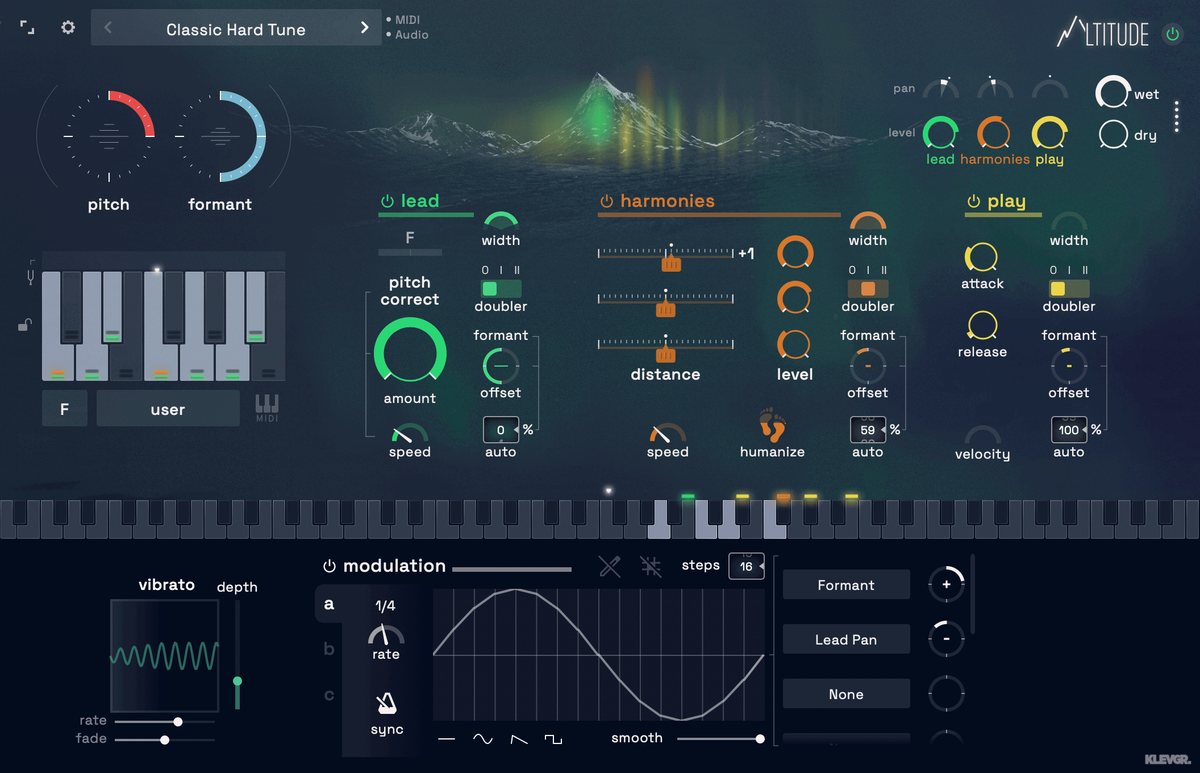
Altitude is a vocal performance station from Sweden's Klevgrand. It combines pitch correction, three-voice smart harmonies, a MIDI-playable voice module and modulation, and is described as working in real time with zero latency.
Pitch correction is the foundation. With formant-aware processing, it is described as covering everything from a hard-tuned sound to a polish that is hard to notice. Two doubler modes and a stereo widener can thicken the lead.
Harmonies use up to three voices that follow the lead in the right key. The official description says dissonant intervals are avoided automatically, and each voice has its own vibrato, humanizer and formant correction. The scale lets you disable notes per voice and can be changed via MIDI.
The Play module lets you perform the voice like an instrument from a MIDI keyboard or from MIDI data in the DAW. Three independent modulators move pitch, formants, pan, volume and more. It runs on macOS 10.13+ and Windows 10+ in AAX, AU, VST and VST3.
Key features
Formant-aware pitch correction
Low-latency pitch correction can be set from a hard-tuned sound to subtle correction. Because formants are taken into account, it may help limit changes in voice character after correction.
Three-voice smart harmonies
Up to three harmony voices follow the lead. Notes can be disabled per voice in the scale, and dissonant intervals are avoided, which may help build backing vocals quickly.
Play module
The voice is played from a MIDI keyboard or MIDI data in the DAW. Attack and release shape the character, which may be useful for arranging harmonies and melodies like a score.
Three modulators
Each modulator controls up to eight parameters. Shapes include sine, saw, square, or a custom step pattern of up to 16 steps, and they can sync to the DAW tempo. Effects range from slow drift to sci-fi textures.
Natural vibrato
Each voice has its own vibrato rate and depth, with a fade-in after a note is held. It may help avoid harmonies sounding too uniform.
Low-latency live mode
A dedicated zero-latency mode is intended for stage use. Together with MIDI scale control, it may be used when the key changes from song to song.
Micro-tuning and presets
Tunings other than standard are supported, and a preset library ranges from natural to unusual. Starting from a preset and adjusting afterward may be a practical flow.
Specifications
| Item | Details |
|---|---|
| Type | Vocal performance station (pitch correction, harmonizer, modulation) |
| Harmonies | Up to 3 voices |
| Modulators | 3 (up to 8 targets each, custom step shapes up to 16 steps) |
| Requirements | macOS 10.13+ (ARM / Intel), Windows 10 (64-bit) or later |
| Formats | AAX / AU / VST / VST3 (64-bit host) |
| Current version | v1.0.3 (per official download listing) |
| Purchase | Standard purchase, or rent-to-own at $9.99 per month for 15 months |
| Demo | The demo equals the full version but with occasional audio dropouts |
What is included and system requirements
- Altitude plug-in (macOS / Windows)
- Large preset collection
- AUv3 / Standalone for iPad (shown on the official page)
- Formats: AAX / AU / VST / VST3
How to use it
- Buy or download the demo with a Klevgrand account and install it with Klevgrand Helper.
- Rescan plug-ins in your DAW.
- Load Altitude on a vocal track.
- Select a scale that matches the song key.
- Set the correction strength, and use hard-tuned settings if needed.
- Set the number and intervals of harmony voices, and disable unwanted notes in the scale.
- Add thickness with the doubler and widener.
- When using Play or the modulators, connect a MIDI track and configure them.
Where it may come in handy
Pitch correcting vocals
From natural correction to clearly stepped pitch effects, one plug-in may cover the range. It can also be used to punch in on specific notes.
Backing vocals and harmonies
Three harmony voices can be built from one lead, which may suit quick backing-vocal sketches.
Live use
The zero-latency mode and MIDI scale switching may be tried on stage where the key changes between songs.
Sound design with voice
The Play module and modulators may be used to play and wobble the voice like an instrument for effect-like sounds.
Who it may suit
- People who want pitch correction and harmony in one plug-in
- People who want to use vocal processing live
- People interested in playing a voice via MIDI
- People who prefer to start with a monthly rent-to-own plan
Good to know before you buy
- The demo has all functions but with occasional audio dropouts.
- Rent-to-own is $9.99 per month for 15 months, after which the license is permanent. A pause can last up to 6 months.
- The monthly amount is determined by the exchange rate at checkout.
- Using harmonies assumes you set a key (scale).
Price
$149.99 (Klevgrand official site, checked 2026-10-27). Prices can vary by region and promotion, so check the official page before buying.
The official site also offers rent-to-own at $9.99 per month for 15 months.
See Altitude on the product page
More of the same kind
We have introduced 35 vocal processors. Here are some of the others.
- Bogren Digital A-Class Vocal
- Tuned Plugins Vocal Chain
- W. A. Production VocalShaper
- LANDR LANDR VoxChain / VoxTune / VoxVerb / VoxDeEss
- Polyverse Music Polyverse Manipulator
- Techivation T-De-Breather
We have introduced 26 other products from Klevgrand.
- Klevgrand Spinn
- Klevgrand REAMP
- Klevgrand Korvpressor
- Klevgrand DAW Cassette
- Klevgrand Klevgrand Jussi
For a side-by-side comparison scored on the same criteria, see our comparison of vocal processors.
See the full list in Product database: Effects.
Sources: klevgrand.se pluginboutique.com (checked 2026-10-27)










Comments