
Disclosure: This page may contain affiliate links. Prices were checked on the date shown and may change.
An introduction to Waves Sync Vx, based on information from the maker and distributors: what it does, how to use it and who it may suit. It is not scored.
Sync Vx unclutters ALL your vocal tracks in seconds, automatically locking the time and pitch of multiple vocal tracks to your lead performance.
— Waves official site
What is Sync Vx?
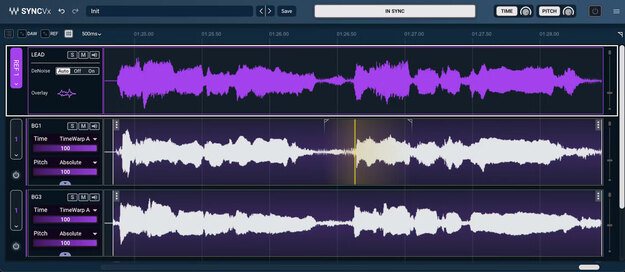
Sync Vx is a Waves plug-in for aligning the timing and pitch of vocal tracks. It is meant for tightening backing vocals and doubles against a lead performance automatically.
A single window shows the whole vocal arrangement, and up to four reference tracks can be assigned so that different sections follow different leads.
It supports ARA, so it works together with the tracks in your DAW. Settings can be changed globally, per track or per region, and pitch and time can be fine-tuned, with transposition and formant controls also available.
Besides music production, it is described as useful for matching re-recorded dialogue (ADR) to the original performance, which may suit anyone spending a lot of time on manual alignment.
Key features
Aligns vocal stacks
Timing and pitch of backing vocals and doubles are locked to the lead automatically. It may help when you want to cut down on slicing and nudging waveforms by hand.
Single-window arrangement view
The whole vocal arrangement is shown in one display, so you can keep adjusting without hopping between plug-in windows.
Four reference tracks
Different sections can follow different reference tracks, which may fit songs where the lead changes or duets.
ARA workflow
In DAWs that support ARA, the plug-in reads the track audio directly and syncs quickly, so you can try settings without bouncing audio.
Pitch, time and formant control
After syncing you can fine-tune pitch and timing by hand. Transposition and formant controls open up more creative treatments.
Shortcuts, Ignore, Bypass and Sync Markers
Customizable shortcuts plus Ignore, Bypass and Sync Marker functions let you exclude passages or pin alignment points.
Specifications
| Item | Details |
|---|---|
| Type | Vocal alignment (vocal processing) |
| Reference tracks | Up to 4 |
| Technology | ARA |
| Plug-in formats (Mac) | VST, AU, AAX |
| Plug-in formats (Windows) | VST, AAX |
| Supported OS (Mac) | macOS Monterey 12, Ventura 13, Sonoma 14, Sequoia 15 |
| Supported OS (Windows) | Windows 10 or later |
What is included and system requirements
- Sync Vx plug-in for Mac and Windows
- Formats: VST, AU, AAX on Mac; VST, AAX on Windows
- Requirements: macOS 12 to 15, Windows 10 or later
How to use it
- Buy from a retailer, receive the license and install.
- Open your DAW, rescan plug-ins and load Sync Vx.
- Choose the lead vocal track and assign it as a reference.
- Add the backing or double tracks you want to align.
- Run the sync and check whether timing and pitch line up.
- Use Sync Markers or Ignore for passages that need attention.
- Fine-tune settings globally, per track or per region as needed.
Where it may come in handy
Aligning backing vocals
When you want choir or harmony parts to follow the lead, it may be an alternative to manual editing, with final touches still done by hand.
Tightening doubles
It may help reduce drift between takes of the same phrase layered on top of each other.
Matching re-recorded dialogue (ADR)
The product page describes using it to match re-recorded dialogue to the original performance for video work.
Who it may suit
- People who spend a long time editing backing vocals and doubles
- Editors who want to speed up ADR dialogue alignment
- Users of ARA-capable DAWs who want to manage vocals in one place
Good to know before you buy
- Requirements are macOS 12 to 15 and Windows 10 or later.
- A review on the retailer page mentions problems in some DAWs, so it is worth checking behavior in your own DAW first.
- In DAWs without ARA support the workflow may differ.
Price
Please check the official page for the price.
See Sync Vx on the product page
More of the same kind
We have introduced 35 vocal processors. Here are some of the others.
- DOTEC-AUDIO DeeField
- Bogren Digital A-Class Vocal
- Antelope Audio InTune Chorus
- UJAM VOXCRAFT
- Maciel Audio VxBx Vocal Processor
- LANDR LANDR FX Voice
We have introduced 215 other products from Waves.
- Waves Renaissance Vox
- Waves Manny Marroquin Triple D
- Waves Greg Wells VoiceCentric
- Waves OVox Vocal ReSynthesis
- Waves JJP Vocals
For a side-by-side comparison scored on the same criteria, see our comparison of vocal processors.
See the full list in Product database: Effects.
Sources: pluginboutique.com (checked 2026-10-27)










Comments