
Disclosure: This page may contain affiliate links. Prices were checked on the date shown and may change.
An introduction to Solid State Logic SSL SubGen, based on information from the maker and distributors: what it does, how to use it and who it may suit. It is not scored.
SSL SubGen Plug-in is a sophisticated, high-quality sub bass harmonic synthesizer that takes bass and LFE material to places no EQ can…
— Solid State Logic official site
What is SSL SubGen?
SSL SubGen is a plugin from Solid State Logic (SSL) that generates bass an octave below the source signal. It is a sub-bass harmonic synthesizer: rather than boosting with an EQ, it adds new low-frequency content.
According to SSL, it uses a wave-inversion approach to create a bipolar waveform one octave below the source, then blends it with the original. It can add low-end weight to kicks, bass and synth bass, and SSL also mentions generating LFE content for film and video.
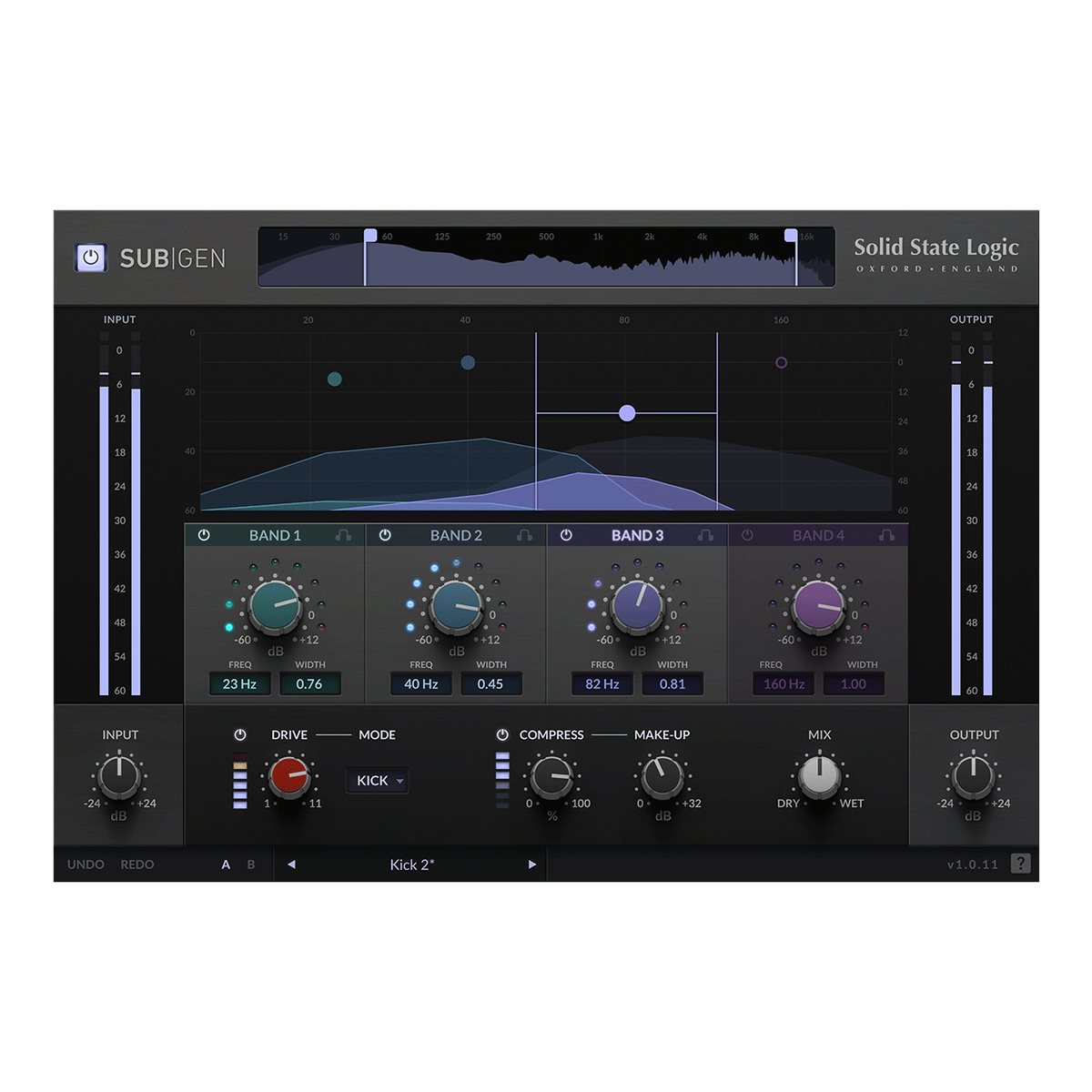
Its key feature is four independently configurable bands. For each band you can set gain, center frequency and width on an on-screen graph. A per-band solo lets you audition each generated band while you adjust.
It also includes SSL's DRIVE (three saturation types) and COMPRESS (compressor) sections, which can add harmonics to the generated bass and help glue it to the source. A 14-day trial is available, and it can be bought outright or through SSL's subscription.
Key features
Four independent sub-bass bands
Up to four bands each generate content an octave below the source. A frequency read-out and LED metering let you see how much low-end is being generated while you set it.
Interactive graph
A graph shows how the source and each synthesized band interact. Gain, center frequency and width are set visually on the graph, so tweaking does not rely on typing numbers.
Three saturation types
DRIVE offers Bass (70s transistor-style, strong harmonics), Kick (60/70s transistor-style, lighter harmonics) and Pre (50s valve-style). It is gain-compensated, so you can adjust it while keeping the level.
SSL compressor
A built-in compressor has newly designed attack and release times and a smooth knee. With make-up gain and a GR meter, it can be used to glue generated bass and the source together.
One-knob mix and parallel processing
A single control blends dry and wet signals, including parallel compression for punch. A mix-lock option holds your setting while you switch presets.
Analyzer and filters
The analyzer shows the frequency content of your source. 12 dB/octave high-pass and low-pass filters can remove unwanted lows and highs, and a built-in help button explains each section.
Presets, A/B and undo
Cross-platform preset management, A/B switching and undo/redo are included, which helps when comparing settings while refining.
Specifications
| Item | Details |
|---|---|
| Type | Sub-bass harmonic synthesizer (plugin) |
| Bands | Up to 4, independently configurable |
| Generation | Creates a waveform an octave below the source (per SSL) |
| Saturation | Three types: Bass / Kick / Pre |
| Compressor | With make-up gain and GR meter |
| Filters | High-pass and low-pass (12 dB/oct) |
| Mac | macOS 11 Big Sur – macOS 13 Ventura (64-bit, M1 supported) per the reseller listing; SSL states native Apple silicon support (Universal 2) |
| Windows | Windows 10 – 11 (64-bit) |
| Trial | 14 days (an iLok account is required) |
| Other | Preset management, A/B, undo/redo |
What is included and system requirements
- SSL SubGen plugin
- User guide (PDF)
- Cross-platform preset management, A/B comparison and undo/redo
- Built-in help
- Licensing via iLok (an iLok account is needed)
How to use it
- Install SubGen using the SSL Download Manager.
- To try it, open your DAW, click Try and log in with your iLok account.
- Insert SubGen on a track that needs more low end, such as a kick, bass or snare.
- Use the analyzer to see where the source's low frequencies sit.
- Set each band's gain, center frequency and width on the graph.
- Use the per-band solo to hear each generated bass on its own.
- Choose Bass, Kick or Pre and adjust DRIVE for harmonics.
- Use COMPRESS and the mix knob to blend with the source.
- Once the mix is set, use mix lock to keep the blend while switching presets.
Where it may come in handy
Reinforcing a thin kick or bass
It may help add low end to a thin-sounding kick or bass guitar. SSL itself cites rebuilding bass frequencies in poorly recorded sources.
Adding body to snares and toms
SSL also lists adding body to snares, toms and strings. You may blend it in parallel so the original stays in place.
Creating LFE for film and video
It may suit generating or reshaping the LFE component in a film or video mix.
Sound design
You may add or reshape the low end of synths and effects when designing sounds.
Dividing low end between kick and bass
When assigning low frequencies between kick and bass, you may set the generated bands separately.
Who it may suit
- People who want to reinforce bass by adding new low end instead of boosting with an EQ
- People who create LFE content for film
- People who prefer visual, graph-based control per band
- People who want SSL's DRIVE and COMPRESS in a bass-focused plugin
- People already using SSL plugins
Good to know before you buy
- Licensing is managed by iLok, and the trial also requires an iLok account login.
- The OS requirements on the reseller page may be older; check SSL's page for the latest supported systems before buying.
- SSL's page mentions subscription from 14.99 USD per month, covering every SSL plugin.
- SSL's page offers a 14-day trial started with the Try button in your DAW. Besides buying outright, it also shows a monthly Rent-to-Own option and a subscription.
- SSL's page links tutorial videos by Joe Carrell and Luke Aziz.
Price
$49 (Solid State Logic official site, checked 2026-10-27). Prices can vary by region and promotion, so check the official page before buying.
See SSL SubGen on the product page
More of the same kind
Other introduction articles of the same kind.
- Waves JJP Strings & Keys
- Bogren Digital Ampknob BDM 410 JVH
- Mellowmuse Mellowmuse ATA Auto Time Adjuster
- Universal Audio Universal Audio dbx 160 Compressor/Limiter
- Sound Particles Energy Panner 2
- Waves Eddie Kramer Guitar Channel
We have introduced 33 other products from Solid State Logic.
- Solid State Logic SSL Fusion Transformer
- Solid State Logic Acoustifier
- Solid State Logic SSL Fusion HF Compressor
- Solid State Logic SSL Fusion Vintage Drive
- Solid State Logic SSL autoDYN
See the full list in Product database: Effects.
Sources: solidstatelogic.com pluginboutique.com (checked 2026-10-27)










Comments