
Disclosure: This page may contain affiliate links. Prices were checked on the date shown and may change.
An introduction to Solid State Logic SSL Fusion Vintage Drive, based on information from the maker and distributors: what it does, how to use it and who it may suit. It is not scored.
The Fusion Vintage Drive plug-in is a digital emulation of the Vintage Drive processor from SSL's critically acclaimed Fusion hardware.
— Solid State Logic official site
What is SSL Fusion Vintage Drive?
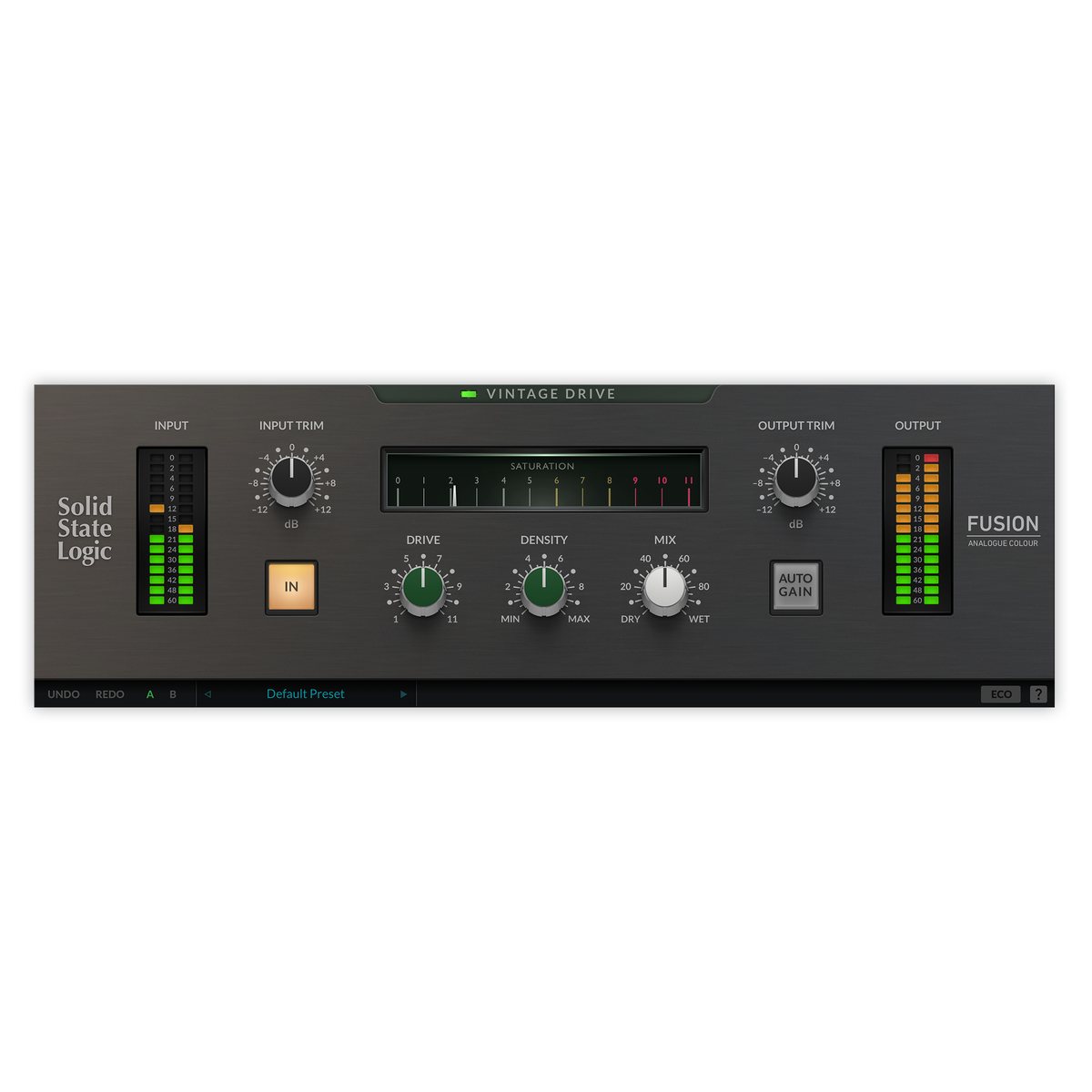
SSL Fusion Vintage Drive is a digital emulation of the Vintage Drive processor in Solid State Logic's Fusion analogue hardware. It is a saturation effect that ranges from gentle harmonic saturation and soft compression to heavy distortion.
The maker describes it as reminiscent of driving vintage hardware into its analogue sweet spot. It can be used on tracks, groups, mixes and masters to add an organic analogue feel.
The design centers on a non-linear saturation circuit, soft clipping and natural compression. It was modelled from real-life measurements, analogue circuit designs and close collaboration with the original designers of the Fusion hardware. The Density and Drive controls work together to generate harmonics.
Eco Mode gives zero latency and reduced CPU load for tracking. Presets from engineers including Adrian Hall, Alan Moulder, Michael Brauer and Sean Divine are included, and the plug-in runs natively on Apple silicon. A 14-day free trial is offered.
Key features
Saturation with soft compression
It applies harmonic saturation together with soft compression, which may suit subtle use to change how a signal sits together.
Density and Drive interaction
The two controls work together to create harmonics, soft clipping and natural compression, so tone can be set by moving them gradually.
From gentle to heavy
The maker lists a range from slight saturation to obvious distortion, which could be tried on single tracks or buses.
Eco Mode
A zero-latency, reduced-CPU mode that may help when monitoring during recording.
Presets from engineers
Presets by Adrian Hall, Alan Moulder, Caesar Edmunds, Charlie Holmes, Michael Brauer, Romesh Dodangoda, Sean Divine and Wez Clarke are included.
Apple silicon native and trial
It runs natively on Apple silicon Macs, and a 14-day free trial lets you try it before buying.
Specifications
| Item | Details |
|---|---|
| Maker | Solid State Logic |
| Mac | macOS 11 Big Sur to macOS 13 Ventura (64-bit, M1 supported), Intel dual-core 2.4 GHz or higher, 4 GB RAM minimum (8 GB recommended), AU / VST2 / VST3 / AAX Native |
| Windows | Windows 10 to 11 (64-bit), Intel Core 2 or comparable at 2.4 GHz or higher, 4 GB RAM minimum (8 GB recommended), VST2 / VST3 / AAX Native |
| Authorization | iLok account |
| Trial | 14-day free trial |
| Type | Analogue-style saturation and soft compression plug-in |
What is included and system requirements
- SSL Fusion Vintage Drive plug-in (AU / VST2 / VST3 / AAX Native)
- Presets from several engineers
- Eco Mode
How to use it
- Create an SSL account and register the purchased license to your iLok account.
- Download SSL Download Manager and install the plug-in.
- Open your DAW and insert the plug-in on a track, group or master.
- For a trial, click Try when the Activation Experience appears to start the 14-day trial.
- Start by recalling a preset and hearing the change.
- Match levels and compare with bypass.
- If it feels heavy during tracking, switch to Eco Mode to reduce latency and CPU use.
- Save settings you like as presets.
Where it may come in handy
Adding warmth to vocals
On a vocal you could add a little and hear how the texture changes.
Shaping bass presence
On bass you might add harmonics and see how the outline changes.
Finishing the mix bus
On a mix or master you could apply soft saturation and check how it hangs together.
Monitoring while recording
Eco Mode could help when you want low latency during tracking.
Who it may suit
- Users who want analogue-style saturation in a mix
- Those who want part of the SSL Fusion hardware as a plug-in
- People looking for a light-weight option usable during tracking
Good to know before you buy
- An iLok account is required for authorization.
- The listed requirements go up to macOS 13 Ventura; please check newer OS support with the maker before buying.
How it differs from similar products
We do not pick a winner; the official figures are placed side by side.
SSL Fusion Transformer
Both reproduce a part of the Fusion hardware. Vintage Drive handles saturation and soft compression through Density and Drive, while Transformer handles transformer phase shift and harmonic distortion, adjusted with Shine and Amount.
Price
Please check the official page for the price.
See SSL Fusion Vintage Drive on the product page
More of the same kind
Other introduction articles of the same kind.
- LEWITT Space Replicator Free
- LANDR LANDR FX Electric
- W. A. Production Fundamental Bass
- Antelope Audio RD47
- United Plugins FirePreamp
- Karanyi Sounds Cloudmax 3
We have introduced 33 other products from Solid State Logic.
- Solid State Logic SSL autoDYN
- Solid State Logic SSL Fusion HF Compressor
- Solid State Logic Acoustifier
- Solid State Logic SSL Fusion Transformer
- Solid State Logic SSL SubGen
See the full list in Product database: Effects.
Sources: solidstatelogic.com pluginboutique.com (checked 2026-10-27)










Comments