
Disclosure: This page may contain affiliate links. Prices were checked on the date shown and may change.
An introduction to Solid State Logic SSL Fusion Transformer, based on information from the maker and distributors: what it does, how to use it and who it may suit. It is not scored.
The SSL Fusion Transformer plug-in captures the unique mojo of an analogue transformer in your DAW.
— Solid State Logic official site
What is SSL Fusion Transformer?
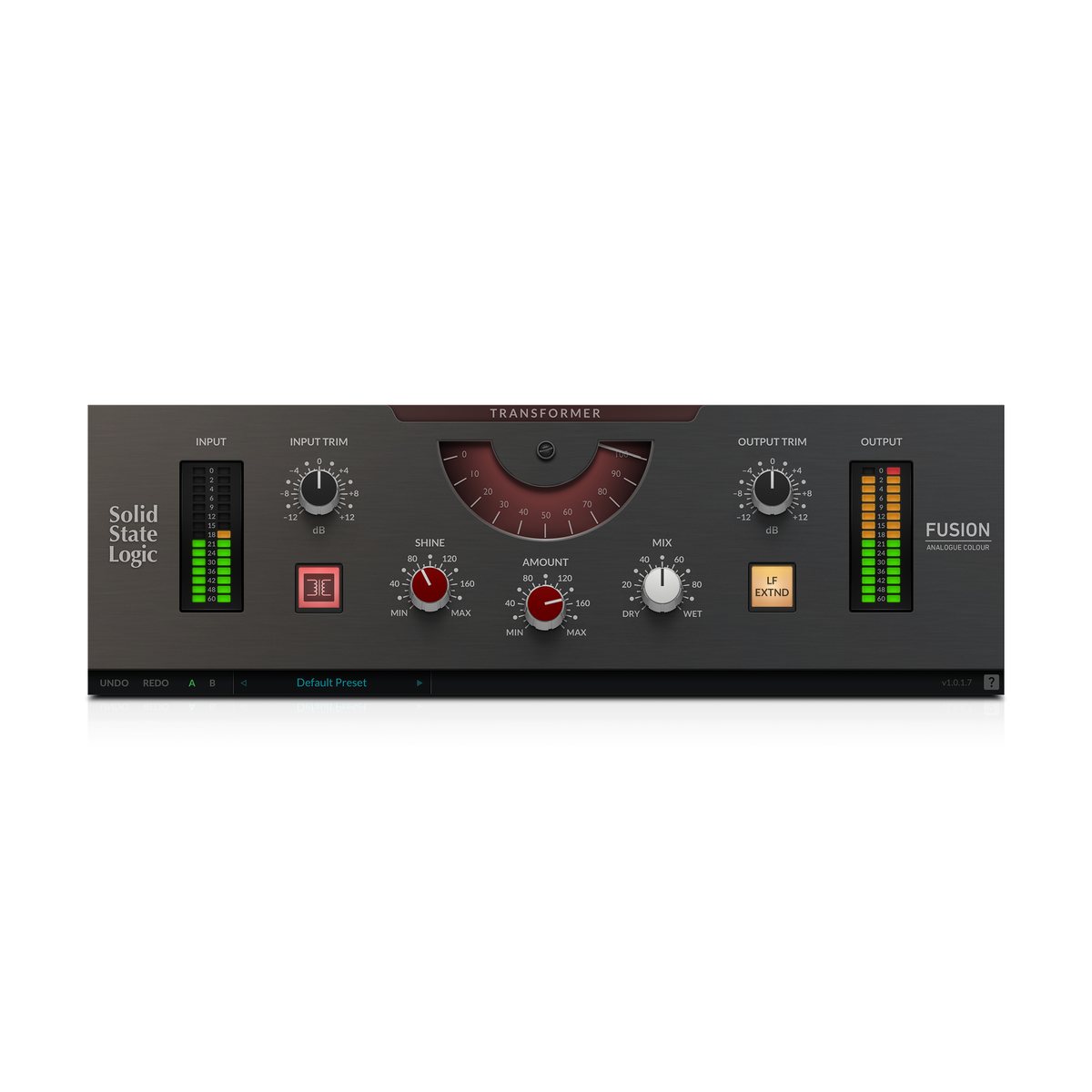
SSL Fusion Transformer is a plug-in that reproduces the transformer stage of Solid State Logic's Fusion analogue hardware. It deals with the combination of high-frequency phase shift, added harmonic distortion and natural low-frequency roll-off that a transformer provides.
The maker says it emulates the 600-ohm, 1:1-wound under-damped transformer in the Fusion hardware. It adds low-end thickening and high-end sheen, from subtle presence and body on vocals and instruments to tighter lows and brighter highs on mixes and masters.
Control centers on two parameters. Shine attenuates the high-frequency phase shift and Amount increases harmonic distortion. The maker notes both can push the processing beyond the original circuit.
Eco Mode reduces latency and CPU use for tracking. Presets from Romesh Dodangoda, Sean Divine and Wez Clarke are included, and it runs natively on Apple silicon. A 14-day free trial is available.
Key features
Transformer character
It reproduces the combination of high-frequency phase shift, harmonic distortion and natural low-end roll-off of a transformer circuit.
Shine control
Shine adjusts the high-frequency phase shift and may be the control to try when you want to change top-end texture.
Amount control
Amount raises the harmonic distortion, and the maker says it can go beyond the original circuit.
From tracks to master
It can be used on single tracks, mixes and masters, and a small amount could be tried across everything.
Eco Mode
A mode that reduces latency and CPU load, intended for tracking.
Presets and Apple silicon
Presets by Romesh Dodangoda, Sean Divine and Wez Clarke are included, and it runs natively on Apple silicon.
Specifications
| Item | Details |
|---|---|
| Maker | Solid State Logic |
| Mac | macOS 11 Big Sur to macOS 13 Ventura (64-bit, M1 supported), Intel dual-core 2.4 GHz or higher, 4 GB RAM minimum (8 GB recommended), AU / VST2 / VST3 / AAX Native |
| Windows | Windows 10 to 11 (64-bit), Intel Core 2 or comparable at 2.4 GHz or higher, 4 GB RAM minimum (8 GB recommended), VST2 / VST3 / AAX Native |
| Authorization | iLok account |
| Trial | 14-day free trial |
| Type | Analogue transformer emulation plug-in |
| Controls | Shine, Amount |
What is included and system requirements
- SSL Fusion Transformer plug-in (AU / VST2 / VST3 / AAX Native)
- Presets by Romesh Dodangoda, Sean Divine and Wez Clarke
- Eco Mode
How to use it
- Create an SSL account and register the purchased license to your iLok account.
- Download SSL Download Manager and install the plug-in.
- Open your DAW and insert the plug-in on a track, group or master.
- For a trial, click Try when the Activation Experience appears to start the 14-day trial.
- Start by recalling a preset and hearing the change.
- Match levels and compare with bypass.
- If it feels heavy during tracking, switch to Eco Mode to reduce latency and CPU use.
- Save settings you like as presets.
Where it may come in handy
Adding body to vocals and instruments
Raising Amount gradually may let you hear changes in low-end body and high-end sheen.
Shaping a drum bus
On a drum bus you could compare top-end texture while moving Shine.
Finishing a master
A small amount across the mix could be tried to see how the lows and highs change.
While tracking
Eco Mode could help you hear the transformer sound with low latency.
Who it may suit
- Users who want to try transformer-style coloration
- Those who prefer adjusting with two simple controls
- People who want part of the SSL Fusion hardware as a plug-in
Good to know before you buy
- An iLok account is required for authorization.
- The listed requirements go up to macOS 13 Ventura; please check newer OS support with the maker before buying.
How it differs from similar products
We do not pick a winner; the official figures are placed side by side.
SSL Fusion Vintage Drive
Both reproduce a part of the Fusion hardware. Transformer deals with transformer phase shift and harmonic distortion through Shine and Amount, while Vintage Drive deals with saturation and soft compression through Density and Drive.
Price
Please check the official page for the price.
See SSL Fusion Transformer on the product page
More of the same kind
Other introduction articles of the same kind.
- Soundtoys Devil-Loc Deluxe
- Dreamtonics Vocoflex
- Waves Waves CLA Nx
- Universal Audio Universal Audio dbx 160 Compressor/Limiter
- Sonnox Oxford Envolution
- Celemony Tonalic
We have introduced 33 other products from Solid State Logic.
- Solid State Logic Acoustifier
- Solid State Logic SSL autoDYN
- Solid State Logic SSL SubGen
- Solid State Logic SSL Fusion Vintage Drive
- Solid State Logic SSL Fusion HF Compressor
See the full list in Product database: Effects.
Sources: solidstatelogic.com pluginboutique.com (checked 2026-10-27)










Comments