
Disclosure: This page may contain affiliate links. Prices were checked on the date shown and may change.
An introduction to Waldorf Nave, based on information from the maker and distributors: what it does, how to use it and who it may suit. It is not scored.
This new Nave brings that notable Nave sound engine to your favorite DAW.
— Waldorf official site
What is Nave?
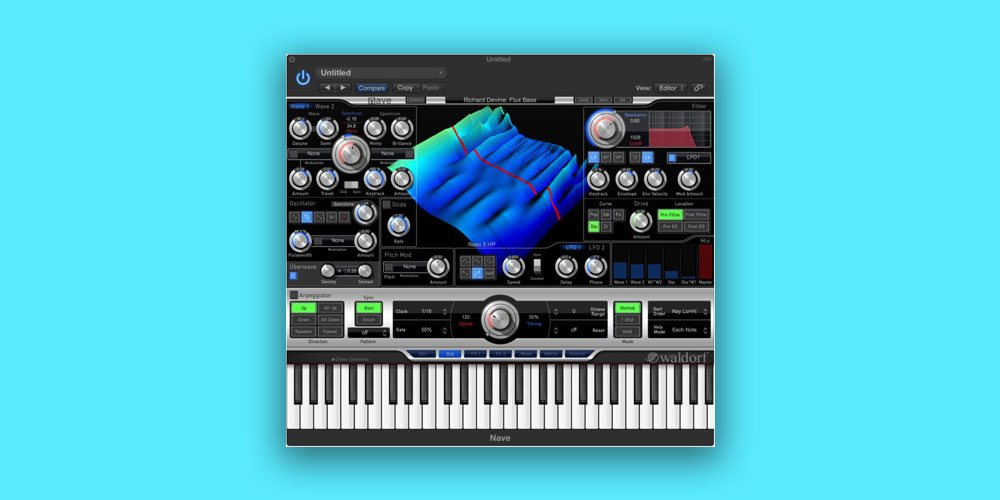
Nave is a wavetable synthesizer from Waldorf Music of Germany. It first became known as an iPad app, and this product brings that sound engine to DAWs as a plugin.
The interface has been reworked for keyboard and mouse rather than touch. The maker says it ships with a wide range of sounds, from spatial pads and wavetable scans to cutting leads and solid basses.
Sound creation centers on two oscillators with expanded wavetable functions. A Uberwave mode stacks up to eight oscillators, and a speech synthesizer and wavetable generation from external audio files are also included.
It follows the usual Waldorf workflow, with arpeggiator, envelopes, effects and modulation matrix each one step away. The keyboard is complemented by blades that can use musical scales, and by X/Y pads.
What helps when using Nave is the common Waldorf workflow. The maker says anyone familiar with Waldorf software will find every sound-shaping module directly accessible, with the arpeggiator, envelopes, effects and modulation matrix each one virtual button away.
Optional soundsets are sold on the maker's site, including New Horizons by D.Puxeddu and Nave Ultimate Soundset Vol. 1. You can start with the included sounds and add more if needed, and a trial version is available to check operation before buying.
For compatibility, the maker lists Windows 7, 10 and 11 on Intel or AMD PCs, Macs with macOS 10.13 or later on Intel or M1, and VST2, VST3, AU and AAX formats, with NKS supported. Checking which formats your DAW loads before buying is a good idea.
Key features
Two wavetable oscillators
Two independent oscillators play wavetables. Wavetables can be edited in 3D and generated from external audio files, which could suit sound design based on your own material.
Uberwave and speech synthesizer
The Uberwave stacks up to eight oscillators with saw, triangle, PWM, white and pink noise. The speech synthesizer for wavetables could be used for voice-like sounds.
Multimode filter and drive
The filter switches between low-pass, band-pass and high-pass at 12 dB or 24 dB. The drive lets you adjust curve, depth and position, and there are two ring modulators.
Modulation and effects
It has three envelopes, two LFOs and ten modulation matrix entries. A modulation effect (chorus, flanger or phaser) is joined by reverb, delay, a three-band parametric EQ and a compressor.
Blades and X/Y pads
Blades that follow musical scales and up to three X/Y pads provide ways of shaping the sound besides the keyboard. An optional chord mode and polyphonic aftertouch are supported.
32 voices and unison
It offers up to 32 voices with polyphonic unison, which can help when stacking thick chords or building moving sounds with the arpeggiator.
Patch management and iPad compatibility
Patches can be organized in user banks and categories, and sound patches can be exchanged with the iPad version of Nave.
Specifications
| Item | Details |
|---|---|
| Type | Wavetable synthesizer |
| Voices | 32 |
| Oscillators | Two wavetable oscillators (Uberwave up to 8 oscillators) |
| Filter | Multimode (LP/BP/HP, 12 dB/24 dB) |
| Envelopes / LFOs | 3 / 2 |
| Modulation matrix | 10 entries |
| Plugin formats | VST2, VST3, AU, AAX |
| OS | Windows 7/10/11, macOS 10.13 or later |
| NKS | Supported |
What is included and system requirements
- Nave plugin (VST2/VST3/AU/AAX)
- Factory sounds including pads, wavetable scans, leads and basses
- A trial version is available on the maker's site
- Optional soundsets sold separately (such as D.Puxeddu – New Horizons and Nave Ultimate Soundset Vol. 1)
How to use it
- After buying, download from your Plugin Boutique account or other store.
- Run the installer and choose the plugin formats.
- Activate the license with your Waldorf account.
- Open your DAW and load Nave as an instrument.
- Choose a patch category such as pads or leads and pick something close.
- Switch wavetables and listen to how the sound changes.
- Try LFO and envelope assignments in the modulation matrix.
- Add the effects and arpeggiator to finish.
Where it may come in handy
Spacious pads
Pads and wavetable scans are included from the start, so it might be worth trying for wide background sounds.
Turning your own recordings into synth sounds
Wavetables can be generated from audio files, so recorded material could become the basis of original sounds.
Voice-like leads
The speech synthesizer might help create sounds with a vocal character.
Working with the iPad version
Patches can be exchanged with the iPad version, which might suit people who want to carry sounds between devices.
Who it may suit
- People who want to try a wavetable synthesizer
- iPad Nave owners who want the same sounds in a DAW
- Users who want to build synth sounds from their own audio
- Producers wanting a wide selection of pad and lead sounds
Good to know before you buy
- For Pro Tools, the Plugin Boutique page lists some versions as unsupported or Rosetta-only; check the latest information before buying.
- It supports Intel and M1 Macs, and Windows is 64-bit only.
- A trial version is available from the maker.
How it differs from similar products
We do not pick a winner; the official figures are placed side by side.
BLEASS Megalit
Nave has two wavetable oscillators, 32 voices and a speech synthesizer. Megalit offers 135 wavetables, four LFOs, a motion sequencer and a built-in multiband compressor.
Price
$165 (Plugin Boutique, checked 2026-10-27). Prices can vary by region and promotion, so check the official page before buying.
More of the same kind
We have introduced 178 synthesizers. Here are some of the others.
- TAL Software TAL-J-8
- Native Instruments Kontour
- Applied Acoustics Systems Multiphonics CV-3 + Packs
- Cherry Audio Lowdown
- Cherry Audio SH-MAX
- Native Instruments FORM
We have introduced 4 other products from Waldorf.
For a side-by-side comparison scored on the same criteria, see our comparison of synthesizers.
See the full list in Product database: Instruments.
Sources: waldorfmusic.com pluginboutique.com (checked 2026-10-27)










Comments