
Disclosure: This page may contain affiliate links. Prices were checked on the date shown and may change.
An introduction to UJAM Virtual Drummer PHAT 2, based on information from the maker and distributors: what it does, how to use it and who it may suit. It is not scored.
Virtual Drummer PHAT is a slick and stylish operator, producing grooves, fills and breaks. Ready at any time to quickly lay down entire beats and rhythms that ooze with groove.
— UJAM official site
What is Virtual Drummer PHAT 2?
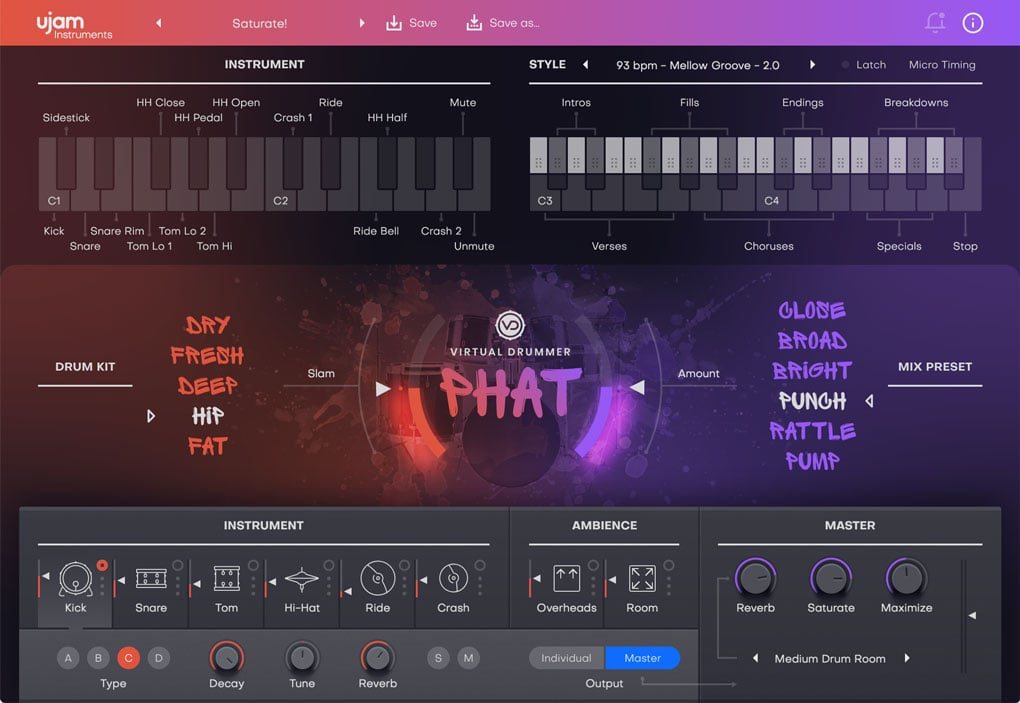
UJAM Virtual Drummer PHAT 2 is a virtual drummer for hip-hop, funk and soul. The maker says it produces grooves, fills and breaks and quickly lays down entire beats, covering styles from retro soul to G-funk.
The basic workflow is choosing a style and playing keys. Each style has several phrases, so you can build convincing rhythms without drumming experience. UJAM highlights its gentle learning curve.
There are five drum kits and six character presets for mix direction. Volumes for kick, snare and other elements, plus swing, feel and humanization can be adjusted, so you can refine details once the beat is close.
Version 2 adds drag-and-drop phrases to the DAW for MIDI editing and multi-outs, with an improved mixer and master section and more kit editing. An upgrade for PHAT 1 owners is offered separately.
Key features
30 styles and 720 phrases
The maker lists 30 styles with 720 rhythmic phrases in total. Version 2 added 30 new styles, 650 new grooves and 100 presets, which you can stitch together into a song flow.
MIDI drag and drop
Phrases can be dragged from the on-screen keyboard into a DAW track as MIDI, useful for detailed note editing or for reusing patterns with other drum sounds.
Five drum kits
Five kits are made for funky, groove-oriented drum tracks, and kit editing lets you build your own.
Mix and master sections
Six mix presets by professional sound designers set the overall direction. The master section has saturation and a maximizer, and multi-outs let you mix elements separately in the DAW.
Instrument channels
Up to four instrument types can be mixed to make a kit, and individual kick and snare levels let you change the character of the beat.
Swing, feel and humanize
Swing, feel and humanize controls fine-tune the groove, which may help soften a stiff programmed feel or get a loose hip-hop swing.
Specifications
| Item | Details |
|---|---|
| Price (official) | $119 |
| Styles / phrases | 30 styles / 720 phrases |
| Drum kits | 5 |
| Mix presets | 6 |
| Formats | VST2, VST3, AAX, AU2 (64-bit only) |
| OS | Windows 10-11, macOS 10.15-26 (Intel and Apple silicon) |
| Minimum | 4 GB RAM, 0.5 GB disk, 1280×768 display, internet connection |
| Authorization | UJAM App or email and password in the plugin |
| Licensing | MIDI phrases and sounds are royalty-free |
What is included and system requirements
- Virtual Drummer PHAT 2 (VST2, VST3, AAX, AU2)
- 30 styles, 720 phrases, 5 drum kits and 6 mix presets
- New master section (saturation, maximizer) and multi-outs
- MIDI phrases and sounds are royalty-free for commercial use
- Windows 10-11 or macOS 10.15-26, 4 GB RAM, 0.5 GB disk
How to use it
- Buy at Plugin Boutique and check the serial in your library.
- Log in to your UJAM account and enter the serial in Partner Checkout.
- Install and authorize PHAT 2 from the UJAM App.
- Create an instrument track in your DAW and load PHAT 2.
- Choose a style and a drum kit and press keys to trigger phrases.
- Drag phrases you like into the DAW track as MIDI.
- Adjust swing and feel, and set kick and snare levels if needed.
- Pick a mix preset and refine the overall texture with the master saturation.
Where it may come in handy
Sketching hip-hop beats
You can build hip-hop drums just by playing keys, which may help sketch the skeleton of a track quickly.
Demos for funk and soul tunes
For home recording without a live drummer, it may help capture funk or soul-style rhythms. Phrases can be exported as MIDI and edited.
Lo-fi track foundations
Adjusting swing and humanize may give a loose, lo-fi feel.
Hybrid with other drum sounds
Multi-outs send kick and snare to separate tracks so you can process them in the DAW or layer other samples, which may suit building only the groove here and shaping the sound elsewhere.
Who it may suit
- People with little drum programming experience who want convincing beats quickly.
- Producers of hip-hop, funk and soul.
- Those who want to export MIDI and swap in other drum sounds.
Good to know before you buy
- A separate upgrade is offered for PHAT 1 owners; this is the regular version for new buyers.
- Plugin Boutique lists 60 styles, 1,380 patterns and 200 presets while UJAM lists 30 styles and 720 phrases; this entry follows UJAM's numbers.
- An internet connection is needed for authorization.
- If you move the sample .blob file to an external drive, an SSD is recommended.
- UJAM's site also lists a Drummer's Bundle of several virtual drummers; if you plan to use more than one, it may be worth checking the bundle contents.
How it differs from similar products
We do not pick a winner; the official figures are placed side by side.
Virtual Drummer PHAT
UJAM's list of what's new in PHAT 2 includes drag-and-drop phrases to the DAW, multi-outs, 30 new styles with 650 grooves and 100 presets, and advanced kit editing, mixing and master sections.
Price
$119 (UJAM official site, checked 2026-10-27). Prices can vary by region and promotion, so check the official page before buying.
See Virtual Drummer PHAT 2 on the product page
More of the same kind
We have introduced 6 drum instruments. Here are some of the others.
We have introduced 32 other products from UJAM.
- UJAM UJAM Usynth GLAM
- UJAM Symphonic Elements STRIIIINGS
- UJAM Virtual Guitarist CARBON
- UJAM Usynth Euphoria
- UJAM Finisher FLUXX
For a side-by-side comparison scored on the same criteria, see our comparison of drum instruments.
See the full list in Product database: Instruments.
Sources: ujam.com pluginboutique.com (checked 2026-10-27)










Comments