
Disclosure: This page may contain affiliate links. Prices were checked on the date shown and may change.
An introduction to AudioThing Orbita, based on information from the maker and distributors: what it does, how to use it and who it may suit. It is not scored.
Orbita is a Euclidean Rhythm Drum Machine plugin designed for creating evolving, interlocking grooves with ease.
— AudioThing official site
What is Orbita?
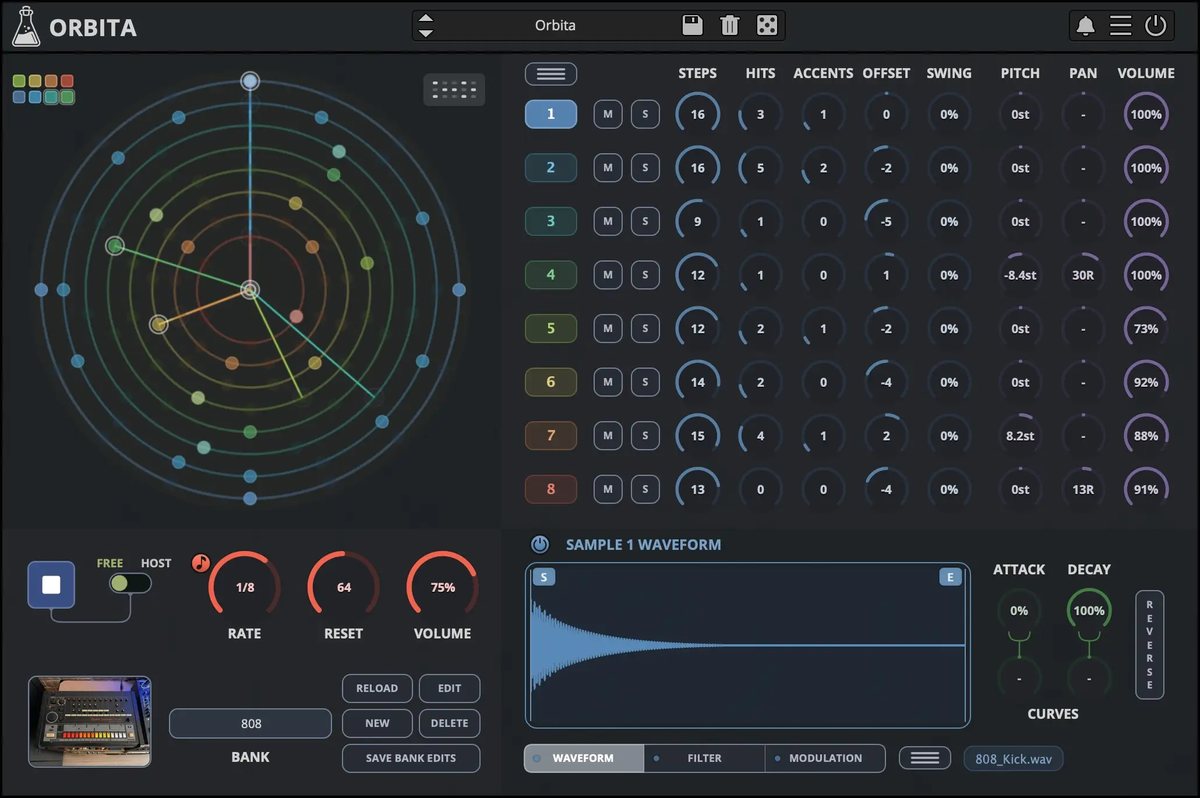
Orbita is a Euclidean-rhythm drum machine plugin from AudioThing. Built around a circular sequencer, it spreads beats across eight sample tracks to create interlocking grooves that slowly shift against each other.
Each track runs its own cycle. Steps set the pattern length, and raising Hits spreads triggers as evenly as possible across the cycle. Accents, Offset and Swing are available to move away from mechanical repetition.
Sounds are loaded through banks. The factory banks include acoustic drum kits and classic drum machines such as 808, CR-78, DD-10 and DR-220A, as well as percussion, found sounds and experimental material. You can also load your own samples to build custom banks.
If you prefer a direct approach, Orbita also works as an eight-pad drum machine played by hand, with assignable MIDI notes that make it usable with a controller.
Key features
Euclidean sequencer
Set Steps and Hits and the beats are distributed evenly. A 16-step kick against 11- or 13-step percussion, for example, takes a long time to realign.
Accents and offset
Accents emphasize chosen hits, and Offset rotates a pattern without changing its steps or hits, so only the interaction between tracks changes.
Reset and swing
Reset sets after how many beats the sequencer restarts, controlling when different-length patterns realign. Swing adds a timing feel.
Per-sample filter and LFO
Each sample has a filter (low-pass, high-pass, band-pass, notch; 2- or 4-pole) and an LFO that can modulate pitch, pan, volume, cutoff or resonance.
Pattern browser
Up to 16 rhythm patterns can be stored in one preset and switched between. Patterns can be saved to a library for reuse and switched through host automation.
Banks and bank editor
Samples can be rearranged by drag and drop and saved as a custom bank, for a personal library of your own recordings and favorite drum sounds.
Play it like a drum machine
The eight pads can be triggered directly with custom MIDI notes, and hand playing can be combined with the Euclidean patterns.
Specifications
| Item | Details |
|---|---|
| Tracks | 8 |
| Pattern storage | Up to 16 per preset |
| Filter | LP / HP / BP / Notch (2-pole and 4-pole) |
| LFO destinations | Pitch, pan, volume, cutoff, resonance |
| Windows | Windows 7 to 11, VST2, VST3, AAX, CLAP (64-bit) |
| macOS | 10.13 to 26, VST2, VST3, AU, AAX, CLAP (Universal 2) |
| Linux | Ubuntu 20.04 LTS, VST2, VST3, CLAP (64-bit) |
| Requirements | 2 GHz CPU, 4 GB RAM |
| iOS | AUv3 and standalone version available separately |
What is included and system requirements
- The drum machine itself (Windows / macOS / Linux)
- Factory banks (acoustic drum kits, 808, CR-78, DD-10, DR-220A, Elsita, SR-LP-88, VL-1, TX101 and more)
- Bank editor
- Pattern browser and pattern library
How to use it
- Open Orbita in your DAW and select a track.
- Set Steps to decide the pattern length.
- Raise Hits and watch the beats distribute evenly.
- Use Accents to emphasize chosen beats.
- Give other tracks different step counts so the patterns drift against each other.
- Adjust Offset and Swing for interaction and feel.
- Switch banks or load your own samples in the bank editor.
Where it may come in handy
Electronica and techno rhythms
Layering patterns with different cycles could be a way to find loops that do not sound repetitive.
Percussion for games and video
The found-sound and experimental banks might help build rhythms that run beneath a scene.
Live performance
The pads and MIDI note assignment could suit a setup that mixes hand playing with Euclidean patterns.
Who it may suit
- People who like thinking about beats as numbers
- People who want to try polyrhythms beyond a standard four-on-the-floor
- People who want to build drum kits from their own samples
- People who want the same tool on Linux or iOS
Good to know before you buy
- Pattern switching can be automated from the host, so familiarity with DAW automation helps.
- The iPhone/iPad version is offered separately on the App Store.
- The regular price at Plugin Boutique is USD 69 (sale prices not included).
Price
$69 (Plugin Boutique, checked 2026-10-27). Prices can vary by region and promotion, so check the official page before buying.
See Orbita on the product page
More of the same kind
We have introduced 6 drum instruments. Here are some of the others.
We have introduced 34 other products from AudioThing.
- AudioThing Hand Clapper
- AudioThing Space Strip
- AudioThing Reels
- AudioThing Arguments
- AudioThing Things – Bubbles
For a side-by-side comparison scored on the same criteria, see our comparison of drum instruments.
See the full list in Product database: Instruments.
Sources: audiothing.net pluginboutique.com (checked 2026-10-27)










Comments