
Disclosure: This page may contain affiliate links. Prices were checked on the date shown and may change.
An introduction to BFD BFD Player, based on information from the maker and distributors: what it does, how to use it and who it may suit. It is not scored.
Building on that heritage, BFD Player offers the same high quality drum kits, grooves and mixing options for songwriters and music producers.
— BFD official site
What is BFD Player?
BFD Player is a free drum instrument plug-in from BFD Drums, the maker of the BFD series. It carries over the ideas of the flagship BFD3 and brings drum kits, grooves and a mixer into a single tool so that songwriters and producers can get a drum track going quickly.
You open it as a virtual instrument inside your DAW or run it standalone. Because it ships with professionally mixed kits and grooves, someone who is not used to programming drums can pick a pattern that fits the song and drop it on the timeline.
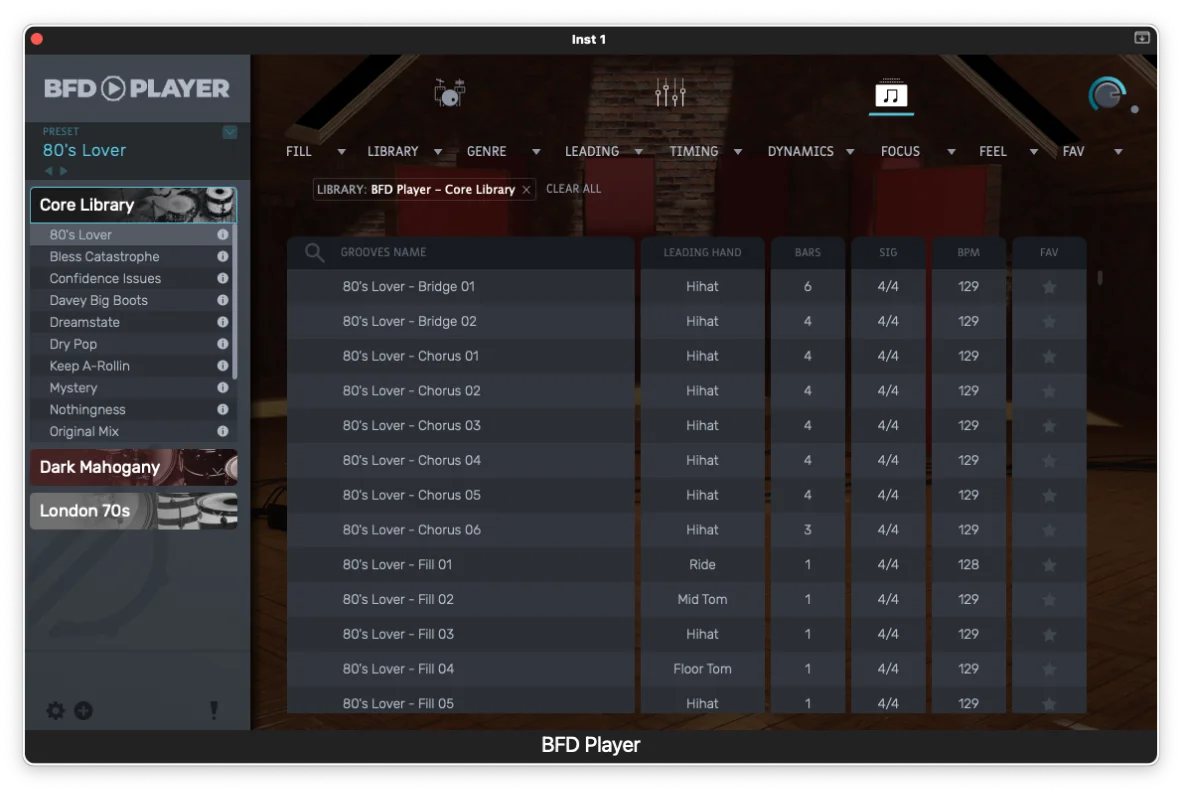
It includes 340 grooves played by top drummers. They can be filtered by tags such as genre, tempo and leading hand, which makes it easier to look for a pattern that suits anything from a ballad to an upbeat track.
The included Core library stays free, and paid expansion packs (BFD Player Expansions) can be added later. The kit piece browser lets you swap individual parts such as snares and cymbals from expansions, so you can grow the library and move a kit closer to your own taste.
Key features
Completely free
The official page describes it as completely free. Even if you are adding a drum instrument for the first time, you can try a full set of kits, grooves and a mixer at no cost, which may make it easy to consider as a replacement for basic programmed drums.
340 grooves
It includes grooves created by top drummers, searchable by genre, tempo and leading hand. You can drag patterns onto the timeline to build the backbone of a song, which may help when detailed MIDI programming is not your strength.
Pro-mixed kits
Kits that have been mixed by professionals are included from the start, along with mixer presets. Even with little recording or mixing experience, you may be able to assemble a usable drum sound quickly.
Built-in mixer with separate outputs
Each drum part can be balanced in the built-in mixer. You can also route the drum outputs separately and process them with your own plug-ins in the DAW, so you can go deeper when you want to shape the mix yourself.
Kit piece browser
Parts such as snares and cymbals from expansion packs can be swapped into the current kit. Because elements from different expansions can be combined, it may suit situations where you want to rebuild a kit for a song while making use of the libraries you already own.
Expandable with packs
Expansion packs such as Vintage Rock, Pop Essentials, Metal Essentials, Jazz Sticks, Jazz Brushes, Dark Mahogany and Americana Sticks are listed. You may be able to add sounds to match the genre you are working in.
Specifications
| Item | Details |
|---|---|
| Price | Free (Core library) |
| Grooves | 340 |
| Usage | Virtual instrument in a DAW / standalone |
| Windows | Windows 10 version 22H2 or later |
| Mac | macOS Ventura or later (Intel and Apple Silicon) |
| Free disk space | 2GB (5.25GB recommended for all content) |
| RAM | 4GB (8GB recommended) |
| CPU | Dual-core 2.5GHz |
| Authorization | Internet connection required to authorize |
What is included and system requirements
- Core library (free): professionally mixed drum kits
- 340 grooves
- Built-in mixer with mixer presets
- Kit piece browser
- Supported OS: Windows 10 22H2 or later / macOS Ventura or later
- 2GB free disk space (5.25GB recommended for all content) and 4GB RAM (8GB recommended)
How to use it
- Download BFD Player from the official BFD site and authorize it with your account (an internet connection is required to authorize).
- After installing, open it as a virtual instrument in your DAW or launch it standalone.
- Choose a kit. Starting with one of the professionally mixed kits may be the easiest.
- Use groove search to look for a pattern by tags such as genre, tempo and leading hand.
- Drag the grooves you like onto the BFD Player timeline.
- Balance levels with the built-in mixer presets.
- If needed, route the drum outputs separately and process them with plug-ins in your DAW.
- If you want more, add an expansion pack and swap parts with the kit piece browser.
Where it may come in handy
Demos of songs and band tracks
Even without a drummer, you may be able to line up grooves and check the flow of a song. Tempo search helps you find patterns from ballads to upbeat tracks.
When drum programming is difficult
Instead of entering each note by MIDI, you may be able to work by choosing and placing grooves.
Widening your genres
Adding expansion packs such as Vintage Rock or Jazz Brushes may let you stretch from rock to more jazz-leaning textures.
Mixing practice
By routing outputs separately and processing them with your own plug-ins, it may also work for practicing drum mixing.
Who it may suit
- People who want to try a drum instrument at no cost
- People who find drum programming hard and would rather choose grooves
- People who want to grow the library with expansion packs later
- People who want to try per-part drum outputs in a DAW
Good to know before you buy
- The Core library is free, but expansion packs are sold separately.
- An internet connection is required to authorize the software.
- 2GB of free disk space is required; 5.25GB is recommended for all content.
- Supported OS: Windows 10 22H2 or later and macOS Ventura or later.
Price
Free to use (BFD official site, checked 2026-10-27).
See BFD Player on the product page
More of the same kind
We have introduced 6 drum instruments. Here are some of the others.
- AudioThing Hand Clapper
- D16 Group PunchBox 2
- AudioThing Orbita
- UJAM Virtual Drummer PHAT 2
- Celemony Tonalic
For a side-by-side comparison scored on the same criteria, see our comparison of drum instruments.
See the full list in Product database: Instruments.
Sources: bfddrums.com minet.jp (checked 2026-10-27)









Comments